Call flows
Auto attendant and multi-level IVR: the call flow
On this page
- Two prompts, three periods, one operator position — what should you know?
- Decide what belongs at level one — what should you know?
- The operator position is a queue, not a desk — what should you know?
- Ring groups carry the rest of the flow — what should you know?
- Voice prompts: three ways to make them, one hard limit — what should you know?
- Lines that should skip the menu entirely
- What to test before the number goes live
Two prompts, three periods, one operator position — what should you know?
The platform gives you a small set of building blocks, and a good call flow is mostly a matter of using them in the right order. There is a working-hours greeting and an off-hours greeting, each addressed by its own voice file. Time-of-day routing allows up to three periods per day. The operator position answers on extension 200 by default, can hold up to five numbers, and distributes calls sequentially, by rotation or to all numbers at once.
Everything else in the flow is a menu level or a destination. The complexity is in the decisions, not the software.
Decide what belongs at level one — what should you know?
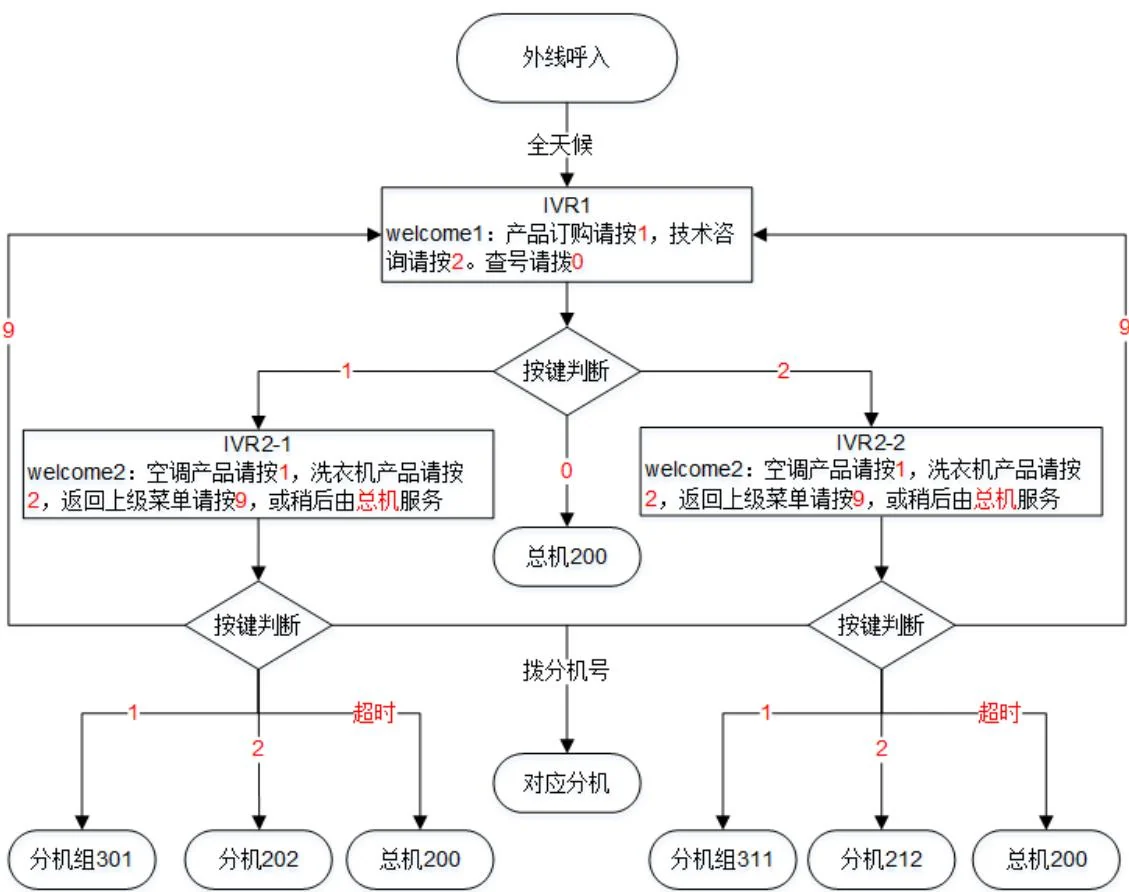
A first-level menu should only contain choices a caller can make without thinking. Four is a comfortable maximum, and "0 for the operator" should always be available and always announced.
| Level | Prompt | Keys | Lands at |
|---|---|---|---|
| 1 | Welcome, working hours | 1 sales, 2 support, 0 operator, or dial an extension | Ring group, queue, or the operator position |
| 2 | Sales menu | 1 new enquiry, 2 existing order, 0 back | Two separate ring groups |
| 2 | Support menu | 1 installation, 2 fault, 0 back | Skill groups, with the fault path first in ring order |
The off-hours file is not a recording of the same menu with a different voice. It is a different flow: state the opening hours, offer a way to leave a message, and give one number for genuine emergencies. That one decision removes most of the frustration of calling a business at 20:00.
The operator position is a queue, not a desk — what should you know?
Extension 200 is where the "0" option lands, and the platform treats it as a small queue rather than a single phone. Up to five numbers can answer it, and when all of them are busy the incoming queue holds up to ten waiting calls. If nobody dials anything, the call transfers to the operator after 24 seconds by default, and the system rings 10 times before falling back to a voice prompt.
- Sequential distribution suits a single receptionist with one backup.
- Rotation spreads load but makes it hard to know who answered what.
- Simultaneous ringing is the right choice for a small team covering a shared queue, provided everybody understands that whoever picks up owns the call.
Ring groups carry the rest of the flow — what should you know?
Behind the menus sit ring groups. Their behaviour is where most "the system lost my call" complaints come from:
- Members: up to 40 extensions on the OM20G and OM50G, up to 60 on the OM80E, OM200G and OM1000-UC.
- Distribution: sequential, rotating or simultaneous, with a configurable ring time before the call moves on.
- Queue: up to 20 calls waiting, with a prompt that tells the caller the extensions are busy.
- Status subscription: on models that support it, a console can show group member state, and idle, ringing, in call and offline are each shown by a distinct lamp state on a matching console.
Voice prompts: three ways to make them, one hard limit — what should you know?
The manual offers three routes for the welcome files: text-to-speech, which needs internet access and working DNS; recording from a phone, using function codes (*81 to record, *8200 to play back, *8301 and *8302 to store the working-hours and off-hours versions, *8300 to restore the original); or uploading a prepared file. If an IP extension does the recording, it must use PCMU or PCMA, or the result will not play back correctly.
The limit to keep in mind when scheduling is that the platform can play a maximum of 30 voice files at the same time. Thirty callers hearing a prompt is the ceiling, which is generous for a small business and worth checking for a campaign line. Recorded prompts are stored on the internal 1 GB voice partition on the models that hold their own storage.
Lines that should skip the menu entirely
Not every caller should hear a menu. Direct inward dialling binds an outside number to an extension or a group and bypasses the auto attendant completely, and the same binding can be marked so that only that number presents on outbound calls. For a support desk with a published number, or a fax line, that is the difference between a useful number and a maze.
Where a site has several numbers, the practical layout is: one main number to the auto attendant, one number per department that goes straight to its group, and one number for the fax or the alarm. Call barring can then restrict which of those groups may dial out, by weekday and by time band.
What to test before the number goes live
- Call every branch of the flow from outside, including the "0" and the timeout paths.
- Let a ring group saturate and confirm the queue prompt plays and that a waiting caller is eventually answered.
- Check the off-hours flow by temporarily changing the schedule rather than waiting for the evening.
- Verify that a DID-bound number rings the desk, not the menu.
- Confirm the recorded prompts are audible in both directions - a prompt recorded in the wrong codec is the single most common cause of "we cannot hear the greeting".