Skip to content

Scenarios · migration and interfaces

VoIP Gateways — putting analog phones, lines and fax onto a SIP platform

Every migration to SIP runs into the same two dozen devices that cannot be replaced: the fax, the lift line, the door entry handset in a storeroom, the alarm line, the phone in the workshop with no network cable near it. A gateway is the box that keeps them working by translating between an analog interface and SIP. This page explains the gateway roles this catalogue documents — the GA10 ATA for a single analog phone, FXS and FXO ports on the PBX itself, paging gateways that drive an existing speaker line, and a radio-over-IP gateway for UHF fleets — and how they are used in a phased migration. NEXVIA designs, manufactures, supplies and commissions the system; the gateways and PBX are manufactured by NEXVIA.

  • The GA10 ATA gateway publishes 2 SIP lines and 1 FXS (RJ11) port, so one analog phone or fax machine becomes a SIP extension
  • FXS and FXO ports are also available on the PBX itself: 4, 12, 48 and 96 across four models, ordered as FXS, FXO or a mix
  • Fax is supported two ways: T.38 and G.711 pass-through, with G.711 pass-through required over an analog line and a maximum transmission speed of 33600 bps
  • Outbound SIP calls can fall back to an analog line automatically when the trunk fails, which is the continuity path a migration needs
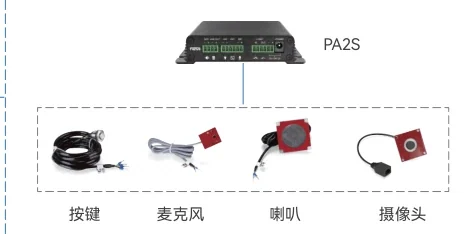
  • Paging gateways (PA3, PA2S) put an existing amplifier and speaker line onto the same system with a 10–30 W mono output
  • A radio gateway (W712) does the same job for a UHF 400–470 MHz radio fleet, with group calls between radios and SIP phones
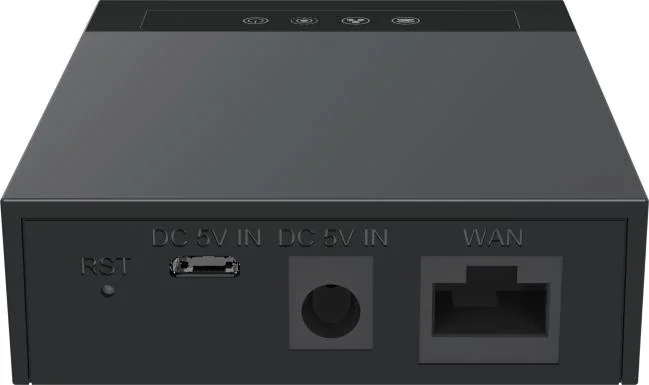
ATA gateway with a single FXS port for connecting an analog telephone to a SIP platform

The short answer

A gateway is chosen by the interface it has to replace, not by port count alone. One analog phone, fax machine or legacy door handset becomes a SIP extension with a GA10 ATA: 2 SIP lines and 1 FXS (RJ11) port, Linux-based, on a 10/100 Mbps port with a Micro USB supply at DC 5 V/1 A. Where the requirement is larger, the analog ports sit on the PBX itself: 4 on the OM20G, up to 12 on the OM50G, up to 48 on the OM80E and up to 96 on the OM200G.

The two directions matter. FXS ports feed analog devices — a phone, a fax, a legacy door entry — with dial tone and ringing; FXO ports take an outside analog line into the system. Keeping two or four FXO ports in the design is what allows an outbound SIP call to fall back to an analog line automatically when the trunk fails, and the published trunk types include a registered-to mode that is documented as a way to extend the PBX FXO ports.

Fax decides several settings at once. Two modes are published, T.38 and G.711 pass-through, with G.711 pass-through required over an analog line and T.38 recommended where the IP platform supports both; the maximum transmission speed stated is 33600 bps, and G.711 pass-through needs G.711U/20 or G.711A/20 selected correctly. Other gateway port counts and host configurations are confirmed on the quotation, because the published materials document the GA10 ATA and the PBX analog ports rather than a full gateway portfolio.

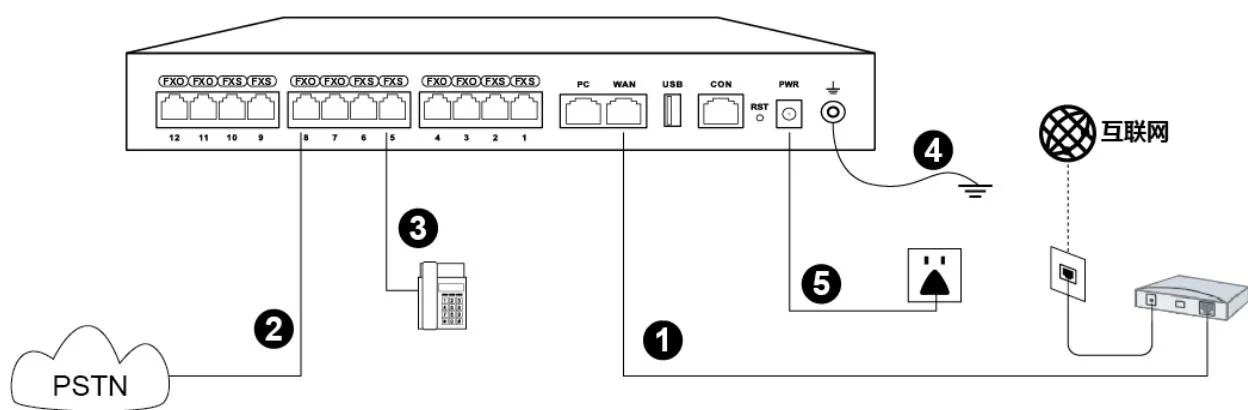
System wiring: internet uplink, PSTN lines, analog phones and grounding all land on one chassis

What goes wrong on this type of site

The device nobody remembered

A migration plan that counts desk phones and forgets the fax, the lift line, the alarm line and the door handset in the plant room will fail at cut-over. Walk the site with a list of line and handset positions before the analog port count is fixed.

Fax has its own rules

Fax is the classic migration casualty: T.38 and G.711 pass-through behave differently, G.711 pass-through is required over an analog line, and both sides have to agree. Set G.711U/20 or G.711A/20 correctly, use a DID for the fax extension, and test with real documents before handover.

A gateway is not a substitute for a design

An ATA solves one position; it does not solve a floor of them. The design question is whether the requirement is best met by PBX analog ports, a gateway, a converter over existing cable, or replacing the device — and the answer differs per position.

One box, two fault domains

A gateway introduces a second device into the call path, with its own power and its own firmware. Document which positions depend on it, put the power supply on the critical circuit where the position matters, and include it in the maintenance schedule rather than only in the commissioning file.

Choosing by size

Size bandSystemDevicesNotes
One or two analog devices — a fax and a door handsetGA10 ATA gateway (2 SIP lines, 1 FXS port), registered to any OM model1 analog phone or fax on the FXS (RJ11) port, with the PBX holding the dial plan and the trunksThe GA10 is a desktop or wall-mounted unit powered from Micro USB at DC 5 V/1 A, with status LEDs for the FXS port, the network, SIP registration and power. It supports three-way voice conference and remote-office access over the internet.
Small office keeping 2 to 4 analog linesOM20G — 24 SIP trunks; 4 analog ports as 4 FXS, 4 FXO or 2+2Analog lines on the FXO ports, a fax or an analog phone on the FXS ports, IP phones on the deskThe sub-model is chosen at order: OM20G-4S, OM20G-4FXO or OM20G-2S/2. The fixed interface card means the port split is decided before purchase rather than at installation.
Growing business keeping 6 to 12 analog devicesOM50G — 62 SIP trunks; up to 12 analog ports across 3 interface cardsMixed FXO and FXS ports by sub-model (6S/6, 8S/4, 10S/2 or 12S), plus IP phones and consoles on the networkInterface cards are 401A-4S and 401A-2S/2, so the port mix is built from the cards as well as the model; the cards connect to a patch panel over Cat5 Ethernet cable.
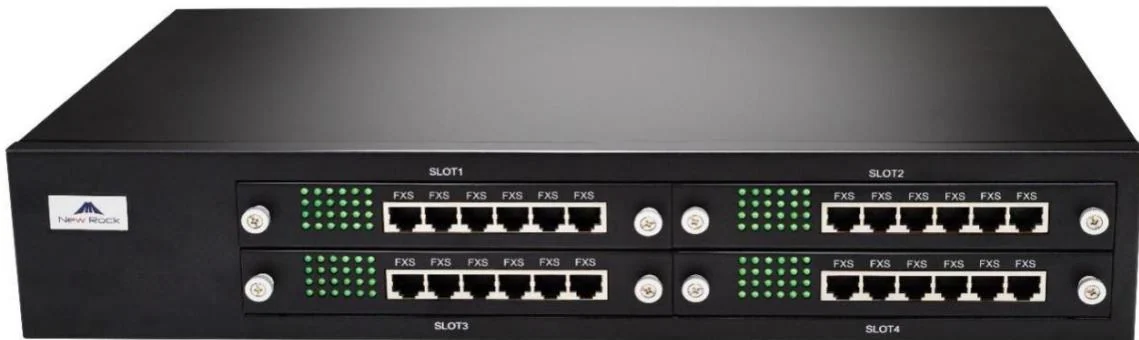
Multi-floor site with a large analog estateOM80E — 216 SIP trunks; up to 48 analog ports across 13 published sub-models, or OM200G — 496 SIP trunks; up to 96 analog portsFaxes, analog phones, lift and alarm lines across the frame, with IP telephony on every deskThe OM80E uses 16-line cards with a 4×4 LED status matrix per RJ45; the OM200G uses 4 slots with 24-line cards and supports hot-swap card replacement.
Pure SIP site with no analog requirementOM1000-UC — 1000 SIP trunks; no FXS and no FXO portsSIP terminals only, with DID/DOD binding up to 4 outside numbers to an extension or groupA site that reaches this model with one analog device left must keep a smaller PBX or a gateway for it, because the OM1000-UC has no analog interfaces at all.
Existing paging line or radio fleet to bring acrossPA3 or PA2S paging gateways; W712 RoIP gateway for UHFPA3 and PA2S drive passive speakers and legacy analog horn speakers; the W712 connects one analog or DMR II radio per channelBoth are gateways in the same architectural sense as an ATA: they translate an existing non-SIP asset onto the platform. Available models and port counts beyond those documented are confirmed on the quotation.

Numbers behind the design

Gateway and analog-port options, as published
ItemWhat it connectsPublished capabilityNotes
GA10 ATA gatewayOne analog phone or fax machine to SIPLinux, 2 SIP lines, 1 FXS (RJ11) port, 3-way voice conference, DTMF In-band/RFC2833/SIP Info, caller-ID Bellcore/ETSI/NTT/DTMF, 10/100 Mbps single portCodecs G.722, Opus, G.711A/U, G.729A/B, G.726 and iLBC; 0–45 °C, 10–95% RH; desktop or wall-mounted, powered by Micro USB DC 5 V/1 A; status LEDs for FXS, network, SIP registration and power
OM20G analog portsUp to 4 analog devices or lines4 ports total: 4 FXS, 4 FXO or 2 FXS + 2 FXO by sub-model, on a single interface cardPart of the PBX rather than a separate box; ring groups hold up to 40 extensions on this model
OM50G analog portsUp to 12 analog devices or linesPublished sub-models provide 6 FXS/6 FXO, 8 FXS/4 FXO, 10 FXS/2 FXO or 12 FXS, across up to 3 interface cardsInterface cards are 401A-4S and 401A-2S/2, terminated on a patch panel over Cat5 Ethernet cable
OM80E analog portsUp to 48 analog devices or lines13 published sub-models from 8 FXS/8 FXO to 48 FXS or 48 FXO, on 16-line interface cardsEach card carries a 4×4 LED status matrix per RJ45; remote recording only on this model
OM200G analog portsUp to 96 analog devices or lines4 slots with 24-line cards: 24FXS, 24FXO, 16FXS+8FXO or 12FXS+12FXO; cards can be replaced while the unit is runningPT2400 or PT4800 lightning-protection patch panels are the published accessories
OM1000-UC analog portsNone — SIP only0 FXS and 0 FXO ports; DID/DOD binds up to 4 outside numbers to an extension or groupA surviving analog device needs a gateway or a smaller PBX in the design
PA2S paging gatewayAn existing passive speaker or amplifier line10–30 W mono output adapting to the input voltage, line out for an external active speaker, SOS call key, 1 short-circuit in and 1 out with a built-in relay, recording outputPoE to IEEE 802.3af or 12–24 V 2 A DC; −30 °C to 60 °C
PA3 paging gatewayAn existing paging system with scheduled audio and camera linkage10–30 W mono output, line out, SOS call key, line in 3.5 mm, USB 2.0 and TF card, analog output to passive speakers or amplifiers, video linkage with an IP cameraPoE / PoE+ (IEEE 802.3at, published as PoE Class 4) or 12–24 V 2 A DC; −20 °C to 50 °C
W712 RoIP gatewayOne UHF radio channel to SIPUHF 400–470 MHz radio module; one analog or DMR II radio plus one SIP call; group calls between radios and SIP phones; recording to a TF card up to 128 GB or USBSIP standard protocol; web deployment and management; trans-regional communication using DSS speed-dial keys
SIP trunk types on the PBXThe provider side of the migrationDirect-IP, registered and registered-to types, with multi-platform registration, IMS interconnection and a backup SIP server by fixed address or DNS SRVThe registered-to type is documented as a way to extend the FXO ports of the OM; local port default 5060 and registration timeout range 15–86400 with a default of 600
This design against keeping a separate analog system alive
RequirementKeeping a separate analog system aliveThis IP designWhat changes operationally
Analog phones and faxA second exchange, a separate pair per device and a separate fault routineFXS ports on the PBX (4, 12, 48 or 96 by model) or a GA10 ATA for a single position, all registering on one platformOne dial plan, one records feed, one maintenance routine
Outside analog linesKept on the old exchange, disconnected from the rest of the siteFXO ports on the PBX, with automatic outbound fallback to an analog line when the SIP trunk failsThe old lines become the continuity path rather than a parallel system
FaxA dedicated fax line and machineT.38 or G.711 pass-through, with G.711 pass-through required over an analog line; a DID number is recommended for the fax extensionFax travels the same infrastructure, with the settings documented rather than guessed
A position with no network cableA pair back to the old exchangeAn FXS port where the pair still reaches the frame, a GA10 over the network, or a PN1 converter putting network and power on the two-core pairThe position is reached without depending on the old exchange
Paging and speakersA separate amplifier with its own timetablePA3 and PA2S gateways drive the existing passive speakers with a 10–30 W mono output and a line out for the amplifierThe old speaker line becomes a zone on the new system
RadiosA radio network with no connection to the telephoneThe W712 puts one UHF channel on the system with group calls between radios and SIP phones and recording of bothOne talk group spans the radio fleet and the phones
Remote and branch sitesA second exchange or nothingSIP extensions register over the internet and multi-site networking shares extension numbers and trunk capacity across PBXsA branch joins the numbering plan rather than duplicating it

Deployment by area

AreaDeviceNote
Single analog phone or faxGA10 ATA gatewayLinux-based with 2 SIP lines and 1 FXS (RJ11) port, 3-way voice conference, DTMF In-band/RFC2833 and SIP Info, caller-ID Bellcore/ETSI/NTT/DTMF and codecs G.722, Opus, G.711A/U, G.729A/B, G.726 and iLBC; desktop or wall-mounted, powered by Micro USB at DC 5 V/1 A, on a 10/100 Mbps port.
Analog lines from the providerFXO ports on the PBX (4 / 12 / 48 / 96 by model)FXO ports take the existing exchange lines and allow automatic outbound fallback to an analog line when a SIP trunk fails. Ordered as FXS, FXO or a mix, and terminated on a patch panel over Cat5 Ethernet cable.
Analog phones, fax and legacy handsetsFXS ports on the PBX, or a GA10 where the device sits away from the frameFax runs as T.38 or G.711 pass-through at a maximum transmission speed of 33600 bps, with a DID number recommended for the fax extension. Never connect a live analog trunk or extension line to an FXS port.
Existing paging amplifier and speaker linePA2S or PA3 SIP paging gatewayBoth publish a 10–30 W mono output that adapts to the input voltage and a line out for an external active speaker or amplifier; PA2S carries an SOS call key, 1 short-circuit in and 1 out with a built-in relay; PA3 adds line in, USB 2.0, TF storage and camera linkage.
UHF radio fleetW712 RoIP gatewayIntegrates a UHF 400–470 MHz radio module and supports one analog or DMR II radio plus one SIP call, with group calls between radios and SIP phones and recording to a TF card up to 128 GB or USB storage.
Positions with no usable network cablePN1 converter, or PN8 / PN24 2-wire switchPN1 carries network and power over an existing two-core pair up to 1600 m for the network function without power, at AC 100–240 V; PN8 and PN24 distribute up to 8 and up to 24 devices at up to 300 m for network plus power.
The SIP side of the interfaceSIP trunks from the provider, with a backup SIP serverTrunk types published as direct-IP, registered and registered-to, with multi-platform registration and IMS interconnection. A backup server can be configured by fixed address or DNS SRV, with the main server monitored by periodic OPTION requests.

Questions buyers ask

What does a VoIP gateway actually do?

It translates between an interface a SIP platform does not have and one it does. An ATA gateway gives an analog telephone a SIP account; an FXO port brings an outside analog line into the PBX; an FXS port gives an analog phone, fax or legacy handset a dial tone from the PBX; a paging gateway drives a passive speaker line; a radio gateway joins a UHF channel to the system.

  • The GA10 ATA publishes 2 SIP lines and 1 FXS (RJ11) port, which is the single-device case.
  • FXS and FXO ports are also built into the PBX: 4, 12, 48 and 96 across the OM20G, OM50G, OM80E and OM200G, and none on the OM1000-UC.
  • Choose by the interface on the wall, then by port count; port counts beyond the documented GA10 are confirmed on the quotation.

What is the difference between FXS and FXO?

FXS is the port that behaves like an exchange: it supplies dial tone and ringing to an analog device. FXO is the port that behaves like an analog telephone: it receives an outside analog line. In practice, FXS keeps analog instruments and FXO keeps analog lines.

  • Analog phones, fax machines and legacy door entry handsets sit on FXS ports.
  • Exchange lines from the provider sit on FXO ports, which is what allows outbound fallback to an analog line when a SIP trunk fails.
  • The OM20G publishes both splits in one card — 4 FXS, 4 FXO or 2+2 — so the decision is made at order.

Can we keep our fax machines?

Yes, on an FXS port. Fax runs two ways on this platform: T.38 and G.711 pass-through, with G.711 pass-through required over an analog line and a maximum transmission speed of 33600 bps.

  • Where the IP platform supports both modes, T.38 is the recommended setting in the published guidance.
  • G.711 pass-through needs G.711U/20 or G.711A/20 selected correctly, and a dedicated DID line for the fax extension is recommended so the number stays stable.
  • Error-correction mode, the option to allow the far end to switch to T.38 and the fax port selection are published settings on the PBX fax pages.

How does an analog position with no network cable get migrated?

Three documented routes. Where the pair still reaches the equipment room, the position can stay on an FXS port; where the device can move, a GA10 ATA gives it a SIP account over the network; and where only two-core cable exists at the wall, the PN1 converter carries network and power over that pair.

  • PN1 reaches up to 1600 m for the network function without power, with an external AC 100–240 V supply, and the PN8 and PN24 switches distribute 8 and 24 devices at up to 300 m for network plus power.
  • Analog ports are ordered as FXS, FXO or a mix, so a site can convert one device at a time without changing the plan.
  • Every converted position keeps its extension number, which is what makes the migration invisible to the people using it.

Can the system keep working if the SIP trunk fails?

Yes, where FXO ports are fitted: an outbound SIP call can be set to fall back to an analog line automatically when the trunk fails. That is one of the reasons a migration often keeps two or four copper lines in place.

  • The published escape conditions cover outbound timeout and failure responses 4xx, 5xx and 6xx, with specific codes excluded.
  • A backup SIP server can also be configured by fixed address or DNS SRV, with the main server monitored by periodic OPTION requests.
  • The OM20G can dial out through a 3G/4G USB modem where no wired path exists, which is the last-resort route for a remote site.

Are there gateways for paging and radio as well?

Yes, and they are documented as the same architectural idea applied to other assets. PA3 and PA2S are SIP paging gateways with a 10–30 W mono output and a line out for an external amplifier, and the W712 is a radio-over-IP gateway with a UHF 400–470 MHz module and one analog or DMR II channel.

  • The IP endpoint tier is stated to bridge legacy paging systems into the IP environment, which is what makes a hybrid paging installation normal rather than a compromise.
  • The W712 supports group calls between radios and SIP phones and records both to a TF card up to 128 GB or USB storage.
  • Models and port counts beyond those documented here are confirmed on the quotation; NEXVIA designs the gateway position in the architecture rather than assuming a catalogue.

Which PBX model should a site with analog requirements choose?

Any model except the OM1000-UC, which has no FXS and no FXO ports at all. The published analog capacity is 4 ports on the OM20G, up to 12 on the OM50G, up to 48 on the OM80E and up to 96 on the OM200G.

  • Count analog devices and lines before choosing: a fax, a lift line, an alarm line and an old door handset quickly uses the small models up.
  • The OM200G supports hot-swap card replacement, which matters on a site that cannot be taken down to change a card.
  • A site that must be pure SIP and still has one analog device should keep a smaller PBX or a gateway for it, and say so in the design rather than during installation.

Cabling, power and network notes

  • Analog ports need a patch panel: interface cards connect over Cat5 Ethernet cable and the FXO/FXS groups on the RJ45 connectors are broken out into pairs; PT2400 or PT4800 lightning-protection panels are the published accessories.
  • Never connect a live analog trunk line or a PBX extension line to an FXS port — the warning is printed with the interface cards, and the port will be damaged.
  • Earth the PBX chassis and land the uplink, the PSTN lines, the analog extensions and the power input as the published installation diagram shows.
  • Where an analog line is kept for continuity, land it on an FXO port and set the outbound fallback so a failed SIP call retries over the analog line automatically.
  • The GA10 ATA needs a network run and a power outlet: it is powered by Micro USB at DC 5 V/1 A and sits on a 10/100 Mbps port, with status LEDs for FXS, network, SIP registration and power.
  • Where no data cable exists at the position, PN1 puts network and power onto an existing two-core pair, and PN8 or PN24 distributes a floor at up to 300 m for network plus power.
  • Plan the SIP side deliberately: local SIP port 5060 by default, RTP range 10010–10266 with an RTP and an RTCP port per call, and the firewall rules agreed with the provider before the trunk is commissioned.

The four gateway roles in one architecture

Gateway roles, and where each is documented

RoleWhat it translatesPublished equipmentTypical use
Analog telephone adapterA single analog phone or fax to SIPGA10: 2 SIP lines, 1 FXS (RJ11) port, Linux, 10/100 Mbps portOne position left over from an old system
Analog extension and line portsAnalog devices and provider lines on the PBX itself4 / 12 / 48 / 96 ports on the OM20G / OM50G / OM80E / OM200G, FXS, FXO or a mixA phased migration with the copper still in service
Paging gatewayAn existing amplifier and speaker line to SIP pagingPA3 and PA2S: 10–30 W mono output, line out, SOS call key, built-in relay on PA2SA building that keeps its old paging installation
Radio-over-IP gatewayA UHF radio channel to SIP calls and talk groupsW712: UHF 400–470 MHz module, one analog or DMR II radio plus one SIP callA plant with a radio fleet that must not be replaced

All four register with the same PBX and the same dial plan. That is the point of the architecture: the gateway is an interface, not a second system.

A migration sequence that keeps the site working

  • Step 1 — inventory every position: desk phones, analog instruments, faxes, alarm lines, lift or gate lines and door handsets, with the cable condition at each one.
  • Step 2 — keep the lines: land the existing copper on FXO ports so outside calls behave as they always have, and set the fallback from SIP to analog.
  • Step 3 — choose the analog capacity on the published figures: 4, 12, 48 or 96 ports, remembering that the OM1000-UC has none.
  • Step 4 — move the desks in groups, with extensions created in batches and phones provisioned over DHCP option 66 or TR069.
  • Step 5 — move the awkward devices last: fax with T.38 or G.711 pass-through, door and alarm lines where the contractor agrees they may move.
  • Step 6 — retire the old exchange only after a full busy-hour test of the new one, including the fallback path and the emergency number.

The settings that decide whether fax and voice work

  • Media: G.729A/20, G.711U/20, G.711A/20, G.722.2/20 and G.722/20 are the published codecs; G.729 is suggested for IP telephony on the PBX guidance.
  • DTMF: RFC2833 by default, with SIP INFO and pass-through as alternatives; the payload type default is 101 and the signal duration default is 100 ms.
  • Fax: T.38 or G.711 pass-through, with G.711 pass-through required over an analog line and G.711U/20 or G.711A/20 selected correctly; error-correction mode is off by default at 14400 bps and on at 33600 bps.
  • RTP: default range 10010–10266, one RTP and one RTCP port per call, with echo cancellation and echo suppression both enabled by default.
  • SIP: UDP by default, with TCP and UDP plus TCP available; session refresh, early media and PRACK compatibility switches are published where a provider needs them.

Compliance, standards and local requirements

What may be connected to the provider network

An FXO port connects customer equipment to a line that belongs to a provider, and the terms of that connection — what may be attached, what signalling and tones are used, how many lines a site may take and what happens on an emergency call — are governed by the provider and by national telecom rules, which differ by country. The published material behind this page records no approval or certification for these products. A compliant design is one where the organisation has confirmed with its own line provider and adviser what may be connected and on what terms, before the analog port mix is ordered.

Fax and alarm lines are the compliance edge cases

Fax on T.38 or G.711 pass-through, alarm signalling over an analog line and legacy door-entry or lift lines are the devices that most often hold up a migration, because each has its own requirement about how the line behaves. The published settings — G.711 pass-through required over an analog line, a maximum transmission speed of 33600 bps, a recommended DID number for the fax extension and the option to allow the far end to switch to T.38 — are the technical answers. Whether an alarm or lift line may be moved onto a gateway at all is a question for the alarm or lift contractor and the applicable code, and it needs answering before the line is touched.

Earthing, cabling and the analog frame

Analog ports need a patch panel: interface cards connect to it over Cat5 Ethernet cable, the FXO and FXS groups on the RJ45 connectors are broken out into pairs, and the published accessories for this are the PT2400 and PT4800 lightning-protection panels. The PBX chassis is earthed as the installation diagram shows. The instruction printed with the interface cards is explicit, and is worth repeating: never connect a live analog trunk line or an exchange extension line to an FXS port, because it will damage the port. Cable classes, separation and protection requirements are local; confirm them with the site own contractor before the frame is rebuilt.

No certification is claimed, and gateway models are confirmed on the quotation

This page makes no certification claim: the published material records no third-party safety certification for these products, and no type-approval or regulatory position for any country. It also documents a specific gateway portfolio — the GA10 ATA, the analog ports on the OM models and the PA3, PA2S and W712 gateways — rather than every possible interface. Where a project needs a port count or an interface that is not in those documents, the model and its published figures are confirmed on the quotation instead of being inferred from this page.

Standards referenced

Frequently asked questions

What is a VoIP gateway used for?

To connect something that is not SIP to a SIP platform: an analog phone or fax through an FXS port, an outside analog line through an FXO port, an existing paging amplifier through a paging gateway, or a UHF radio channel through a radio gateway.

How many ports does the GA10 have?

It publishes 2 SIP lines and 1 FXS (RJ11) port, on a Linux-based unit with a single 10/100 Mbps network port, desktop or wall mounting and a Micro USB supply at DC 5 V/1 A. Other port counts are confirmed on the quotation.

What analog port counts are available on the PBX?

4 ports on the OM20G (4 FXS, 4 FXO or 2+2), up to 12 on the OM50G, up to 48 on the OM80E and up to 96 on the OM200G, ordered as FXS, FXO or a mix. The OM1000-UC has none.

Does fax work over SIP?

Yes, in two published modes: T.38 and G.711 pass-through, with G.711 pass-through required over an analog line and a maximum transmission speed of 33600 bps. T.38 is recommended where the IP platform supports both.

What happens if the SIP trunk fails?

Where FXO ports are fitted, an outbound SIP call can fall back to an analog line automatically. A backup SIP server can also be configured by fixed address or DNS SRV, and the OM20G can dial out through a 3G/4G USB modem as a last resort.

Can we connect our old paging amplifier and radios?

Yes. The PA3 and PA2S gateways drive passive speakers and legacy analog horn speakers with a 10–30 W mono output, and the W712 puts one UHF 400–470 MHz channel on the same system as SIP calls, with group calls between them.

Can an analog phone keep its old number?

Yes. An analog device on an FXS port becomes an extension on the PBX, and extensions are numbered from 200 upwards with any scheme the site prefers, so the position keeps a number the users recognise. The DID binding of up to 4 outside numbers per extension or group applies on the OM1000-UC.

Project evidence

We have not published a named reference project on this page. The site does not carry customer names or installation records until the client confirms in writing which projects may be made public.

Page author: NEXVIA EngineeringPublished:Last updated:

Covers: voip gateway · fxs gateway · fxo gateway · sip gateway · analog telephone adapter

All IP telephony, intercom and paging equipment in this design is supplied and integrated by NEXVIA.

Already decided on a platform, or replacing a system?

Explore Products

Related products

Planning an IP telephony project?

Send us the site type, the number of extensions or rooms and the areas to cover — we will come back with a configuration and quotation.

Send the site details

Six facts build a configuration: site type, extensions or rooms, simultaneous calls, areas to cover, existing lines and the documents you already hold. Send as many as you know — nothing has to be final before the first reply.

  • Reply within one working day
  • Configuration + quotation for your site
  • Your details are used only to answer this inquiry

* required