
Care range · big-button phone
X305 big-button IP phone — Braille keys and one-press help for care rooms
The phone the range puts in rooms where the user may be elderly or visually impaired: a 3.5-inch colour screen, ten digit keys with Braille dots, four picture keys for frequent contacts and a dedicated HELP button.
- 3.5-inch (320×240) colour screen with HD audio, G.722 and Opus
- Ten digit keys with Braille dots, so the keypad can be read by touch
- Four speed-dial buttons that support image customisation, for the contacts used most
- A HELP button plus support for the KT10, KT20 and KT30 buttons on 433 MHz — up to 10 wireless buttons per phone
- Dual gigabit ports with integrated PoE, desktop or wall-mounted
- Built-in 2.4 GHz and 5 GHz Wi-Fi and Bluetooth 4.2; hearing-aid compatible handset
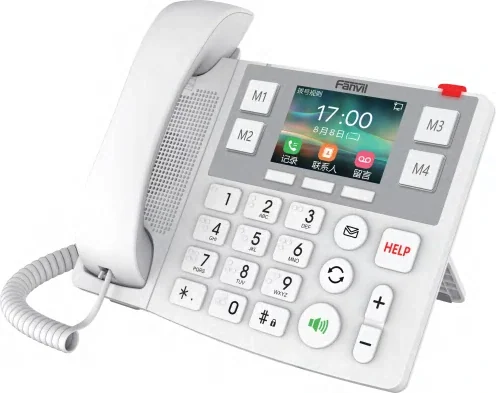
Readable by touch, not only by sight
This is the phone in the range intended for daily use by elderly residents, so the keypad itself is the interface: large digit keys with Braille dots, and picture keys for the people the resident actually calls.
- Ten digit keys with Braille dots
- Four speed-dial buttons supporting image customisation
- 3.5-inch (320×240) colour screen
- HD audio with an adjustable volume key, G.722 and Opus
- Hearing Aid Compatible (HAC) handset
One button for help
The HELP key is the centre of the care use case, and the same phone accepts the wireless buttons — so a call can be raised from the bed or from anywhere in the room without reaching the phone first.
- HELP button for a one-click emergency call
- Wireless KT10 button support, up to 10 buttons
- Works with the KT10, KT20 and KT30 buttons on 433 MHz
- The KT30 pull cord covers the bathroom on the same phone
Wired and wireless in the same desk set
- Dual gigabit ports with integrated PoE
- Built-in 2.4 GHz and 5 GHz Wi-Fi
- Bluetooth 4.2
- Desktop or wall-mounted installation
- SIP registration to the site PBX, alongside the nurse console
SIP line count, DSS key count, dimensions, weight, colour and protection rating are not stated for the X305, so we do not publish them.
Where it fits on site
Elderly resident room
A phone the resident can use daily, with Braille digits and picture keys for family and care staff.
Care room with a wireless button
One HELP key on the phone, plus up to ten KT10 buttons around the room for calls that do not wait for someone to reach the desk.
Room with an en-suite bathroom
The KT30 pull cord reports through the same phone, covering the bathroom as well as the bed.
Specifications
Telephony & audio
| Screen | 3.5-inch (320×240) colour |
|---|---|
| Digit keys | 10, with Braille dots |
| Speed-dial keys | 4, image customisation supported |
| Emergency call | HELP button; up to 10 KT10 wireless buttons |
| Audio | HD audio, G.722 and Opus |
| Handset | Hearing Aid Compatible (HAC) |
| SIP lines | Not stated for this model |
Network & mounting
| Ethernet | Dual gigabit ports |
|---|---|
| PoE | Integrated |
| Wi-Fi | Built-in 2.4 GHz and 5 GHz |
| Bluetooth | 4.2 |
| Mounting | Desktop or wall-mounted |
| Dimensions, weight, colour, IP rating | Not stated in the source materials |
iSpecifications are taken from the care solution deck and the product guide for this range. SIP line count, DSS key count, dimensions, weight, colour and protection rating are not stated for this model; confirm those on the quotation.
Choosing between options
| Model | Specifications |
|---|---|
| KT10 | 433 MHz · 6–25 m range · Self-powered, no battery · Up to 10 per station |
| KT30 | IP65 · 2 m pull cord · 433 MHz · 6–25 m range |
| KT31 | IP44 · 2 m pull cord · No power needed · Y501 series host |
| X305 | 3.5" 320×240 screen · Braille digit keys · 4 speed-dial keys · Dual gigabit + PoE |
| X306 | 3.5" 320×240 LCD · Wi-Fi 6 dual-band · Bluetooth 5.0 · Braille digit keys |
| A308i | 7" 1024×600 · 20 SIP lines · 116 DSS keys · 90 dB speaker |
| A320i | 10.1" touchscreen · 20 SIP lines · 116 DSS keys · Up to 100 devices |
| A330i | Android 14 · 10.1" touchscreen · 116 DSS keys · 8 in / 1 out + RS-485 |
| A308 | 7" 1024×600 · 5 MP camera · Android 9.0 · Gigabit port |
Compatibility boundaries
This model uses standard SIP and the interfaces listed in the specification table. Confirm the PBX, SIP provider or platform against those interface notes before the order; where the documentation does not state a value, the table records it as not stated rather than estimating. PoE, analog port variants, power options and card compatibility are fixed at order time.
Handover, spares and support
Extension plan, provisioning and interface language can be prepared before dispatch. Remote support continues after handover. Spare-part, warranty and service terms are confirmed in the quotation for the models and quantity ordered, so they are not printed as a single figure here.
Where it sits in the system
Frequently asked questions
How does a resident call for help?
Can someone who cannot see the screen use it?
Can the X305 take the bathroom button as well?
How is the phone powered and connected?
Standards referenced
Explore Products
Related products
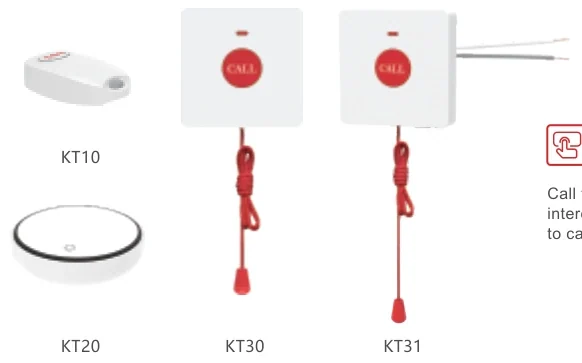
KT10
Pendant button for a one-press call from the bedside or anywhere in the room.
- 433 MHz
- 6–25 m range
- Self-powered, no battery
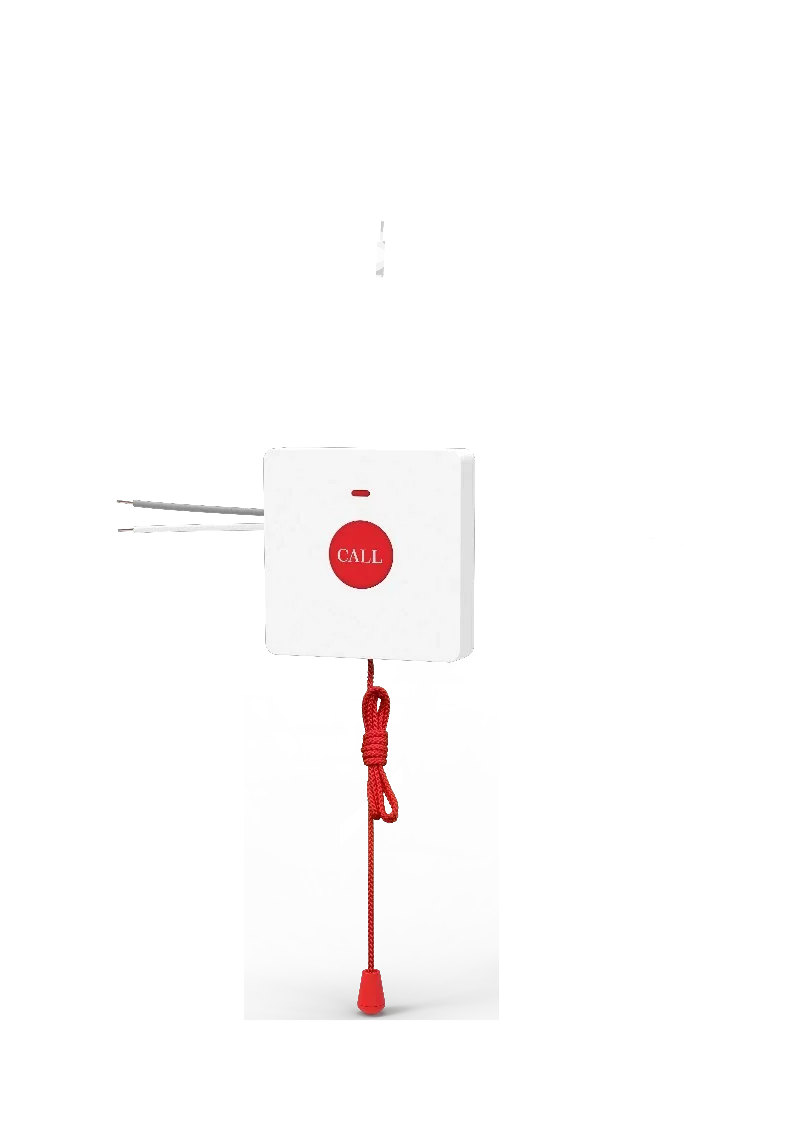
KT30
Wireless bathroom call point with a 2 m pull cord and IP65 protection.
- IP65
- 2 m pull cord
- 433 MHz
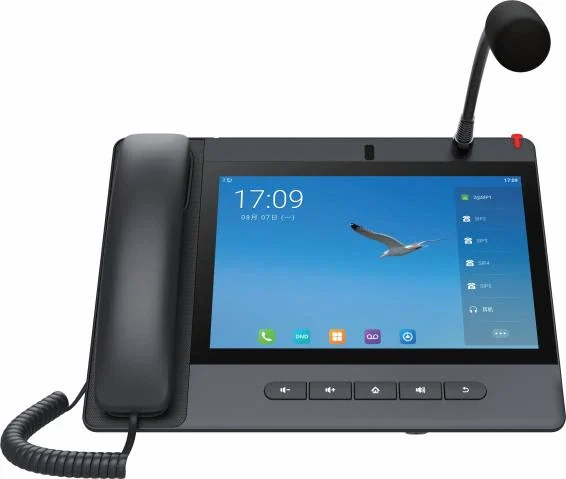
A320i
Android nurse console that answers ward calls and drives the corridor display.
- 10.1" touchscreen
- 20 SIP lines
- 116 DSS keys
Planning an IP telephony project?
Send us the site type, the number of extensions or rooms and the areas to cover — we will come back with a configuration and quotation.
Send the site details
Six facts build a configuration: site type, extensions or rooms, simultaneous calls, areas to cover, existing lines and the documents you already hold. Send as many as you know — nothing has to be final before the first reply.
- Reply within one working day
- Configuration + quotation for your site
- Your details are used only to answer this inquiry
Page author: NEXVIA EngineeringPublished: Last updated: