Skip to content

Scenarios · senior living and home care

Assisted Living Intercom — call buttons, big-button phones and the carer who answers

Assisted living communications fail for a simple reason: the person calling cannot see the button, cannot reach the cord, or cannot hear the answer. The design on this page is therefore built around reach and legibility first — a pendant button that needs no battery, a 2 m pull cord from the floor of the bathroom, a big-button telephone with Braille digits and a HELP key, and a console that tells the carer which room and which type of call. It covers sheltered housing, assisted living apartments, nursing homes and home care, which the care material names together as residential care communities. NEXVIA designs, manufactures, supplies and commissions the system; the terminals are manufactured by NEXVIA, including the care range used throughout this design.

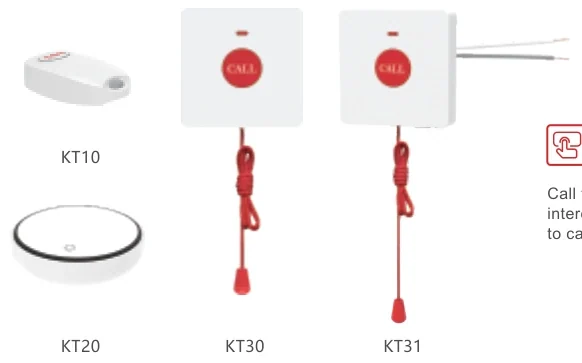
  • A pendant button that needs no battery at all (KT10, KT20), so a flat button cannot silently disable the call point
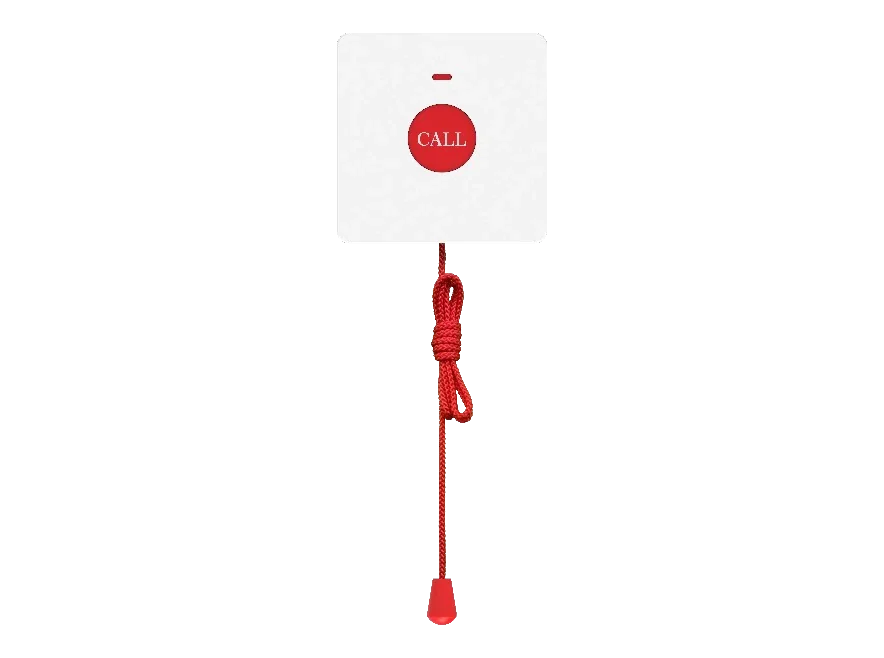
  • A 2 m pull cord at floor level in the bathroom — the position a person who has fallen can still reach (KT30 wireless at IP65, KT31 wired at IP44)
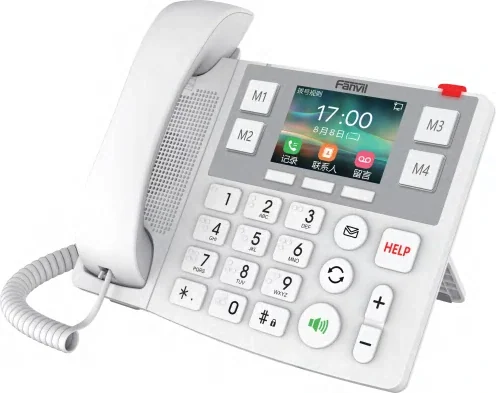
  • Big-button phones built for elderly daily use: X305 with 10 Braille digit keys, four speed-dial buttons and a HELP key
  • Up to 10 wireless buttons on one station, so a pendant, a wall button and a bathroom cord share one host
  • Family calling on the indoor station: one-touch family call and multi-party full-duplex voice, with 8 alarm inputs for a fire or gas alarm
  • A console sized on devices — up to 100 connected devices on the A320i, with calls forwarding to a portable when nobody is at the station
Carer attending a bed-side call station in a care setting

The short answer

Count call positions per resident, not per building. The reference plans in the care material count a 70-bed nursing home as 70 bed-side stations, 70 bathroom call points, 1 console and 15–20 portable handsets, with 40 corridor lights and 4 corridor displays per floor as options; a 50-bed clinic as 50 bed-side, 15 door-side stations, 15 bathroom points and 15 corridor lights. The ratio is the planning tool: one call point per bed, one bathroom point per bed or bathroom, one console per station.

The physical design is what makes it usable. Wireless buttons link over 433 MHz across 6–25 m indoors with up to 10 buttons on one station, a KT31 pull cord needs no power of its own and is wired to the station with two wires, and both bathroom options put a 2 m cord at floor level. The big-button phones add 10 Braille digit keys, four speed-dial buttons with image customisation and a HELP key that calls with one press.

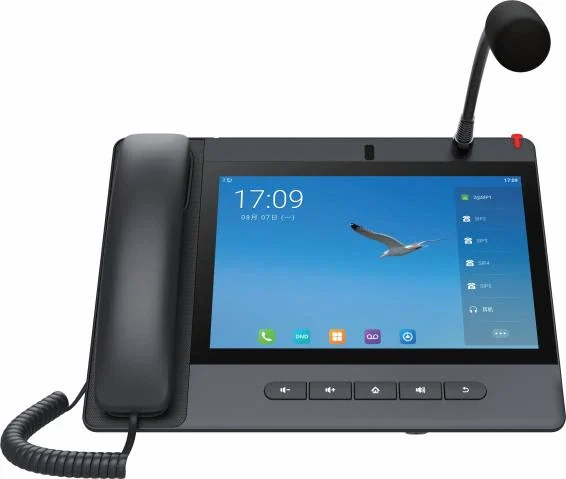
The answering side is sized on devices: the A320i console supports up to 20 SIP lines, up to 116 DSS keys and up to 100 connected devices, with emergency calls requiring a password before the connection is made, and calls transferring automatically to the W611W handset when the station is unattended. Prices are not published on this site — NEXVIA quotes per resident count, room mix and the cable already in the building.

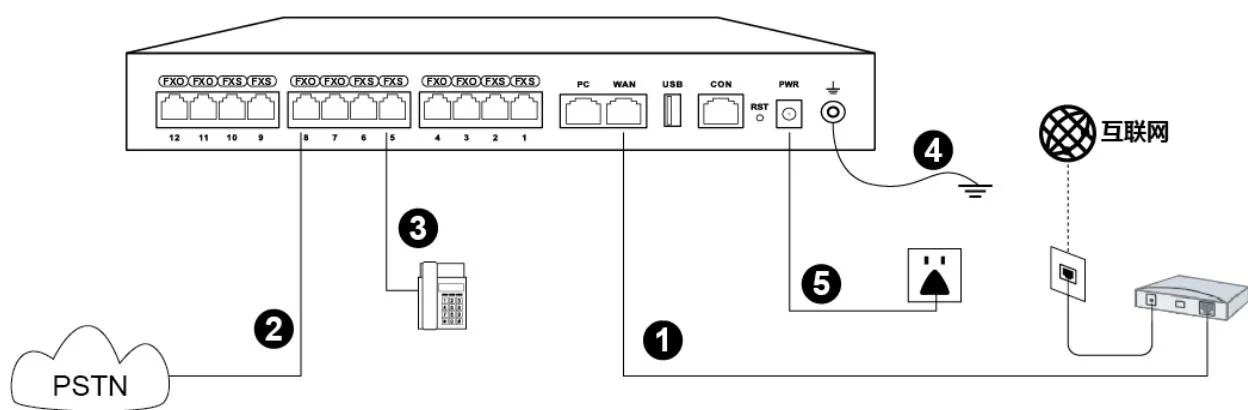
System wiring: internet uplink, PSTN lines, analog phones and grounding all land on one chassis

What goes wrong on this type of site

The button that fails silently

A flat battery in a pendant disables the one thing a resident depends on. KT10 and KT20 are self-powered with no battery, and the KT30 battery is in the bathroom unit rather than in the worn device — which is why the range is built this way.

A call that rings where nobody is standing

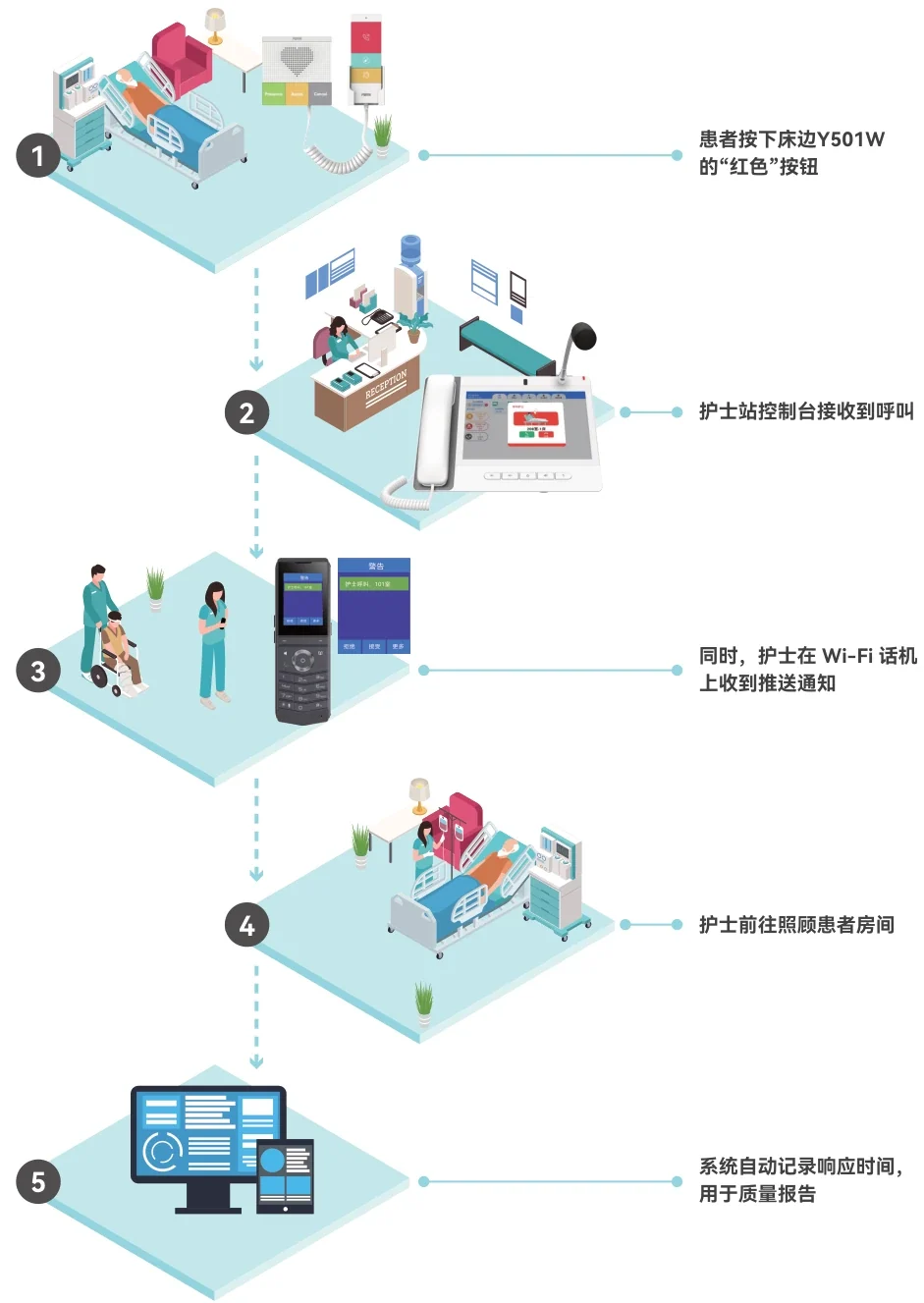
Care staff are between rooms. The chain widens: the call forwards to the W611W portable, speakers amplify it, and the corridor light plus the display identify the room to whoever is passing.

The resident who cannot see the keypad

Legibility is part of the design: 10 digit keys with Braille dots, four big speed-dial buttons with image customisation, a dedicated HELP key and an HAC handset on the big-button phones, with a 3.5-inch screen on the X306.

Night cover with a small team

At night a smaller team covers more rooms. Prioritised calls with colour coding, exported call and attendance logs, zoned paging and a documented escalation order are what let one console hold responsibility for a floor without losing the room number.

Choosing by size

Size bandSystemDevicesNotes
Sheltered housing or assisted living apartments — up to 30 homesOM50G — 62 SIP trunks; up to 12 analog ports if a legacy line is keptOne bed-side or wall station per home, one bathroom pull cord per home, big-button phones (X305 / X306), 1 console (A308i / A320i), 8–12 portable handsetsRing groups hold up to 40 extensions on this model. Scale the published ratios down and confirm the site count on the quotation, because the plan figures are counting templates rather than site surveys.
70-bed nursing home — 10 single and 30 double roomsOM200G — 496 SIP trunks70 × Y501W / Y501W-Y bed side, 70 × KT30/KT31, 1 × A320i console, 15–20 portables, 40 × CL-01 optional, 4 × CMD-01 per floor optionalThe figures are the published plan: one bed-side station per bed and one bathroom call point per bed, with the corridor items marked optional. Add day rooms and staff rooms at survey.
50-bed assisted living clinic — 10 four-bed and 5 two-bed rooms, 3 shiftsOM200G — 496 SIP trunks; up to 96 analog ports if legacy wiring is kept50 × Y501W-Y bed side, 15 × Y501W door side, 15 × KT30/KT31, 15 × CL-01, 1 × A320i, 15–20 portablesThe plan runs 3 shifts: 08:00–16:00, 16:00–24:00 and 00:00–08:00. Write the escalation order per shift into the handover document, because the night cover is the case that matters.
Residents living independently at homeAny model — a small system or a POTS-style arrangement with a home gatewayA big-button phone (X305 / X306) with a pendant button, or an indoor station with an alarm input and one-touch family callKT10 and KT20 connect to the X305 and the Y501 series; the indoor stations carry 8 alarm inputs and 1 embedded relay for an external fire or gas alarm, and one-touch family calling. Confirm how the call is carried to the responder on the quotation.
Care group with several homesOM1000-UC — 1000 SIP trunks, up to 200 concurrent calls per trunkThe per-home counts repeated on one dial plan, per-home extension ranges, a central management site where the group runs one administrationSIP only, with dual hot standby (3 fixed IP addresses) and multi-site networking using unique or repeatable numbering; the care material does not state a maximum number of stations per system.

Numbers behind the design

Assisted living terminals, as published
ModelWhere it goesPublished specificationConnection and notes
X305Resident room and living room, the daily-use phone3.5-inch 320×240 colour screen, 10 digit keys with Braille dots, four speed-dial buttons supporting image customisation, a HELP button and support for up to 10 KT10 wireless buttons; HAC handsetDual Gigabit ports with integrated PoE; G.722 and Opus; Bluetooth 4.2 and 2.4G/5G Wi-Fi; desktop or wall mounted
X306Resident room where a larger display helps3.5-inch 320×240 colour LCD, 10 Braille digit keys, 4 programmable big keys with custom images, wireless or wired emergency call with the KT familyPoE support; Wi-Fi 6 (2.4G/5G), Bluetooth 5.0 and HAC handset
Y501 seriesBed side and door side in a care roomNurse call, toilet emergency call, staff assist call and code blue on one station platform; hosts up to 10 KT10/KT20/KT30 buttons; powers and controls the CL-01 corridor lightSIP with PoE support per the product guide; antibacterial detachable buttons; handset on the -Y variants
KT10 / KT20Pendant or wall buttonWireless push button or emergency call button; self-powered with no battery433 MHz to the Y501 series station or the X305 big-button phone; working range 6–25 m indoors; up to 10 per host
KT30Bathroom pull cord, wirelessIP65, battery inside, 2 m cord, 433 MHz link; works with the X305 and the Y501 seriesNo data cable: the radio link replaces the wiring
KT31Bathroom pull cord, wiredIP44, needs no power of its own, 2 m cord, connected with two wires to the Y501 series stationWired back to the station in the room; the option where a cable already exists
CL-01Corridor light over the room doorRed, green, blue and yellow states for different statuses; 86 box or wall mountedPowered and controlled by the Y501 series station; a supplementary guide also allows an independent 12 V DC adapter
CMD-01Corridor displayUp to 30 prioritised messages on a double-sided LED display at 128×32 dots, multilingual, customisable textWorks with the nurse console; the console pushes call status and location to it
A320i / A308iCarer stationA320i: 10.1-inch 1280×800 touchscreen, 20 SIP lines, up to 116 DSS keys, up to 100 connected devices, 92 dB speaker. A308i: 7-inch 1024×600, 20 SIP lines, 90 dB speakerDual Gigabit ports with integrated PoE; emergency calls require a password before connecting; call and attendance logs can be exported
W611W / W620WCarer on the moveW611W: IP67, 1900 mAh, up to 9 h talk / 200 h standby. W620W: 3000 mAh, up to 13 h / 240 h, dual microphones and H.264 video previewWi-Fi 6 dual-band; incoming calls forward to the handset when the station is unattended
FH-S01 / A212Room, ward or corridor audioFH-S01: up to 20 W with a built-in class D amplifier, talkback, customisable WAV for emergency notification. A212: 8 Ω up to 15 W class D, talkback and alarm linkage (PoE 8 W / PoE+ 15 W)FH-S01 on PoE to IEEE 802.3af; both support up to 20 multicast zones with prioritisation
This design against a conventional analog call-bell installation
RequirementConventional analog call-bell installationThis IP designWhat changes operationally
Call point reachA cord beside the bed and a buzzer at the doorPendant buttons with no battery, a 2 m pull cord at floor level and up to 10 buttons on one stationThe call point follows the resident rather than the bed
CablingBell wiring to every call point, and lamp wiring to every doorSIP stations on the site network with the corridor light driven by the station; KT30 needs no cable at all and KT31 is a two-wire connectionA room can be reconfigured without opening the walls
What the carer seesA lamp over one door and a buzzer somewhere in the corridorA light over the door, a corridor display with up to 30 prioritised messages, and a console with colour-coded priority and call typeThe carer knows which room and which kind of call before arriving
Reaching a carer away from the stationNothing, or a pager contractCalls forward automatically to the W611W portable handset, and speakers amplify the call so it is heard in the corridorThe call follows the person on shift
Family contactA separate telephone lineOne-touch family calling and multi-party full-duplex voice on the indoor station, and a big-button phone with four customisable contact buttonsFamily calls and care calls use the same instrument and the same system
Alarms in the roomNot connected8 alarm inputs and 1 embedded relay on the indoor station take an external fire or gas alarm; the Y501 series station takes cabinet and pull-cord devicesThe room call point doubles as an alarm input position
RecordsA paper book at the deskCall and attendance logs viewed and exported from the console; a record survives the shiftA review after an incident starts from data rather than recollection

Deployment by area

AreaDeviceNote
Resident room — daily use phoneX305 (X306 where a display is wanted)X305: 3.5-inch 320×240 colour screen, 10 Braille digit keys, four speed-dial buttons with image customisation, a HELP button, up to 10 KT10 wireless buttons and an HAC handset, on dual Gigabit PoE. X306 adds Wi-Fi 6, Bluetooth 5.0 and 4 programmable big keys.
Bed sideY501W / Y501W-Y stationNurse call, toilet emergency, staff assist call and staff presence, with a handset on the -Y variants; hosts up to 10 wireless buttons and powers and controls the CL-01 corridor light.
BathroomKT30 wireless or KT31 wired pull cordA 2 m pull cord at floor level. KT30 is IP65 with its own battery and a 433 MHz link over 6–25 m; KT31 is IP44, needs no power and is wired to the station with two wires.
Worn by the residentKT10 / KT20 pendant buttonSelf-powered with no battery, connecting to the Y501 series station or the X305 over 433 MHz with a 6–25 m indoor working range; up to 10 buttons per host.
CorridorCL-01 light and CMD-01 displayCL-01 sits over the room door in red, green, blue and yellow, powered by the station in that room. CMD-01 shows room and call status from the console with up to 30 prioritised messages on a double-sided 128×32 dot display.
Carer stationA320i console (A308i for a smaller position)A320i: 10.1-inch 1280×800 touchscreen, 20 SIP lines, up to 116 DSS keys, up to 100 connected devices, 92 dB speaker; password-gated emergency calls, colour-coded priority and exportable logs.
Carer on the moveW611W / W620W portable handsetReceives forwarded calls when the station is unattended. W611W is IP67 with 1900 mAh (up to 9 h talk / 200 h standby); W620W has 3000 mAh (up to 13 h / 240 h) with H.264 video preview.

Questions buyers ask

How many call points does an assisted living home need?

One per bed, one per bathroom, and one where a person may fall or need help alone. The published plans are the ratio to use: a 70-bed nursing home as 70 bed-side stations and 70 bathroom call points, a 50-bed clinic as 50 bed-side, 15 door-side and 15 bathroom points.

  • Round up for day rooms, dining rooms, treatment rooms and staff rooms, which the published plans do not itemise.
  • Wireless buttons cover positions a fixed point cannot reach: up to 10 KT10/KT20/KT30 buttons can sit on one station.
  • Confirm the final resident and room counts on the quotation — the plan figures are counting templates, not site surveys.

What is the difference between a senior call button and a nurse call system?

Where the button is worn. A senior call button is a pendant or wrist button carried by the resident — the KT10 and KT20 are self-powered with no battery — while a nurse call system is the fixed chain of bed-side and bathroom call points, corridor indication and a console. This design uses both on one system, so a pendant and a pull cord raise the same call type to the same console.

  • KT10 and KT20 connect to the Y501 series station and to the X305 big-button phone, over 433 MHz with a working range of 6–25 m indoors.
  • The X305 supports up to 10 KT10 wireless buttons, so a room can have several call positions on one phone.
  • Call type is separated at the call point — nurse call, bathroom emergency, staff assist and code blue — and shown with different flash patterns.

Can an elderly resident reach the bathroom call point?

That is the design intention of both bathroom options: each places a 2 m pull cord at floor level, so a person who has fallen can still reach it. KT30 is IP65 with its own battery and a 433 MHz link; KT31 is IP44, needs no power of its own and is wired to the station with two wires.

  • KT30 needs no data cable at all, which suits a wet room where a new run would be disruptive.
  • KT31 is the option where a cable already exists and no battery should ever have to be changed.
  • The working range for the wireless version is 6–25 m indoors, so the distance from the host station to the bathroom point is a design input to check on site.

Can a resident call family as well as staff?

Yes, on the equipment that publishes family calling. The indoor stations support one-touch family calling and multi-party full-duplex voice, and the X305 and X306 big-button phones have four programmable buttons for frequent contacts plus a HELP key for the emergency call.

  • The X305 is documented for elderly daily use: 10 digit keys with Braille dots, four speed-dial buttons with image customisation and an HAC handset.
  • The X306 adds a 3.5-inch display, 4 programmable big keys with custom images, Wi-Fi 6 and Bluetooth 5.0.
  • Family extensions and care extensions sit on the same PBX, so the responder list is a ring-group setting rather than a second telephone line.

What happens when the carer is not at the station?

The call moves rather than waiting. It transfers automatically to the W611W portable handset when the station is unattended, and speakers such as the FH-S01 or A212 can amplify the incoming call so staff elsewhere in the building hear it.

  • The corridor display keeps showing the room and call status while the call is unanswered.
  • Both published care plans issue 15–20 portable handsets per site, which is the ratio to keep on shift.
  • The console logs the call and its attendance, so an unanswered call is visible in the record rather than lost.

How does a resident with a hearing aid manage?

Two documented provisions apply: the X305 and X306 publish a hearing-aid-compatible (HAC) handset, and several door phones in the wider range carry a line-out interface that can be integrated with an induction loop antenna for positions with a fixed station.

  • Big-button phones put larger targets and Braille markings on the digits, which helps in low light or with reduced vision.
  • The corridor light over the door shows status in red, green, blue and yellow, so a carer can read the room state without entering.
  • The A320i console carries a 92 dB speaker and supports two-way speech, so the conversation is intelligible at a distance.

Is the system certified, and does it meet our national care requirements?

Nothing on this page is a certification claim. The published comparison for this care system records no third-party safety certification, and the material states none. A compliant design has to be confirmed against the local code and the facility own care policy by the buyer compliance officer before it is tendered.

  • What the design documents: IP and SIP architecture, PoE supply, 433 MHz button links, call types with colour and flash semantics, password-gated emergency calls and exportable call and attendance logs.
  • What the buyer must fix locally: the required response time, whether a specific safety listing is mandatory, how long care records are retained and what is recorded.
  • Raise any tender requirement for a specific listing at enquiry stage, because it changes the system choice rather than only the documentation.

Cabling, power and network notes

  • The Y501 series station is the powered node in the room: PoE support per the product guide, and the station hosts the room buttons and the corridor light.
  • KT30 is a radio device with its own battery and no data cable; KT31 needs no power of its own and is wired back to the station with a two-wire connection; KT10 and KT20 are self-powered radio buttons.
  • The 433 MHz working range is 6–25 m indoors — check it against the distance from the host station to each button before fixing positions, and count the walls between them.
  • CL-01 is powered and controlled by the Y501 series station rather than taking its own PoE run; a supplementary guide also allows an independent 12 V DC adapter where a separate supply is preferred.
  • Speakers are PoE: FH-S01 to IEEE 802.3af and A212 published as PoE 8 W / PoE+ 15 W. Mount them where the call must be heard in an emergency rather than where the ceiling grid is convenient.
  • The console needs a network drop with PoE, and on a multi-floor site the plan must say which console owns which floor before commissioning, because extension ownership is what makes the escalation order work.
  • Indoor stations in independent living take alarm wiring: 8 alarm inputs and 1 embedded relay support an external fire or gas alarm, so the care call point and the room alarm share one device.

The call chain for an assisted living resident

  • Start: a pendant button (KT10/KT20, self-powered), a wall button, a bed-side station or a 2 m bathroom pull cord (KT30 or KT31).
  • Indication: colour and flash pattern on the station, the CL-01 light over the door and the room and call status on the CMD-01 corridor display.
  • Answer: the A320i console at the carer station, with emergency calls requiring a password before the connection is made.
  • Escalation: automatic transfer to the W611W portable handset when the station is unattended, with ward speakers amplifying the call.
  • Record: call and attendance logs exported from the console, and audio archiving where the paging tier provides it.

Two published plans, and how to read them as ratios

The sized deployments printed in the care material

Item50-bed clinic plan70-bed nursing home plan
Bed-side stations50 × Y501W-Y70 × Y501W / Y501W-Y
Door-side stations15 × Y501WNot in this plan
Bathroom call points15 × KT30 / KT3170 × KT30 / KT31
CL-01 corridor lights1540, optional
CMD-01 corridor displays2 per floor, optional4 per floor, optional
Carer console1 × A320i1 × A320i
Portable handsets15–2015–20
Shift pattern3 shifts: 08:00–16:00, 16:00–24:00, 00:00–08:0015 carers plus RN and cleaners

Read them as ratios rather than equipment lists: one bed-side station per bed, one bathroom point per bed or bathroom, one console per carer station, 15–20 portables per site. The final count is confirmed on the quotation.

Independent and home care: what changes

  • In independent living the room is a home, so the daily-use instrument is a telephone with family buttons rather than a ward handset: the X305 with four speed-dial buttons and a HELP key, or the X306 with a display.
  • Family calling is published on the indoor stations as one-touch family call with multi-party full-duplex voice, which is the function that keeps a resident in touch without a second line.
  • Alarms do not stop at the care chain: 8 alarm inputs and 1 embedded relay on an indoor station accept an external fire or gas alarm, so the room has one device for calls and alarms.
  • The care material names home care alongside nursing homes and clinics as a target environment, and the wireless button family is what makes a home installation possible without cable runs.
  • Where a resident needs help outside the building, the same system can carry the call to a nominated family number or a response service — the destination list is a ring-group design decision, not a device one.

Running the system after handover

  • The responder list is a ring group: console first, portable second, duty manager third, with the order written down and tested on each shift.
  • Buttons are paired at commissioning and recorded on the room sheet — which button calls which station, and which station drives which corridor light.
  • Call and attendance logs can be exported, which is what a care manager needs for a review after an incident.
  • Battery and device checks belong in the maintenance schedule: the KT30 has a battery in the bathroom unit, while KT10 and KT20 are self-powered and need no battery at all.
  • Extension numbers stay stable when a resident moves rooms, so the dial plan is changed rather than the equipment.

Compliance, standards and local requirements

A compliant care call chain, and who confirms it

A compliant assisted living design starts with the response chain: what a call does in the first seconds, who it reaches, what happens when it is not answered, and what record survives. This page sets out a chain built from IP and SIP terminals — a pendant with no battery, a 2 m pull cord, a station that drives the corridor light, a console with password-gated emergency calls and automatic transfer to a portable handset, and exportable call and attendance logs. Whether that chain satisfies a particular national requirement or registration condition is a determination the facility own compliance officer makes against the applicable code. NEXVIA does not assert it, and the published material records no certification for these products.

Accessibility is a physical requirement, not a feature list

A call point that cannot be reached is not a call point. The published provisions are specific: a 2 m pull cord at floor level on both bathroom options, IP65 on the wireless KT30 and IP44 on the wired KT31, self-powered KT10 and KT20 buttons with no battery to fail, Braille digit keys and four customisable contact buttons on the X305, an HAC handset, and an 86 box or wall position for the CL-01 corridor light. Mounting heights, reachability from a bed or from the floor, and the cleaning agents that may be used on each device should be confirmed with care staff on site rather than taken from a drawing.

Wiring, PoE and the corridor circuit

The station is the powered node in the room — PoE support per the product guide — and it powers and controls the CL-01 corridor light rather than the light taking its own PoE run. Wireless buttons are self-powered or battery-fed and the wired pull cord needs no power, so the radio and two-wire positions do not add to the PoE budget. Speakers are PoE: FH-S01 to IEEE 802.3af and the A212 published as PoE 8 W / PoE+ 15 W. Cable classes, separation rules, mounting heights and the 86 box standard are local installation matters — confirm them against the applicable wiring code before first fix.

Records, dignity and personal data

Care systems generate sensitive records: call and attendance logs, room status, and in some designs audio or video. Who may see a resident call log, how long it is kept, what is shared with family and what the resident is told are decisions for the facility under the applicable care and data-protection rules. Audio archiving of SIP paging, intercom and calls is a published capability of the paging tier and call recording runs in G.711 and G.729 where a recording server is used — the retention rule and the notice are policy, not equipment. Write them down before the system goes live, and review them whenever a recording or video function is enabled.

Standards referenced

Frequently asked questions

What is the difference between an assisted living intercom and a nurse call system?

Scope and setting. A nurse call system is the fixed ward chain; an assisted living intercom adds the resident-worn button and the daily-use telephone with family calling, for sheltered housing and home care as well as care homes. Both use the same terminals and the same console in this design.

Does the pendant button need a battery?

No. KT10 and KT20 are self-powered with no battery, linking over 433 MHz to the Y501 series station or the X305 with a working range of 6–25 m indoors. The battery in the KT30 bathroom unit is inside the wall device rather than the worn button.

Can a resident who has fallen still reach the call point?

Both bathroom options place a 2 m pull cord at floor level: KT30 wireless at IP65 with its own battery, and KT31 wired at IP44 with no power requirement of its own.

How does the resident call family?

With one-touch family calling and multi-party full-duplex voice on the indoor station, or with the four programmable speed-dial buttons on the X305 and the 4 programmable big keys on the X306. Both big-button phones carry a HELP key for the emergency call.

What happens if nobody is at the carer station?

Calls transfer automatically to the W611W portable handset, and speakers such as the FH-S01 or A212 can amplify the incoming call. Both published care plans issue 15–20 portables per site for exactly this reason.

Can the room alarm be connected to the same point?

Yes. The indoor stations carry 8 alarm inputs and 1 embedded relay, so an external fire or gas alarm can be wired to the same device that handles the care calls; the Y501 series station hosts the room buttons and drives the corridor light.

Is the system certified for care use?

No certification is claimed here. The published comparison records no third-party safety certification for this care system, and a tender requiring a specific listing must confirm it against local code and raise the requirement at enquiry stage.

Project evidence

We have not published a named reference project on this page. The site does not carry customer names or installation records until the client confirms in writing which projects may be made public.

Page author: NEXVIA EngineeringPublished:Last updated:

Covers: assisted living intercom · assisted living nurse call systems · senior call button systems · care home phone system · elderly care intercom

All IP telephony, intercom and paging equipment in this design is supplied and integrated by NEXVIA.

Already decided on a platform, or replacing a system?

Explore Products

Related products

Planning an IP telephony project?

Send us the site type, the number of extensions or rooms and the areas to cover — we will come back with a configuration and quotation.

Send the site details

Six facts build a configuration: site type, extensions or rooms, simultaneous calls, areas to cover, existing lines and the documents you already hold. Send as many as you know — nothing has to be final before the first reply.

  • Reply within one working day
  • Configuration + quotation for your site
  • Your details are used only to answer this inquiry

* required