Skip to content

Scenarios · hospitality

Hotel Phone Systems — guest rooms, front desk and wake-up calls on one IP PBX

A hotel phone system has three jobs at once: reach the guest in the room, hand every request to the right desk, and survive a refurbishment that cannot re-cable 120 rooms. The design below is a reference configuration built from published capacity and product figures — one OM series IP PBX, guest-room handsets and the front-desk positions, sized by room count. NEXVIA designs, manufactures, supplies and commissions the system; the equipment itself is manufactured by NEXVIA and supplied under the NEXVIA brand.

  • Guest-room handsets with 5 to 10 programmable service keys — housekeeping, ticket booking, the switchboard, ordering food and wake-up call service are the named functions
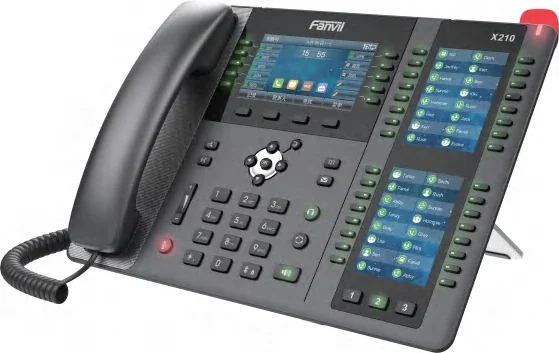
  • Front-desk positions that carry 106 DSS keys across three screens, so room lines and extensions stay visible on one desk
  • A cordless guest handset (H603W) on a QC3.0 fast-charge base for guests who take the phone to the balcony or bathroom
  • Wi-Fi 6 on the H4W, H6W, H602W and H603W, so a room handset can sit where there is no data outlet
  • One PBX from 24 to 1000 SIP trunks across five models, with up to 120 concurrent calls per trunk and 200 on the OM1000-UC
  • Door phones at service entrances and SIP speakers in corridors register on the same network as the room handsets
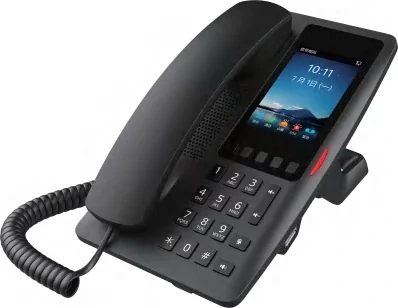
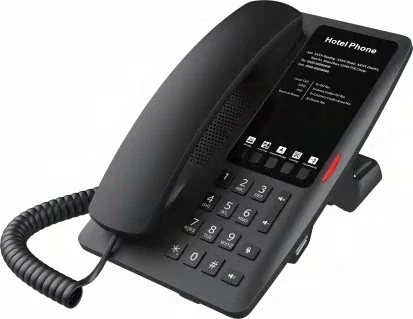
H6W guest-room handset with five service keys, including wake-up call service

The short answer

A 50-room property needs about 50 guest-room handsets, 2 to 4 front-desk positions and 4 to 6 back-of-house or wall phones — roughly 60 devices on one network, all registering to a single IP PBX as SIP extensions. The room count, not a seat count, chooses the model: the OM50G publishes 62 SIP trunks, the OM200G 496 and the OM1000-UC 1000, and one trunk carries up to 120 concurrent calls (200 on the OM1000-UC).

Every handset is an extension with its own number from 200 upwards, so the switchboard, housekeeping and the back office share one dial plan. Wake-up call service is a named service key on the H6W, H602W and H603W and a system feature with its own voice prompt on the PBX; room status can be pushed to a property management system when an extension dials a feature code.

Cabling decides the method rather than the model. Integrated PoE is published for the H2U, H3W, H4W, H5W and H6W, so each position needs one cable run; where only two-core cable exists, the PN1 converter carries network and power over the existing pair, up to 1600 m for the network function without power. Prices are not published on this site — every project is quoted per room count, handset mix and cable condition.

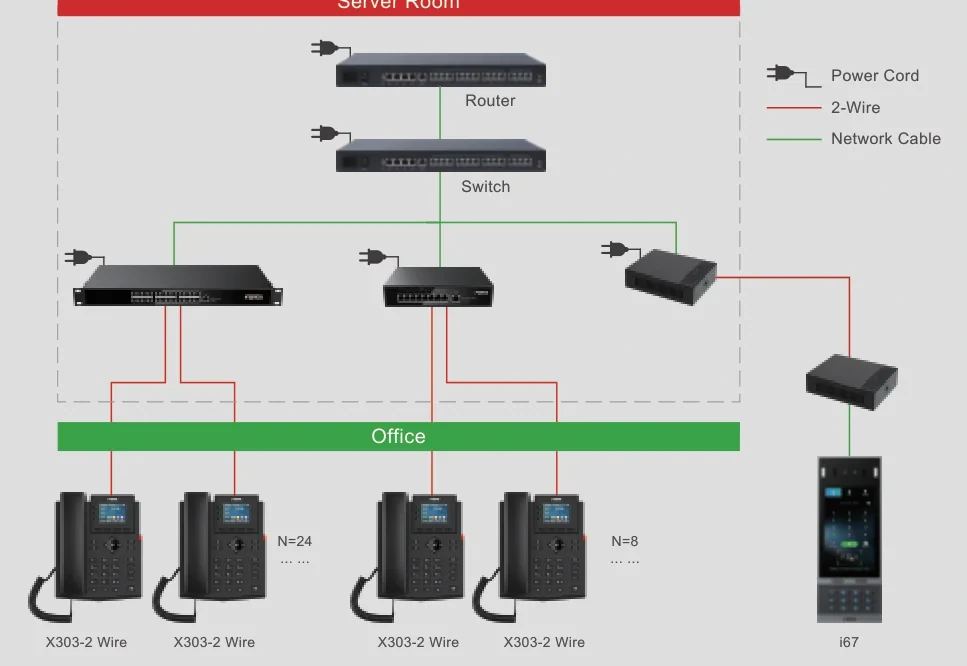
Two-core topology: network and power carried over the cabling already in the wall

What goes wrong on this type of site

The room wiring is older than the plan

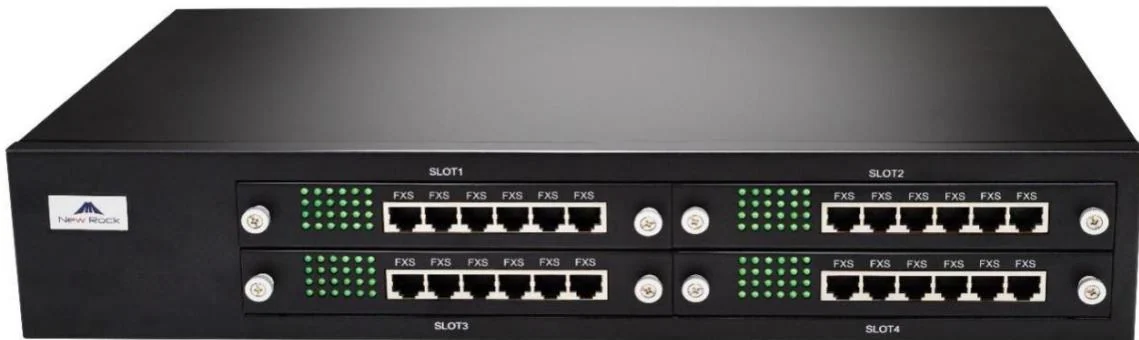
A refurbishment often inherits two-core cabling in the riser rather than data cable. Three documented answers exist: handsets with the radio built in where Wi-Fi covers the room, analog ports on the PBX where pairs still reach the frame (up to 12 ports on the OM50G, 48 on the OM80E, 96 on the OM200G), and the PN1 2-wire converter, which carries network and power over an existing two-core cable.
The front desk is a single point of contact

Room calls, wake-up requests and internal transfers all pass one position. Ring groups distribute calls sequentially, in rotation or simultaneously, the operator position accepts up to 5 numbers, and up to 20 calls can wait in a queue instead of failing.

A wake-up call that does not happen

Wake-up call service is a named service key on the range, and the PBX provides wake-up calls as a system feature with its own voice prompt file. A handset with a dedicated key plus a tested procedure at the desk is what keeps the promise across shift changes.

Guest expectations arrive before the cabling does

Charging a phone and getting on Wi-Fi are asked for at check-in. The H3W, H4W, H5W and H6W carry a USB-A charging port, the H4W, H6W, H602W and H603W publish Wi-Fi 6, and a hotspot function lets several phones share one server account where registrations are limited.

Choosing by size

Size bandSystemDevicesNotes
Up to 50 rooms — boutique hotel, motel, guesthouseOM50G — 62 SIP trunks; up to 12 analog ports across 3 interface cardsAbout 50 room handsets (H2U / H3W / H4W), 2 front-desk phones (X210 / X6U), 4–6 wall phones (V60G), 1–2 entrance stations (A12V)Desktop chassis with 3 interface cards and 12 analog ports if the riser is still analog. Ring groups hold up to 40 extensions on this model. The published capacity is SIP trunks — a maximum extension count is not stated.
51–150 rooms — full-service or resort hotelOM200G — 496 SIP trunks; up to 96 analog ports on 24-line interface cardsRoom handsets per room, 3–4 front-desk positions, 4–8 wall phones, entrance stations, corridor speakers, 1–2 paging consoles (X210i)4 hot-swap card slots, gigabit Ethernet and single or dual AC/DC power. Ring groups hold up to 60 extensions; PT2400 or PT4800 patch panels are named for structured cabling at this size.
151–400 rooms — large hotel or conference propertyOM200G or OM1000-UC — 496 or 1000 SIP trunksPer-floor room handset counts, 4–6 front-desk and guest-relations positions, wall phones per service corridor, zoned corridor pagingChoose the OM200G while analog ports are still needed; move to the OM1000-UC when the property is pure SIP and needs dual hot standby with 3 fixed IP addresses.
400+ rooms or a multi-building resortOM1000-UC — 1000 SIP trunks, up to 200 concurrent calls per trunkPer-building counts as above, one shared dial plan, extension ranges per buildingSIP only, with no FXS or FXO ports, dual hot standby and multi-site networking using unique or repeatable extension numbering. Buildings keep their own numbering and share the trunk plan.
Refurbishment on existing two-core cableOM20G or OM50G — 24 or 62 SIP trunksRoom handsets as above, with PN1 converters at the points that cannot be re-cabled; PN8 or PN24 2-wire switches where a floor needs 8 or 24 pointsPN1 supplies network and power over a two-core cable and reaches up to 1600 m for the network function without power, powered locally at AC 100–240 V. PN8 and PN24 carry 8 and 24 two-wire devices with a maximum connection distance of 300 m for network plus power.

Numbers behind the design

Guest-room and front-desk equipment, as published
ModelWhere it goesKeysWirelessPowerPublished notes
H2UStandard room10 speed-dial + 1 programmableNoneIntegrated PoEThree colours; the programmable key can work a door phone for remote door release
H3WStandard room6 service keys2.4G Wi-FiPoE + 1 USB-AUSB-A port for charging a guest phone
H4WStandard / premium room5 or 6 (sources differ)Wi-Fi 6, 2.4G + 5GIntegrated PoE + 1 USB-ACustomisable faceplate; the key count is confirmed on the quotation because the two brochures print different figures
H5WPremium room6 service keys2.4G Wi-FiPoE + 1 USB-A3.5-inch 480×320 screen; receives video calls in H.264
H6WPremium room with screen5 service keysWi-Fi 6, 2.4G + 5GIntegrated PoE + 1 USB-A3.5-inch 320×480 screen; AP mode lets the handset also act as a room router; two colours
H602WRoom, DC-powered position6 programmable service keysWi-Fi 6, 2.4G + 5GDC supply, 10/100 Mbps portMagnetic handset; faceplate customisation; wake-up call service is one of the named keys
H603WSuite / guest who moves about6 programmable service dialsWi-Fi 6, 2.4G + 5GCordless, QC3.0 fast-charge baseThree-colour status light; voice reminder if the handset is left off the base; lab figures 8.1 h talk / 159 h standby
X210Front desk106 DSS keys across 3 screensBluetooth 4.2; Wi-Fi via dongleDual Gigabit, integrated PoE4.3-inch main screen plus two 3.5-inch side screens; 20 SIP lines
X6USecond desk / guest relations60 DSS keys + 5 LED line keysBluetooth 4.2; Wi-Fi via dongleDual Gigabit, integrated PoEThree screens (4.3-inch main, two 2.4-inch side); 20 SIP lines
V60GKitchen, stores, service corridors6 DSS keysNoneDual Gigabit, PoE support2.4-inch 320×240 screen; wall-mount only
This design against a conventional analog PBX
RequirementConventional analog PBXThis IP designWhat changes operationally
Room handset cablingOne dedicated pair per handset back to the frameOne cable run per position, power and data together (PoE published on H2U, H3W, H4W, H5W, H6W)Fewer terminations in the frame room; a handset can be swapped without touching the riser
Adding or moving a room phoneNew pair and a new port on the switchboardA SIP extension created in a batch on the PBX; the handset is provisioned over DHCP option 66 or TR069A refurbished floor does not need a new frame position
Outside linesAnalog trunks on FXO ports, one pair per line24 to 1000 SIP trunks, or analog lines on FXO ports where the property keeps them, with outbound fallback to an analog lineTrunk capacity is a licence of the model, not a card count
Wake-up callsSeparate wake-up unit or a manual list at the deskA named service key on the handset plus a system wake-up feature with its own voice prompt fileThe desk can see and set wake-ups from the operator position
Front-desk visibilityLamp field wired per extension, or noneExtension status subscription on the OM20G, OM50G and OM1000-UC, with idle, ringing, in-call and offline statesA busy-lamp field appears on the screen without a separate indicator panel
Door phone and corridor pagingSeparate door-entry unit and a separate paging amplifierEntrance stations and SIP speakers register on the same PBX as the room handsetsOne network, one fault-finding routine, one dial plan
Call records for billingPrinted tickets or a separate loggerCall detail records pushed to an external server on port 1809Disputes are answered from the record rather than from memory

Deployment by area

AreaDeviceNote
Guest room — standardH4WWi-Fi 6 on 2.4G and 5G, programmable service keys, a USB-A charging port and integrated PoE; the faceplate can be customised to the room. The two brochures print different key counts for this model, so the layout is confirmed on the quotation.
Guest room — with a screenH6W3.5-inch 320×480 screen, 5 service keys named for housekeeping, ticket booking, the switchboard, dining and wake-up call service, plus Wi-Fi 6 and AP mode in which the handset also acts as a room router.
Suite or room where the guest moves aboutH603WCordless handset on a QC3.0 fast-charge base, with a voice reminder if the handset is left off the base, 6 programmable service dials and a three-colour status light. Lab figures are 8.1 h talk and 159 h standby.
Front desk and second deskX210 / X6UX210: 4.3-inch main screen plus two 3.5-inch side screens and 106 DSS keys, so room lines and extensions sit on one desk without an expansion console. X6U: three screens, 20 lines and 60 DSS keys for a guest-relations position.
Kitchen, stores and service corridorsV60G wall-mount phoneWall handset with a 2.4-inch 320×240 colour screen, 6 keys and dual Gigabit ports, for positions where a desk phone has nowhere to sit.
Service entrance or staff gateA12V outdoor video intercomIP66 and IK10 die-cast body from −40 °C to 70 °C, 4 MP camera with infrared night vision, 10W speaker with echo cancellation, 2 short-circuit inputs and 2 outputs, and an anti-tamper alarm that reports to the control centre if the cover is removed.
Corridors and function areasA201 ceiling speaker or A212 wall speakerBoth register over SIP and support up to 20 multicast zones with prioritisation. A212 is published as 8 Ω with up to 15 W class D output (PoE 8 W / PoE+ 15 W) and talkback; the A201 ceiling figure is printed two ways in the source, so its wattage is confirmed on the quotation.

Questions buyers ask

How many phones does a 100-room hotel need?

Count one handset per room first, then add the operational positions: a 100-room property typically lands at about 100 room handsets, 3 to 4 front-desk phones, 6 to 10 wall handsets for kitchen, stores and service corridors, and 1 to 2 entrance stations — around 115 devices in total.

  • Room handsets: H4W or H5W for standard rooms, H6W where the room has a screen, H603W for suites.
  • Front desk: X210 for the main position (106 DSS keys across three screens) and an X6U for a second desk.
  • Service areas: V60G wall handsets where a desk phone has nowhere to sit.
  • The PBX is then chosen on trunks — the OM200G publishes 496 SIP trunks, which leaves room for a phase-two expansion without a new chassis.

Can a room handset be fitted where there is no data outlet?

Yes, in two documented ways. Five handsets take power and data on one network cable (integrated PoE on the H2U, H3W, H4W, H5W and H6W), and six of the range carry the radio themselves (H3W, H4W, H5W, H6W, H602W and H603W), so no cable is needed at the position at all.

  • Where the wall has two-core cable only, the PN1 converter carries network and power over the existing pair — up to 1600 m for the network function without power, supplied at AC 100–240 V.
  • A floor that needs several 2-wire points can use the PN8 (up to 8 devices) or PN24 (up to 24 devices), both rated to 300 m for network plus power.
  • The power arrangement for each position is confirmed on the quotation, because it depends on the cable actually in the wall.

Do room phones keep working when the internet fails?

Internal calls keep running on the local network, and analog lines wired to FXO ports keep working directly. An outbound SIP call can also be set to fall back to an analog line automatically when the trunk fails.

  • The OM20G can dial out through a 3G/4G USB modem as well; the OM50G does not support one.
  • Analog ports by model: 4 on the OM20G, 12 on the OM50G, 48 on the OM80E and 96 on the OM200G, ordered as FXS, FXO or a mix.
  • The OM1000-UC has no analog ports, so a pure-SIP property should keep at least one analog route on a smaller PBX or a gateway if continuity matters.

How does a wake-up call reach the right room?

Wake-up call service is one of the named service keys on the H6W, H602W and H603W, and the PBX runs wake-up calls as a system feature with its own voice prompt file. The desk sets the time against the room extension, and the call is placed to that extension rather than announced floor-wide.

  • A handset with a dedicated key plus a tested desk procedure is what keeps the promise when the shift changes.
  • Call detail records pushed to a server on port 1809 give the property a timestamped record of the call.
  • Where a property management system is in place, room status changes can be pushed to it when an extension dials a feature code.

What happens to a call when nobody answers at the front desk?

The call is distributed rather than abandoned. Ring groups work in sequential, rotating or simultaneous mode, and up to 20 calls can wait in a queue with a prompt instead of failing.

  • The operator position accepts up to 5 numbers, so the desk, the duty manager and the back office can be tried in turn.
  • An unanswered call waits 24 seconds for digits before it is routed to the operator, and rings 10 times before the voicemail prompt.
  • Off-hours routing and a multi-level IVR answer before anyone picks up, with time-of-day rules in up to 3 periods per day.

Can guests charge a phone and get on Wi-Fi from the room handset?

On the models that carry it. The H3W, H4W, H5W and H6W have a USB-A charging port, the H4W, H6W, H602W and H603W publish Wi-Fi 6 on 2.4G and 5G, and the H6W adds an AP mode in which the handset also acts as a room router.

  • A hotspot function lets several phones share one server account where registrations are limited.
  • Faceplate customisation is published for the H4W, H602W, H603W and H1/H1-2 Wire, so the handset can match the room.
  • The H603W cordless handset sits on a QC3.0 fast-charge base and reminds the guest by voice if the handset is left off the base.

Cabling, power and network notes

  • Room handsets run as SIP extensions and most take power over the network cable: integrated PoE is published for the H2U, H3W, H4W, H5W and H6W, so a position needs one cable run.
  • Wi-Fi radios on the H3W, H4W, H5W, H6W, H602W and H603W remove the need for a data run to the handset position; the power arrangement for each position is confirmed on the quotation.
  • Analog pairs that still reach the frame can be terminated on the PBX: up to 12 ports on the OM50G, 48 on the OM80E and 96 on the OM200G, with interface cards connected to a patch panel over Cat5 Ethernet cable.
  • The PN1 2-wire converter extends PoE wiring over an existing two-core cable, which is how a historical building gains network and power without new cabling; PN8 and PN24 carry 8 and 24 two-wire devices with a maximum connection distance of 300 m for network plus power.
  • Keep an analog line on an FXO port for outbound calls during an internet outage: outbound SIP calls can be set to fall back to an analog line when the trunk fails, and the OM20G can dial out through a 3G/4G USB modem.
  • Plan the RTP port range on the firewall where any extension registers from outside the property: the published default is 10010–10266, and each call uses an RTP and an RTCP port.
  • Earth the PBX chassis in the equipment room. The published installation diagram pairs the internet uplink, the PSTN lines, the analog phones, the power input and a grounding point.

How a hotel runs on one system

The PBX is the one box that decides where a call goes. Room handsets and desk phones register as SIP extensions; outside lines arrive as SIP trunks, or as analog lines on FXO ports where the property still has them. Because the port is an IP extension rather than a pair in a frame, the dial plan is a configuration task rather than a wiring task.

  • A multi-level auto attendant and a multi-language voice menu answer before the desk picks up, with separate working-hours and off-hours prompts and time-of-day routing in up to 3 periods per day.
  • Ring groups distribute guest and room calls sequentially, in rotation or simultaneously, with up to 20 calls waiting in a queue.
  • Call recording runs in G.711 and G.729; the OM20G and OM50G record locally as well as remotely, while the larger models record to a recording server only (remote server port 1311), so plan the server if the property records calls.
  • Entrance door phones and SIP speakers register on the same system, so admitting a guest or making an announcement does not need a second network.
  • Call detail records can be pushed to an external server on port 1809 for billing or dispute handling, and extension status subscription on the OM20G, OM50G and OM1000-UC drives a busy-lamp field on a reception desk, in groups of up to 5 members.

Wake-up, room status and the front desk

  • Wake-up call service is a named service key on the H6W, H602W and H603W, and the PBX provides wake-up calls as a system feature with its own voice prompt file.
  • Room status can be sent to a property management system: an extension dials a feature code and the state is pushed over the system message channel.
  • The operator position takes up to 5 numbers, and ring groups hold up to 40 extensions on the OM20G and OM50G and up to 60 on the larger models.
  • A call that reaches no one is not lost: group queues hold up to 20 waiting calls, and a call that is not dialled through within 24 seconds is routed to the operator.
  • Voicemail is retrieved by dialling *98, with the option to forward a message to a mailbox; guest messages can be left per extension.

Feature codes and prompts are system files; the exact numbering is set at commissioning and recorded in the handover document.

Three cabling routes for an existing property

How a room position is reached, by the cable that already exists

RouteWhat carries itPublished limitsWhen it fits
Network cable to the positionData and PoE power on one runIntegrated PoE on H2U, H3W, H4W, H5W, H6WA refurbishment that is opening the walls anyway
No cable at allThe handset radio reaches the property Wi-FiWi-Fi 6 dual-band on H4W, H6W, H602W, H603WRooms where a data run would damage the finish
Existing two-core cablePN1 converter: network plus power over the pairUp to 1600 m for network without power; local supply AC 100–240 VHistorical buildings and stone-walled floors
Many 2-wire points on a floorPN8 or PN24 2-wire switchUp to 8 or 24 devices; 300 m for network plus powerA whole floor converted without new riser cable
Pairs still on the frameAnalog ports on the PBX4 / 12 / 48 / 96 ports on OM20G / OM50G / OM80E / OM200GA property keeping analog room handsets for a final phase

The cable in the wall is the deciding fact. Measure it at survey, then choose the route per position rather than per property.

What the property decides before the survey

  • Room count now and after any planned extension — this sets the PBX model, because capacity is published in SIP trunks (24, 62, 216, 496 and 1000 across the five models).
  • How many simultaneous outside calls a busy hour really holds — each trunk carries up to 120 concurrent calls, 200 on the OM1000-UC.
  • Which positions must survive an internet outage, and whether an analog line stays for them.
  • Whether calls are recorded, and if so where the recording server sits and what retention rule applies.
  • Whether the property management system will take room status, and who owns that integration on the property side.
  • The handset mix: charging and Wi-Fi expectations decide between the H3W, H4W, H5W, H6W and the cordless H603W.

Compliance, standards and local requirements

Structured cabling is the first rule

Room runs are terminated and tested as structured cabling, and the interface cards connect to a patch panel over Cat5 Ethernet cable. The PBX installation diagram pairs the internet uplink, the PSTN lines, the analog phones and the power input with a grounding point, so the chassis is earthed in the equipment room. Cable classes and outlet labelling follow the local installation standard; confirm the requirement with the property's consultant before the riser is closed up.

PoE budget and power planning

A property that feeds handsets by PoE is building a power plan, not just a data plan. Integrated PoE is published for the H2U, H3W, H4W, H5W and H6W; the H602W is a DC-supplied position with a 10/100 Mbps port. Budget the switch ports per floor and keep the analog and FXS positions on their own supply. Confirm the switch and PoE class against the terminals you select.

Emergency and priority calls

Emergency calls in a care or hospitality context are treated as priority events: on the care system the published behaviour is that the recipient must enter a password before the call is connected, so a real person answers rather than a device. For a hotel, the equivalent decision is which extension is called first out of hours and how a call escalates when it is not answered. Write that order down and test it with the property before handover.

Local code and guest privacy

Telephone regulation, emergency-number routing, call-recording consent and guest-privacy rules differ by country, and the material behind this page records no certification for these products. The design therefore has to be checked against the local code by the property's own adviser, and any recording, billing or PMS integration must be reviewed against the applicable privacy and retention rules before it is switched on. Nothing on this page is a compliance determination — it is a list of the points a compliant design has to answer.

Standards referenced

Frequently asked questions

Is a hotel phone system just a PBX with room handsets?

It is a PBX with room handsets, plus two hotel-specific behaviours: wake-up call service on the handset and the PBX, and room status that can be pushed to a property management system. The rest — trunks, ring groups, voicemail, recording — is standard PBX work sized on SIP trunks from 24 to 1000.

Can we keep the existing analog lines and room phones?

Yes, in phases. The OM20G takes up to 4 analog ports, the OM50G up to 12, the OM80E up to 48 and the OM200G up to 96, ordered as FXS, FXO or a mix. The OM1000-UC has no analog ports at all, so a pure-SIP decision has to be made before that model is chosen.

Do we need a separate paging system for the corridors?

No. SIP speakers such as the A201 ceiling or A212 wall model register on the same PBX and support up to 20 multicast zones with prioritisation. Note that two-way broadcast is not supported by the series; talkback is a feature of the speaker models that publish it, such as the A212.

Can the room handset be branded to match the room?

Faceplate customisation is published for several models, the H6W and H5W offer two colours (white and black) and the H2U is offered in three. Send the room artwork with the enquiry and the finish is confirmed on the quotation.

How is the installation staged in an operating hotel?

Floor by floor and by riser section, so rooms can be handed back the same day. The sequence is agreed with the property in the project plan; the programme itself is written per project rather than published here, because it depends on the cable condition and the room-release plan.

Can one system serve two buildings?

Yes. The OM1000-UC supports multi-site networking with either unique or repeatable extension numbering, dual hot standby and SIP-only operation. Buildings can keep their own extension ranges and share the trunk plan through the management site.

Where do the prices come from?

They do not appear on this site. The design is quoted per project — room count, handset mix, trunk plan, cable route and the services you ask NEXVIA to carry out are what a quotation is based on. Send the counts and the cable survey and the configuration, port mix and endpoint list come back priced.

Project evidence

We have not published a named reference project on this page. The site does not carry customer names or installation records until the client confirms in writing which projects may be made public.

Page author: NEXVIA EngineeringPublished:Last updated:

Covers: hotel phone system · telephone systems for hotels · hospitality phone system · 50 room hotel phone system · hotel voip phone

All IP telephony, intercom and paging equipment in this design is supplied and integrated by NEXVIA.

Already decided on a platform, or replacing a system?

Explore Products

Related products

Planning an IP telephony project?

Send us the site type, the number of extensions or rooms and the areas to cover — we will come back with a configuration and quotation.

Send the site details

Six facts build a configuration: site type, extensions or rooms, simultaneous calls, areas to cover, existing lines and the documents you already hold. Send as many as you know — nothing has to be final before the first reply.

  • Reply within one working day
  • Configuration + quotation for your site
  • Your details are used only to answer this inquiry

* required