
IP PBX · small business
OM50G IP PBX — up to 12 analog ports and 62 SIP trunks
The step up from the OM20G: up to three interface cards, twelve analog ports and 62 SIP trunks, still in a sound-box-sized chassis with local recording.
- Three interface-card slots, so the port mix can grow with the site
- Variants from 6 FXS up to 12S, 10S/2, 8S/4 and 6S/6
- 62 SIP trunks — enough for a busy sales floor
- Records both locally to 16 GB and to a remote recording server
- Built-in OpenVPN client for private-network SIP trunks
- No 3G/4G modem support — plan a wired line for this model
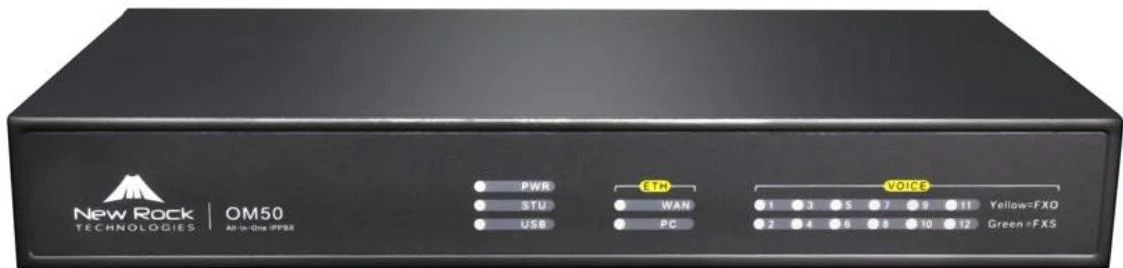
Pick the port mix at order time
The OM50G carries up to three interface cards. The common variants trade analog extensions against analog lines.
OM50G analog port variants
| Variant | FXS extensions | FXO lines |
|---|---|---|
| OM50G-12S | 12 | 0 |
| OM50G-10S/2 | 10 | 2 |
| OM50G-8S/4 | 8 | 4 |
| OM50G-6S/6 | 6 | 6 |
Cards are 401A-4S and 401A-2S/2. Confirm the exact variant on the quotation.
Six ways to choose an outbound line
Outbound calls can be routed by rule rather than by dialling a prefix, which keeps call costs predictable.
- Analog lines in sequence, or rotating across the group
- SIP trunks in sequence, or rotating across the group
- Smart trunk selection — local calls over analog lines, long distance over SIP
- Route table — 500 rules, applied top to bottom, covering number translation, call-duration limits and directed routing
Where local recording matters
Like the OM20G, the OM50G records to its own storage as well as to a server. The larger models in the range record remotely only, so this is the point in the range where local recording stops.
- Storage split is the same as the OM20G: 10 GB recording, 3 GB logs, 1 GB voice, 0.8 GB other
- Full and browser-based management over the web interface
Product gallery
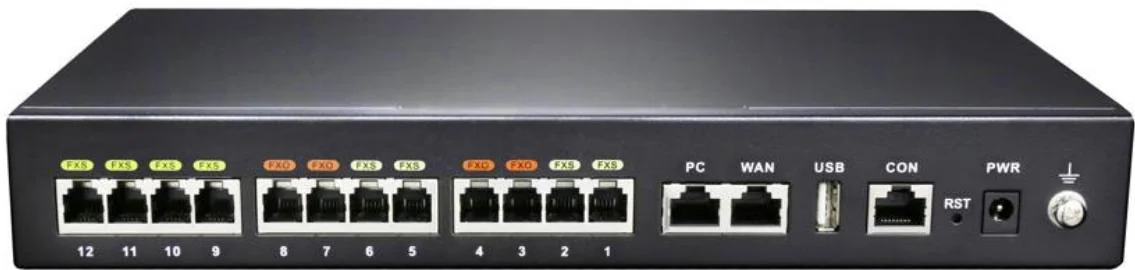
Where it fits on site
Office keeping PSTN lines
Six to eight analog lines stay in use for local calls while internal traffic moves to SIP.
Clinic or small hotel
Twelve analog extensions cover rooms, with SIP for staff and common areas.
Multi-site branch
Joins a larger network as a site, with SIP trunks over a VPN to the head office.
Specifications
Capacity
| Interface cards | Up to 3 |
|---|---|
| Analog extensions (FXS) | 6 to 12 depending on variant |
| Analog lines (FXO) | 0 to 6 depending on variant |
| Maximum SIP trunks | 62 |
| Concurrent calls per trunk | 120 |
| Ring group members | Up to 40 extensions |
Interfaces & storage
| Ethernet | 2 × 100M (PC + WAN), switched, one shared IP address |
|---|---|
| Default IP | DHCP; falls back to 192.168.2.218 |
| Internal storage | 16 GB |
| USB | USB storage device |
| Console | CON, RJ45 to RS232 |
| Power | Adapter supplied with the unit |
Features & management
| Recording | Remote and local |
|---|---|
| 3G/4G USB modem | Not supported |
| OpenVPN client | Built in |
| Dual hot standby | No |
| Ping diagnostics | Yes |
| Port capture | Supported, up to 200 seconds |
| Initial admin password | Random, printed on the label on the back of the unit |
iSpecifications are taken from the OM series product manual. Variant availability and final configuration are confirmed on the quotation.
Choosing between options
| Model | Specifications |
|---|---|
| OM20G | Up to 4 analog ports · 24 SIP trunks · 16 GB storage · 3G/4G USB modem |
| OM50G | Up to 12 analog ports · 62 SIP trunks · Local + remote recording · OpenVPN client |
| OM80E | Up to 48 analog ports · 216 SIP trunks · AC 100–240 V or −48 V DC · Remote recording |
| OM200G | 4 hot-swap slots · Up to 96 analog ports · 496 SIP trunks · 2 × gigabit Ethernet |
| OM1000-UC | 1000 SIP trunks · 4 × gigabit interfaces · Dual hot standby · DID/DOD support |
Compatibility boundaries
This model uses standard SIP and the interfaces listed in the specification table. Confirm the PBX, SIP provider or platform against those interface notes before the order; where the documentation does not state a value, the table records it as not stated rather than estimating. PoE, analog port variants, power options and card compatibility are fixed at order time.
Handover, spares and support
Extension plan, provisioning and interface language can be prepared before dispatch. Remote support continues after handover. Spare-part, warranty and service terms are confirmed in the quotation for the models and quantity ordered, so they are not printed as a single figure here.
Where it sits in the system
Frequently asked questions
Why choose the OM50G over the OM20G?
Can I mix analog and SIP phones?
How does outbound call routing work?
Does it support fax?
Standards referenced
Explore Products
Related products
Planning an IP telephony project?
Send us the site type, the number of extensions or rooms and the areas to cover — we will come back with a configuration and quotation.
Send the site details
Six facts build a configuration: site type, extensions or rooms, simultaneous calls, areas to cover, existing lines and the documents you already hold. Send as many as you know — nothing has to be final before the first reply.
- Reply within one working day
- Configuration + quotation for your site
- Your details are used only to answer this inquiry
Page author: NEXVIA EngineeringPublished: Last updated: