Skip to content

Scenarios · workplace

Office Phone Systems — desk phones, reception and outside lines on one IP PBX

An office phone system is bought twice: once as a set of phones on desks, and again as a set of rules — who answers first, what happens when nobody does, who may call where, and what the record shows afterwards. This page sizes both sides. The hardware is the OM series PBX with desk phones and consoles; the rules are the published features of the platform, from the auto attendant to the call detail record feed. NEXVIA designs, manufactures, supplies and commissions the system; the PBX and terminals are manufactured by NEXVIA.

  • One PBX across 24 to 1000 SIP trunks, each carrying up to 120 concurrent calls and 200 on the OM1000-UC
  • Desk phones from two-line entry sets to 20-line phones with a 7-inch touchscreen and 116 DSS keys
  • Reception covered by a 106-key console (X210i) or a three-screen X6U with 60 DSS keys
  • Rules that matter daily: auto attendant, ring groups in three modes, group pickup across up to 32 departments, queues of up to 20 waiting calls
  • Voicemail retrieved by dialling *98, recording in G.711 and G.729, call detail records to an external server on port 1809
  • Phones provision themselves over DHCP option 66 or TR069, so a new desk is a configuration task rather than a wiring job
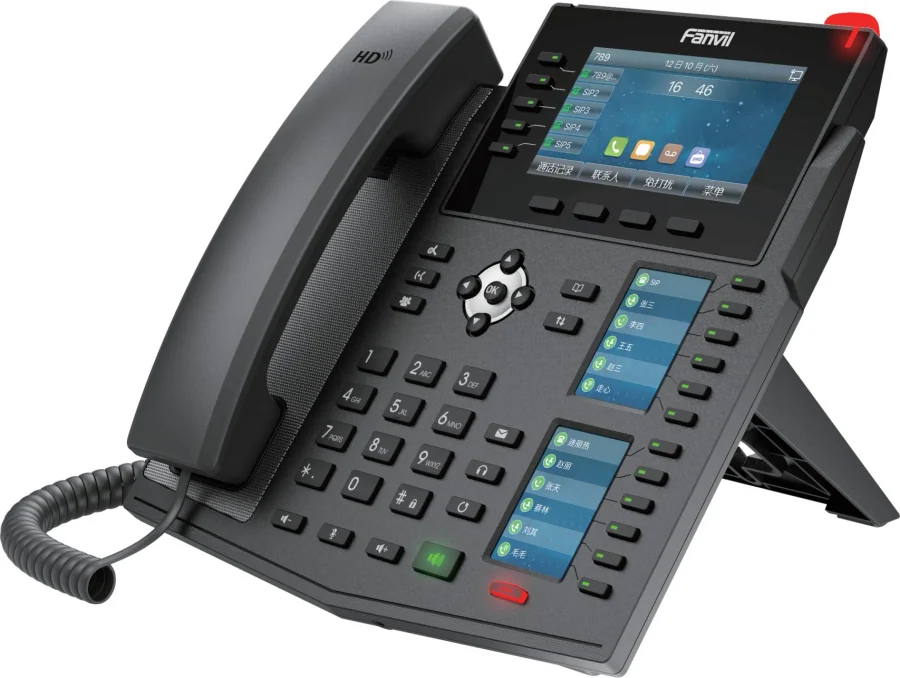
Multi-screen desk phone at a reception position in an office phone system

The short answer

A small office system is a desktop PBX with 24 SIP trunks (OM20G) or 62 (OM50G) and a phone on every desk: two-line entry sets at a bench, four-line phones at a standard desk, six to twenty lines where a person handles call traffic. Trunk sizing is a separate number from the desk count — one trunk carries up to 120 concurrent calls, so a site that peaks at 12 outside calls sits comfortably inside the smallest model.

The reception position is where an office phone system is judged. The X210i puts 106 DSS keys across three screens with a gooseneck microphone and group broadcasting; the X6U carries three screens, 20 SIP lines and 60 DSS keys; the X210i and X6U both take power and data on one PoE cable. Behind them, ring groups run sequentially, in rotation or simultaneously, group pickup covers up to 32 departments, and up to 20 calls can wait in a queue with a prompt.

The rules are published, not promised. Extensions are numbered from 200 upwards and created in batches; the auto attendant answers with working-hours and off-hours prompts and time-of-day routing in up to 3 periods per day; voicemail is retrieved by dialling *98; recording runs in G.711 and G.729; and call detail records go to an external server on port 1809. Prices are not published on this site — every system is quoted per desk count, trunk plan and position mix.

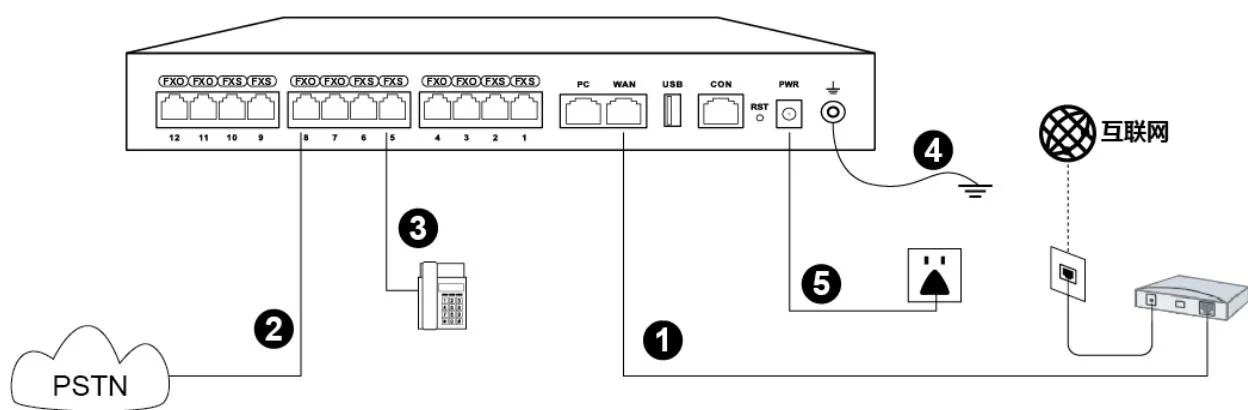
System wiring: internet uplink, PSTN lines, analog phones and grounding all land on one chassis

What goes wrong on this type of site

Reception is a single point of failure

Every outside call passes one desk. Ring groups, group pickup across up to 32 departments, a queue of up to 20 waiting calls and an operator position that accepts up to 5 numbers are what keep the number answerable through lunch, holidays and sickness.

A desk count is not a trunk count

Capacity is published in SIP trunks — 24, 62, 216, 496 and 1000 — not in extensions, and no maximum IP extension count is stated for any model. Start with the busy-hour outside call count and the desk count follows.

The fax, the alarm line and the lift phone

Analog devices outlive office refits. Each one needs a port: 4 on the OM20G, 12 on the OM50G, 48 on the OM80E, 96 on the OM200G and none on the OM1000-UC. Count them before the model is chosen, not after the frame is dismantled.

Hybrid working arrived before the cabling did

Extensions register from home over the internet, so the design has to include the firewall rules, TLS and SRTP where a call crosses the internet, and a provisioning method that does not need a site visit. A wireless desk phone or a Wi-Fi 6 handset covers a position that moves.

Choosing by size

Size bandSystemDevicesNotes
Up to 10 desks — studio, clinic, workshop officeOM20G — 24 SIP trunks; 4 analog ports (4 FXS, 4 FXO or 2+2)Up to 10 desk phones (X301G / V61G), 1 reception phone (X301G / V64), 1 analog device on an FXS port if a fax is keptRing groups hold up to 40 extensions on this model, and 16 GB of internal storage covers local recording and voicemail. The OM20G is the only model that can dial out through a 3G/4G USB modem.
10–40 desks — single-floor officeOM50G — 62 SIP trunks; up to 12 analog ports across 3 interface cardsDesk phones per position (V61G / V64 / X3U), 1 reception console (X6U or X210i), 1–2 conference terminals (CA400 / CA600)Interface cards connect to a patch panel over Cat5 Ethernet cable where analog ports are used, and the 12 analog ports suit a fax line, an alarm line or a legacy device.
40–150 desks — multi-floor officeOM80E or OM200G — 216 or 496 SIP trunks; up to 48 or 96 analog portsDesk phones per floor, a console per floor or wing, meeting-room terminals, door phones at entrances, paging speakers per zoneThe OM80E uses 16-line interface cards with an LED status matrix; the OM200G adds 4 hot-swap slots, gigabit Ethernet and single or dual AC/DC power. Ring groups hold up to 60 extensions from the OM80E upwards.
150–400 desks, or a contact hubOM200G — 496 SIP trunks; up to 96 analog ports on 24-line interface cardsPer-desk phones, one console per team, call-centre phones (X2P / X7C), wireless handsets for staff who move, paging zones per floorRecording is remote only on this model, so the recording server (port 1311) and the call-detail destination (port 1809) are part of the design from day one. PT2400 or PT4800 patch panels suit structured cabling at this size.
400+ desks or several sites with one number planOM1000-UC — 1000 SIP trunks, up to 200 concurrent calls per trunkPer-site counts repeated, a shared dial plan across sites, DID numbers bound to extensions or groups where teams publish one numberSIP only, with no analog ports, dual hot standby (3 fixed IP addresses) and DID/DOD binding up to 4 outside numbers to one extension or group.
Remote and home desksAny model — remote extensions register over the internetDesk phones or softphones at home, provisioned over DHCP option 66 or TR069, with TLS and SRTP where the extension registers from outsidePlan the firewall deliberately: SIP signalling on 5060 by default and the RTP range 10010–10266, with each call using an RTP and an RTCP port. A VPN tunnel is the documented alternative to open ports.

Numbers behind the design

Desk phones and consoles, as published
ModelPositionLines and keysScreen and network
X301 / X301GEntry desk, back office, warehouse deskTwo lines; the G version adds dual Gigabit ports and PoE2.3-inch dot-matrix display; X301G takes PoE
V61G / V61WStandard desk4 SIP lines, up to 12 DSS keys2.4-inch 320×240 colour LCD; dual Gigabit ports with integrated PoE; the W version adds Wi-Fi 6 and Bluetooth 5.4
X3USix-line desk6 lines with three LED line keysGigabit PoE and IPv6, on top of the XU series build
V62G / V62WTwelve-line desk12 SIP lines, up to 21 DSS keys2.8-inch 320×240 colour screen; dual Gigabit with PoE; the W version adds Wi-Fi 6 and Bluetooth 5.4
V64Heavy desk with a screen12 lines, up to 21 DSS keys3.5-inch 480×320 colour screen; dual Gigabit ports with integrated PoE; available to link with security products
X7CCall handling and hot-desking20 SIP lines, 60 on-screen DSS keys5-inch colour screen; dual Gigabit with PoE; SIP hotspot feature
V66 / V67Manager or video-call desk20 SIP lines, up to 116 DSS keys; V67 adds a 5 MP 1080P camera with lens cover7-inch 1024×600 adjustable touch screen; G.722 and Opus; H.264 video receive (V66) or two-way video (V67)
X6USecond reception or manager position20 SIP lines, 60 DSS keys and 5 LED line keys4.3-inch main screen plus two 2.4-inch side screens; dual Gigabit with integrated PoE; Bluetooth 4.2
X210i / X210Reception and paging console20 SIP lines, 106 DSS keys across three screens; X210i adds a gooseneck microphone and group broadcasting4.3-inch main plus two 3.5-inch side screens; dual Gigabit with PoE; Bluetooth 4.2
A330iSwitchboard or facilities deskUp to 116 DSS keys; 8 short-circuit inputs, 1 output and 1 RS-485 interface for alarm and control signals10.1-inch touchscreen, 92 dB speaker, Android 14, dual Gigabit with PoE, built-in broadcast system
V60G / V50GCorridor, store and plant room6 DSS keys; wall-mount onlyV60G: 2.4-inch 320×240 colour screen with dual Gigabit ports. V50G: 2.3-inch monochrome with dual Gigabit ports and PoE support
W611W / W620WStaff who move between floors16 DSS keys plus a configurable push-to-talk keyWi-Fi 6 dual-band. W611W: IP67, 1900 mAh, up to 9 h talk / 200 h standby. W620W: 3000 mAh, up to 13 h / 240 h, H.264 video preview
CA400 / CA600Meeting roomCA400: wireless kit with a receiver hub, UHD camera and screen-sharing speakerphone. CA600: dual 11-inch touch screens, 12-microphone 360° array, dual 10W speakersCA400 runs from USB-C or HDMI plus USB; CA600 supports Wi-Fi 6, Bluetooth, PoE and wired network
This design against a conventional analog office PBX
RequirementConventional analog office PBXThis IP designWhat changes operationally
Adding or moving a deskA card, a port and a cable pair back to the frameA SIP account created in a batch; the phone is provisioned over DHCP option 66 or TR069A move, add or change becomes a configuration task
Outside linesOne analog pair per line, capacity fixed by the card24 to 1000 SIP trunks, with FXO ports where analog lines remain and automatic fallback to an analog line when a SIP trunk failsTrunk capacity scales with the model rather than the card count
Call answeringRinging at the desk that is called, then nothingRing groups in sequential, rotating or simultaneous mode, queues of up to 20 waiting calls, group pickup across up to 32 departments, and an operator position with up to 5 numbersA call reaches a person rather than a ringing desk
Out-of-hours callsDivert to a mobile, or an answering machineAuto attendant with working-hours and off-hours prompts, multi-level IVR and time-of-day routing in up to 3 periods per dayThe first answer is a menu with the right prompt, not a recorded beep
Voicemail and messagesA separate box, or nonePer-extension voicemail retrieved by dialling *98, with message forwarding to a mailbox where a mail server is configuredMessages live on the same platform as the calls
Recording and recordsTape or a separate logger on a few linesRecording in G.711 and G.729 (local and remote on the OM20G and OM50G, remote only on the larger models) and call detail records to an external server on port 1809Proof of what was said and who called whom, on every extension
Remote and branch desksNot possible without a second systemExtensions register over the internet, and multi-site networking shares extension numbers and trunk capacity between sitesA branch shares the dial plan instead of duplicating the equipment
Failure handlingManual switch to a standby unit, or nothingOM1000-UC dual hot standby with 3 fixed IP addresses and a 10-second heartbeat, ETH1-to-ETH2 failover in about 1.75 seconds, backup SIP server, and analog fallback where FXO ports are fittedWhat happens in a failure is a documented behaviour rather than an assumption

Deployment by area

AreaDeviceNote
Reception and main answering positionX210i console or X6UX210i: 106 DSS keys across three screens with a gooseneck microphone, group broadcasting and 20 SIP lines. X6U: three screens with 60 DSS keys and five LED line keys where the desk handles calls but not paging.
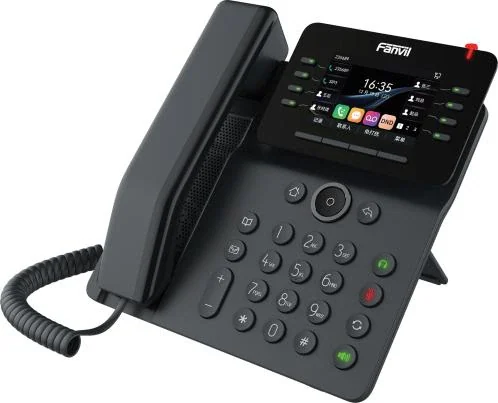
Standard deskV61G (V61W where no cable is available)2.4-inch 320×240 colour screen, 4 SIP lines, up to 12 DSS keys and dual Gigabit ports with integrated PoE; the W version adds Wi-Fi 6 and Bluetooth 5.4.
Heavy call handling / hot-deskingX7C or V64X7C: 5-inch screen with 60 on-screen DSS keys and a SIP hotspot. V64: 3.5-inch 480×320 screen with 12 lines and up to 21 DSS keys.
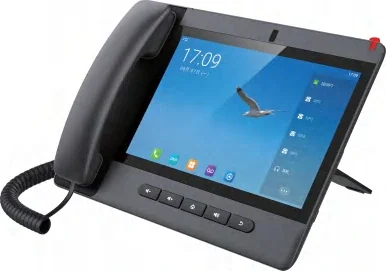
Manager or video-call positionV66 / V677-inch 1024×600 adjustable touch screen with 20 SIP lines and up to 116 DSS keys; V67 adds a 5 MP 1080P camera with a lens cover for two-way video.
Meeting roomCA600 or CA400CA600: dual 11-inch touch screens with a 12-microphone 360° array and dual 10W speakers. CA400: the wireless three-piece kit (receiver hub, UHD camera, screen-sharing speakerphone) for rooms that run from a laptop.
Corridors, stores and plant roomsV60G / V50G wall handsetWall-mount handsets with dual Gigabit ports, for a call position where a desk phone has nowhere to sit.
Entrance door and staff gateA10W / A12V door intercomBoth register as ordinary SIP extensions, so a door call follows the same ring groups and call records as the desks; the A12V adds a 4 MP camera, IP66 and IK10 protection and an anti-tamper alarm.

Questions buyers ask

How many phone lines does an office need?

Count simultaneous outside calls in the busiest hour, not employees. One trunk carries up to 120 concurrent calls, and 200 on the OM1000-UC, so an office that peaks at 8 outside calls is comfortable on the 24-trunk OM20G while a site that peaks at 150 needs at least the 216-trunk OM80E.

  • Published capacities across the range are 24, 62, 216, 496 and 1000 SIP trunks on the OM20G, OM50G, OM80E, OM200G and OM1000-UC.
  • Internal calls — desk to desk, door to desk, announcements — do not consume a trunk.
  • A maximum IP extension count is not stated for any model, so the desk count is confirmed on the quotation rather than read from a capacity table.

Which phone belongs on which desk?

Match the phone to the call traffic and to the space. A bench or back-office position takes a two-line X301G; a standard desk takes a V61G or V64; a person who handles call traffic takes six to twenty lines, which is X3U, X7C or V66 territory.

  • Reception: an X6U with three screens and 60 DSS keys, or an X210i console with 106 DSS keys for a switchboard and paging position.
  • Shared or hot-desking floors: the X7C with 60 on-screen keys and a SIP hotspot, or a wireless desk phone where the position moves.
  • Wall positions in corridors, stores and plant rooms: V60G or V50G, wall-mount only with dual Gigabit ports.
  • Every model in the V and X series supports a wired or EHS wireless headset, which matters for staff who take calls all day.

Can we keep our existing analog lines and fax?

Yes, on every model except the OM1000-UC. Analog ports are 4 on the OM20G (4 FXS, 4 FXO or 2+2), up to 12 on the OM50G, up to 48 on the OM80E and up to 96 on the OM200G, ordered as FXS, FXO or a mix.

  • FXO ports take an outside analog line; FXS ports take an analog phone, a fax machine or a legacy door entry.
  • Fax runs as T.38 or G.711 pass-through, with G.711 pass-through required over an analog line, at a maximum transmission speed of 33600 bps.
  • Outbound SIP calls can be set to fall back to an analog line automatically when the trunk fails, which is one of the published escape routes.

What happens when nobody answers?

The call escalates in a defined order rather than dying. A ring group tries the next extension after the configured ring time, up to 20 calls can wait in a queue with a prompt, and a call that is not dialled through within 24 seconds is routed to the operator position, which accepts up to 5 numbers.

  • Group pickup lets a colleague answer from the next desk across up to 32 departments.
  • Voicemail is the last stop where the extension has it enabled, retrieved by dialling *98.
  • Ring groups hold up to 40 extensions on the OM20G and OM50G and up to 60 on the larger models.

How are phones configured and updated?

Centrally, over the network. Auto provisioning runs over DHCP option 66 with TFTP, FTP, HTTP or HTTPS, TR069 is supported for central management, and extensions can be created in batches — the published setup guide creates blocks of ten, for example 101–110.

  • Firmware updates can run on power-up or on a periodic schedule, with a default period of 3600 seconds where a periodic mode is chosen.
  • Two management levels (administrator and operator) with a read-only browsing mode keep routine checks away from the configuration.
  • The handover package includes the extension list, dial plan, trunk and routing configuration, IP address plan and a configuration export.

What restricts who can call where?

Five outbound permission levels per extension — internal, local, national (the default), international and barred — plus call barring by weekday and time period, a 500-entry routing table and a number-bitmap table of up to 100 rules.

  • DND, call transfer in six variants, hold, park and three-way calling are per-extension settings.
  • Call recording can be enabled per extension, with recording in G.711 and G.729.
  • Extensions can be locked, and an authorisation code (PIN) is used for trunk access from a shared phone.

What happens if the internet or the PBX fails?

Internal calls keep running on the local network, and analog lines on FXO ports keep working directly. Outbound SIP calls can be set to fall back to an analog line when the trunk fails, and the OM20G can dial out through a 3G/4G USB modem where no wired line exists.

  • The OM1000-UC supports dual hot standby between two paired units with 3 fixed IP addresses and a 10-second health heartbeat.
  • ETH1 and ETH2 can run as a redundant pair with a switchover in about 1.75 seconds.
  • A backup SIP server can be configured by fixed address or DNS SRV, with the main server monitored by periodic OPTION requests.

Cabling, power and network notes

  • Desk phones on the V and X models take power and data on one cable where integrated PoE is published; the site switch, not the PBX, powers the endpoints, so budget PoE per switch.
  • Where analog ports are fitted, interface cards connect to a patch panel over Cat5 Ethernet cable and the FXO/FXS port groups are broken out into pairs. PT2400 or PT4800 panels are the published accessories for this.
  • Earth the chassis and land the uplink, the PSTN lines, the analog extensions and the power input as the published installation diagram shows.
  • Remote extensions need the firewall opened deliberately: SIP signalling on 5060 by default and the RTP range 10010–10266, with each call using an RTP and an RTCP port. Where the PBX sits behind NAT, the published options are the vendor tunnel domain or port forwarding with DDNS.
  • Wireless positions have their own design rules: the W611W and W620W need Wi-Fi 6 coverage where the call must work, and a DECT option (W710H base with W610D handsets) gives coverage independent of the data network.
  • Label both ends of every extension run and keep the extension list with the as-built drawings; the first move, add or change after handover depends on it.
  • Leave a spare cable run to each meeting room and to reception: a console, a conference terminal or a door phone added later needs a route, not just an extension.

The features that carry the working day

  • Auto attendant and multi-level IVR with working-hours and off-hours prompts and time-of-day routing in up to 3 periods per day; up to 30 voice files can play simultaneously.
  • Ring groups in sequential, rotating or simultaneous mode, with up to 20 calls waiting in a queue and group pickup across up to 32 departments.
  • Operator position accepting up to 5 numbers, with a 24-second no-dial timeout to the operator and 10 rings before the voicemail prompt.
  • Voicemail retrieved by dialling *98, with forwarding to a mailbox where a mail server is configured.
  • Call transfer in six variants, hold, park, three-way calling, DND and call barring by weekday and time.
  • Call detail records to an external server on port 1809 and extension status subscription on the OM20G, OM50G and OM1000-UC for a busy-lamp field.

Choosing the office model in four questions

What decides the model, and what the material publishes

QuestionPublished figureModel that follows
How many outside calls run at the peak hour?One trunk carries up to 120 concurrent calls — 200 on the OM1000-UC24 / 62 / 216 / 496 / 1000 trunks across the five models
How many analog devices must survive?4, 12, 48 and 96 analog ports on the first four models; 0 on the OM1000-UCThe OM200G where the port count is high; the OM1000-UC only if analog is not required
Does the site record or bill calls?Local and remote recording on the OM20G and OM50G; remote only on the OM80E, OM200G and OM1000-UC, with a recording server on port 1311The smaller models for a simple build; the larger models need a server in the design
Is hot standby required?Dual hot standby on the OM1000-UC, needing 3 fixed IP addresses and a network detection addressThe OM1000-UC, or ETH1-to-ETH2 failover and a backup SIP server elsewhere

Answer those four and the model is decided. The desk count follows the rooms and seats, because no maximum IP extension figure is published for any model.

Running the system after handover

  • Extension creation in batches, auto provisioning over DHCP option 66 or TR069 and a documented dial plan are what make a new desk a same-day task.
  • Move, add and change work is a configuration exercise: a SIP account, a phone that provisions itself and a label change, with no frame position to re-terminate.
  • Management is by web GUI or SSH locally and remotely, with TR069 central provisioning where an estate has many sites.
  • Firmware updates can run at power-up or on a periodic schedule, with a local provisioning port of 2700 and a reporting interval of 900 seconds where a management platform is used.
  • Storage for recording and voicemail sits on internal storage — 16 GB on the first four models and a 32 GB SD card on the OM1000-UC — and can be backed up to a USB device.

Compliance, standards and local requirements

Structured cabling, PoE and the equipment room

An IP phone system is a network installation, and the quality of the cabling decides whether it behaves like one. Desk phones on most V and X models take power and data on one cable, so the site switch carries the load and PoE has to be budgeted per switch. Where analog ports are fitted, the interface cards connect to a patch panel over Cat5 Ethernet cable. Earth the chassis as the published installation diagram shows, label the outlets, and keep the as-built drawing current, because every later move, add or change depends on it.

Emergency calls and local numbering rules

How emergency calls are routed, which numbers must be barred, whether call records must be retained and how extension numbering must look are set by local regulation and by the organisation own policy. The platform supplies the tools — five outbound permission levels, call barring by weekday and time, a 500-entry routing table, a number-bitmap table of up to 100 rules and 30 country or region tone sets — but the required behaviour has to be confirmed with the site telecoms adviser and tested before handover. Nothing on this page is a compliance determination.

Security hardening is part of the installation

An IP PBX is reachable from the network, so hardening is an installation item rather than an option: change the default administrator credentials, use the access whitelist (up to 20 addresses), keep the default deny posture and add only the rules the site needs, enable TLS and SRTP for remote extensions, restrict SSH (disabled by default, with a root login only after operator access), and keep the firmware current. The account lock-out policy locks after 1 to 6 failed logins per day (default 6) for 10 minutes by default, and red alarms cover trunk registration failure, extension registration failure, DNS failure, port disconnection and SIP attacks.

Recording, monitoring and privacy

Recording runs in G.711 and G.729 and can be enabled per extension; call detail records are pushed to an external server on port 1809. In many countries the recording of calls carries notice, consent and retention obligations, and monitoring features such as listening and barge-in are restricted per extension. Those are legal and policy questions for the employer, not features of the platform. Decide what is recorded, who can retrieve it, how long it is kept and what staff and callers are told, and write it into the operating procedure before the system is commissioned.

Standards referenced

Frequently asked questions

How many SIP trunks does an office need?

Count the concurrent outside calls in the busiest hour, not the number of employees. One trunk carries up to 120 concurrent calls — 200 on the OM1000-UC — so a site that peaks at 18 outside calls fits inside the 24-trunk OM20G, while a site that peaks at 200 needs at least the 216-trunk OM80E.

Can we keep our analog lines and fax?

Yes on every model except the OM1000-UC. Analog ports are 4 on the OM20G, up to 12 on the OM50G, up to 48 on the OM80E and up to 96 on the OM200G, ordered as FXS, FXO or a mix. Fax runs as T.38 or G.711 pass-through, and G.711 pass-through is required over an analog line.

Do we need new cabling for IP phones?

A network run per position where cable can be pulled; most V and X models take power and data on that one cable with integrated PoE. Where only two-core cable exists, the PN1 converter carries network and power over the existing pair, and analog positions can stay on FXS ports in the meantime.

How does a call reach someone who is not at their desk?

Ring groups in sequential, rotating or simultaneous mode, group pickup across up to 32 departments, call forwarding in six variants, and a wireless handset such as the W611W or W620W that carries the same extension number.

Can the office phones be provisioned without a site visit?

Yes where the network allows it. Auto provisioning runs over DHCP option 66 with TFTP, FTP, HTTP or HTTPS, TR069 covers central management, and extension blocks can be created in batches — the published guide creates blocks of ten, for example 101–110.

Is recording included?

Recording is a platform feature in G.711 and G.729, enabled per extension. The OM20G and OM50G record locally as well as to a server; the OM80E, OM200G and OM1000-UC record to a recording server only, reached on port 1311, so the server is part of the design on those models.

Can one system cover a branch office?

Yes. Multi-site networking links PBXs over IP so extension short numbers work across sites and trunk capacity is shared, with either unique numbering or repeatable numbering with a site prefix. The management site needs a fixed address, and remote extensions need the firewall rules and TLS/SRTP where calls cross the internet.

Project evidence

We have not published a named reference project on this page. The site does not carry customer names or installation records until the client confirms in writing which projects may be made public.

Page author: NEXVIA EngineeringPublished:Last updated:

Covers: office phone system · phone system for business · small office phone systems · business telephone system · reception phone systems

All IP telephony, intercom and paging equipment in this design is supplied and integrated by NEXVIA.

Already decided on a platform, or replacing a system?

Explore Products

Related products

Planning an IP telephony project?

Send us the site type, the number of extensions or rooms and the areas to cover — we will come back with a configuration and quotation.

Send the site details

Six facts build a configuration: site type, extensions or rooms, simultaneous calls, areas to cover, existing lines and the documents you already hold. Send as many as you know — nothing has to be final before the first reply.

  • Reply within one working day
  • Configuration + quotation for your site
  • Your details are used only to answer this inquiry

* required