Skip to content

Scenarios · workplace

Office Intercom Systems — desk, door and wireless intercom on one business PBX

An office intercom system is not a separate box beside the phone system: on an IP PBX, intercom is what the extension dial plan already does. This page covers the four places intercom is actually asked for in an office — desk to desk, door to desk, the front desk to the whole floor, and staff who are not at a desk at all — with the models and the published figures for each. NEXVIA designs, manufactures, supplies and commissions the system; the PBX and terminals are manufactured by NEXVIA, including the terminal range used throughout this design.

  • Desk-to-desk intercom is extension dialling on the PBX — from 24 to 1000 SIP trunks across five models
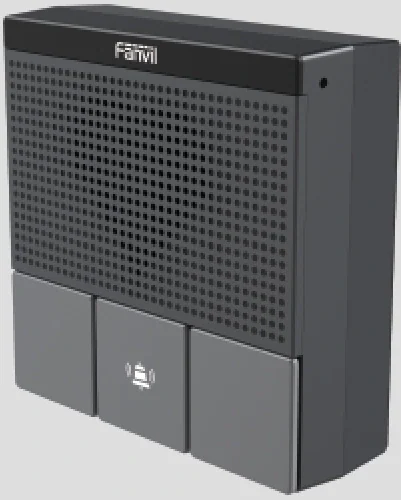
  • Door intercom panels fit a standard 86 box, with three function keys, a 2W speaker and one relay for the lock
  • A 106-key console (X210i) with a gooseneck microphone for floor paging from the reception desk
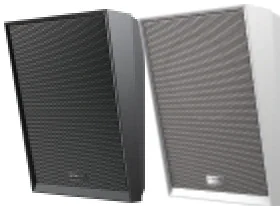
  • Up to 20 multicast zones with prioritisation across the SIP speaker family
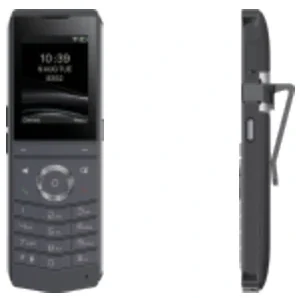
  • Wireless positions: Wi-Fi 6 handsets with a push-to-talk key, and wireless desk phones with optional PoE
  • Group pickup across up to 32 departments, so a call to an empty desk is answered from the next one
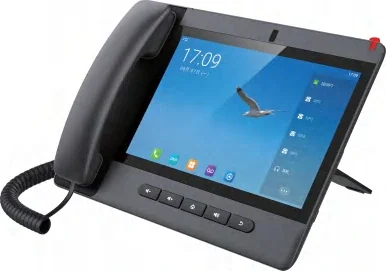
Open-plan office with an intercom-capable desk phone at each workstation

The short answer

For an office of 30 to 80 people, intercom is a configuration of the phone system rather than a second system: 30 to 80 desk phones as extensions, one 106-key console at reception for floor paging, 1 to 4 door intercom panels on the entrances, and 4 to 10 speakers for the zones that need announcements. The PBX behind it publishes 24 SIP trunks on the OM20G and 62 on the OM50G, so the intercom traffic rides on capacity the site already owns.

The three intercom behaviours that matter at a desk are: extension dialling between phones, group pickup across up to 32 departments, and ring groups that distribute a call sequentially, in rotation or simultaneously with up to 20 calls waiting in a queue. A call that is not answered within 24 seconds is routed to the operator position, which accepts up to 5 numbers.

Door and wireless positions complete the picture. The A10W panel fits a standard 86 box with three function keys, a 2W speaker with echo cancellation and one relay for the door strike, running on PoE or 12 V DC; wireless staff carry Wi-Fi 6 handsets with up to 16 DSS keys and a push-to-talk key, with a published 9-hour talk time on the W611W. Prices are not published on this site — every intercom design is quoted per position count and building.

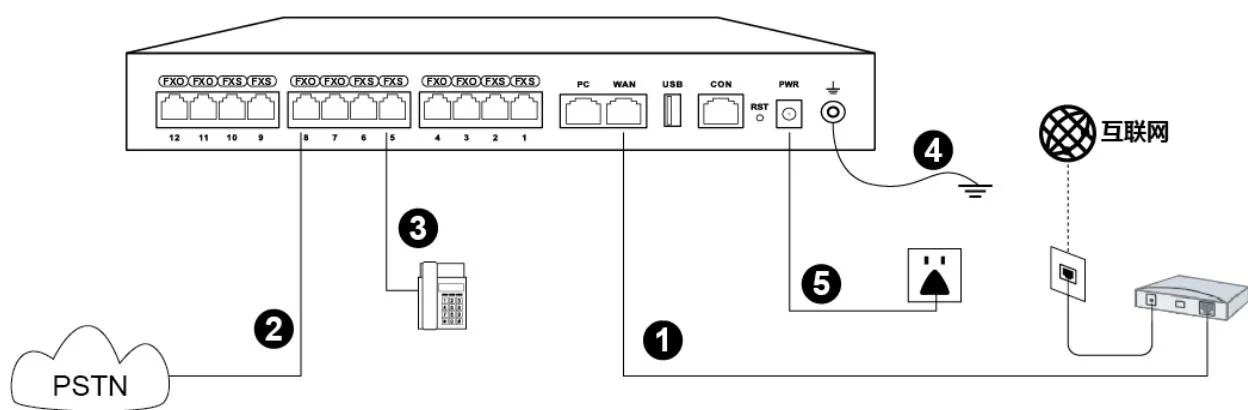
System wiring: internet uplink, PSTN lines, analog phones and grounding all land on one chassis

What goes wrong on this type of site

Trunk planning, not extension planning

A maximum number of IP extensions is not stated for any model in the range. Capacity is published in SIP trunks — 24 to 1000 — so the design conversation starts with how many outside lines the site needs and how many calls run at once, not with a seat count.

One number, several people

Sales floors and support teams share numbers. Ring groups in sequential, rotating or simultaneous mode, group pickup across up to 32 departments, and queues of up to 20 waiting calls are what keep a shared number answerable at busy times.

The desk that has no cable

Fit-outs and hot-desking move faster than cabling. The V61W and V62W publish Wi-Fi 6 and Bluetooth 5.4, the WS210(P) runs on dual-band Wi-Fi with optional PoE, and the W611W and W620W handsets remove the cable from the position entirely.

The door position nobody planned for

A second entrance, a goods door or a car park gate appears after the plan is drawn. Because door panels are SIP terminals, an additional position is an extension and a cable run rather than a new system — but it still needs a cable route, a power decision (PoE or 12 V DC) and a place in the call group, so the design should leave spare capacity at each entrance.

Choosing by size

Size bandSystemDevicesNotes
Up to 30 staff — studio or single-floor officeOM20G — 24 SIP trunks; 4 analog ports (4 FXS, 4 FXO or 2+2)Around 30 desk phones (V61G / X3U), 1 reception phone (X210 or X6U), 1–2 door panels (A10W), 2–4 speakers (A201 / A212)The OM20G is the only model in the range that can dial out through a 3G/4G USB modem. Ring groups hold up to 40 extensions on this model.
30–80 staff — multi-room officeOM50G — 62 SIP trunks; up to 12 analog ports across 3 interface cardsDesk phones per position, 1 × X210i console, 2–4 door panels, 4–8 speakers across 20 multicast zones, 2–4 wireless handsetsAnalog ports suit a fax line, a legacy line or an analog door entry that is being kept. No 3G/4G modem support on this model.
80–300 staff — multi-floor officeOM200G — 496 SIP trunks; up to 96 analog ports on 24-line cardsDesk phones per floor, conference terminals, a console per floor or per wing, door panels at each entrance, speakers zoned per floor4 hot-swap card slots, gigabit Ethernet and single or dual AC/DC power. Ring groups hold up to 60 extensions, and PT2400 or PT4800 patch panels are named for the cabling.
300+ staff or several sitesOM1000-UC — 1000 SIP trunks, up to 200 concurrent calls per trunkPer-site counts repeated, one console per site, a shared dial plan with DID numbers where teams present one public numberSIP only, with dual hot standby (3 fixed IP addresses) and multi-site networking using unique or repeatable extension numbering.
Warehouse, workshop or yard attached to the officeOM200G — 496 SIP trunksWall handsets (V60G) in corridors and stores, an IP66 horn speaker (A233) outdoors, outdoor intercom (A12V) at the gate, portable handsets for staff on the moveOutdoor positions carry their own ratings — A12V is IP66 and IK10 from −40 °C to 70 °C, the A233 horn is IP66 with 30 W rated output — and the same PBX routes them.

Numbers behind the design

Intercom positions and the equipment published for them
PositionModelPublished capabilityConnection and power
Entry door / reception side doorA10W SIP mini intercom3 function keys, 2W speaker with echo cancellation, 1 relay, 1 short-circuit in / 1 out, MP3 broadcast, works with KT10/KT20/KT30 buttonsStandard 86 box; PoE or 12 V DC; IP54; −10 °C to 50 °C
Main entrance / gateA12V outdoor intercom4 MP camera with IR night vision, 10W speaker with AEC, 2 short-circuit inputs and 2 outputs, anti-tamper alarm to the control centreIP66 and IK10, −40 °C to 70 °C; 2 SIP lines; ONVIF and RTSP on the video model
Reception paging deskX210i console106 DSS keys, 4.3-inch colour main screen plus two 3.5-inch side screens, group broadcasting, gooseneck microphoneDual Gigabit, integrated PoE; Bluetooth 4.2; 20 SIP lines
Control room / facilities deskA330i console116 DSS keys, 10.1-inch touchscreen, 92 dB speaker, 8 short-circuit inputs, 1 output and 1 RS-485 interfaceDual Gigabit, PoE; Android 14; built-in broadcast system
Corridor and open-plan zonesA212 wall / A201 ceiling speakerUp to 20 multicast zones with prioritisation; A212 8 Ω up to 15 W class D with talkback; A201 two-way audio with offline timed broadcastPoE; A212 published as PoE 8 W / PoE+ 15 W; A201 PoE, PoE+ or DC
Meeting roomsCA600 / CA400CA600: dual 11-inch touch screens, 12-microphone 360° array, dual 10W speakers. CA400: three-piece wireless kit with 4K screen sharingNetwork and USB-C respectively; conference terminals, not intercom endpoints
Staff who move between floorsW611W / W620W handset16 DSS keys plus a configurable push-to-talk key; W611W IP67, 1900 mAh, up to 9 h talk / 200 h standby; W620W 3000 mAh, up to 13 h / 240 hWi-Fi 6 dual-band 2.4G and 5G, Bluetooth 5.0
Desks that move or have no cableWS210(P) / V61W / V62WDual-band Wi-Fi; WS210(P) has 2 SIP accounts, 5 paperless programmable keys and PoE as an option; V61W and V62W publish Wi-Fi 6 and Bluetooth 5.4Wireless to the network; V61W/V62W additionally take PoE on dual Gigabit ports
Multi-cell cordless coverageW710H base + W610D handsetUp to 30 handsets per base and 300 per system; 16 simultaneous calls per base and 200 per system; coverage 100 m indoor / 700 m outdoor (US figures, EU 60 m / 350 m)PoE base station; DECT radio, so no Wi-Fi dependency
This design against a conventional analog intercom and entry system
RequirementConventional analog intercomThis IP designWhat changes operationally
Desk-to-desk callSeparate intercom wiring and handsets beside the telephoneExtension dialling on the same desk phone the office already usesOne instrument per desk; no separate intercom handset
Door releaseA dedicated door-entry panel wired back to a lockA10W panel with one relay, or A12V with 2 inputs and 2 outputs, on the same system as the phonesDoor and phone are one system, so a door fault is visible at the console
Floor pagingA separate amplifier and a microphone at receptionConsole broadcasting from the X210i or A330i to SIP speakers in 20 zonesZones are addressed from a screen instead of mechanical selector switches
Bridging legacy pagingReplace the amplifier or keep it isolatedPA3 and PA2S gateways drive passive speakers and legacy analog horn speakers; the IP endpoint tier is stated to bridge legacy paging into the IP environmentThe existing speaker line can be kept and extended zone by zone
Staff who are mobileRadio handsets on a separate systemWi-Fi 6 handsets with 16 DSS keys and a push-to-talk key on the same extensions as the desk phones; a W712 gateway puts UHF 400–470 MHz radios on the same system where radios stayOne number reaches a person, not a place
Pickup and coverageAnyone at the intercom handset answersGroup pickup across up to 32 departments, ring groups in three modes, up to 20 waiting calls in a queueA call to an empty desk is answered from the next one
RecordsNone, or a separate loggerCall detail records to an external server on port 1809; audio archiving of SIP paging, intercom and calls where the paging tier provides itAnnouncements and calls can be reviewed

Deployment by area

AreaDeviceNote
ReceptionX210i console / X6U phoneX210i: 106 DSS keys, 4.3-inch main screen plus two 3.5-inch side screens, gooseneck microphone and group broadcasting. X6U: three screens, 20 lines and 60 DSS keys where the desk handles the call traffic but not the paging.
Standard staff deskV64 or X3UV64: 3.5-inch 480×320 screen, 12 lines, dual Gigabit with PoE. X3U: 6 lines with three LED line keys, Gigabit PoE and IPv6.
Entry doorA10W SIP mini intercomFits a standard 86 box with three function keys, a 2W speaker with echo cancellation, one relay and one short-circuit in/out; supports KT10/KT20/KT30 buttons and runs on PoE or 12 V DC (IP54).
Main entrance or yard gateA12V outdoor intercomIP66 and IK10 from −40 °C to 70 °C, 4 MP camera with infrared night vision, 10W speaker with echo cancellation, 2 short-circuit inputs and 2 outputs, anti-tamper alarm to the control centre.
Corridor, open plan and canteenA212 wall speaker or A201 ceiling speakerUp to 20 multicast zones with prioritisation. A212 is 8 Ω with up to 15 W class D output and talkback (PoE 8 W / PoE+ 15 W); A201 adds offline timed broadcast and two-way audio, with its wattage confirmed on the quotation.
Meeting roomsCA600 or CA400CA600: dual 11-inch touch screens with a 12-microphone 360° array and dual 10W speakers. CA400: the three-piece wireless kit (receiver hub, UHD camera, screen-sharing speakerphone) for rooms that run from a laptop.
Staff on the moveW611W / W620W handset, or W710H + W610D DECTWi-Fi 6 dual-band with 16 DSS keys and a PTT key (W611W IP67, 1900 mAh, up to 9 h talk); W620W adds a 3000 mAh battery (up to 13 h / 240 h). The DECT option carries up to 30 handsets per base and 300 per system.

Questions buyers ask

Can intercom run on the existing phone system?

Yes, and on an IP PBX that is the normal design: intercom is extension dialling, so no additional hardware is needed beyond the handsets you already have. The PBX publishes 24 to 1000 SIP trunks across the five models, and intercom calls use the internal extension side of the system rather than a trunk.

  • Desk to desk: dial the extension, or use a DSS key programmed as a speed dial or BLF key.
  • Group call: a ring group rings several extensions sequentially, in rotation or simultaneously.
  • Group pickup: up to 32 departments can answer each other's calls.
  • Door and speaker endpoints register on the same PBX, so they appear in the same dial plan as the desks.

What happens to a call when nobody answers?

It escalates in a defined order. A ring group tries the next extension after the configured ring time, a queue holds up to 20 waiting calls with a prompt, and a call that is not dialled through within 24 seconds goes to the operator position, which accepts up to 5 numbers.

  • Voicemail is the last stop where the extension has it enabled, retrieved by dialling *98.
  • A call to an empty desk can also be answered by a colleague through group pickup, without transferring it first.
  • Ring groups hold up to 40 extensions on the OM20G and OM50G and up to 60 on the larger models.

Do we need a separate paging amplifier for the office floor?

Usually not. Broadcasting to analog extensions is supported by the PBX, and SIP speakers and paging gateways register on the same system, so a floor announcement is made from a console or an IP phone.

  • Speakers: A212 wall or A201 ceiling indoors, A233 horn (IP66, 30 W) outdoors, up to 20 multicast zones with prioritisation.
  • Gateways for existing speaker lines: PA3 (PoE/PoE+ to IEEE 802.3at, PoE Class 4, 12–24 V 2 A DC, 10–30 W mono output) and PA2S (IEEE 802.3af, 10–30 W mono output, 1 short-circuit in and 1 out with a built-in relay).
  • Note the boundary: two-way broadcast is not supported by the series. Talkback is a feature of the speaker models that publish it, such as the A212.

What is the best wireless intercom option for an office?

It depends on how far people walk. Wi-Fi 6 handsets (W611W, W620W) suit staff who stay inside the Wi-Fi coverage; a DECT multi-cell system (W710H base with W610D handsets) suits a building where coverage must be independent of the data network and up to 300 handsets are needed.

  • W611W: 16 DSS keys plus a push-to-talk key, IP67, 1900 mAh, up to 9 h talk / 200 h standby.
  • W620W: 16 DSS keys plus a programmable key and a PTT key, 3000 mAh, up to 13 h / 240 h, six-party conferencing and H.264 video preview.
  • W710H plus W610D: up to 30 handsets per base and 300 per system, 16 simultaneous calls per base, 100 m indoor and 700 m outdoor on the published US figures.
  • A wireless desk phone (WS210(P), V61W, V62W) is the option for a desk that moves, rather than for a person who walks.

How does a visitor reach the person they are visiting?

A door intercom panel calls an extension, a ring group or the reception desk, and the person who answers releases the door. The A10W fits a standard 86 box with three function keys and one relay; the A12V adds a 4 MP camera and two inputs and outputs for an outdoor or gate position.

  • One-click calling rings the host plus the call-group extensions, and an alarm input can take an external emergency button.
  • Terminals support ONVIF, so a call can be linked to a camera and reviewed on a VMS where the site runs surveillance.
  • Anti-tamper alarms on the A11, A12 and i16 series report to the control centre if a cover is removed.

Can headsets and hands-free positions be part of the intercom design?

Yes. Every desk phone in the V and X series supports a wired or EHS wireless headset, and the conference terminals double as hands-free audio for a team room. Headsets are a workplace-health decision as much as a technical one for staff who take intercom and call traffic all day.

  • Desk phones with integrated PoE take power and data on one cable, so a position needs one outlet to the switch.
  • The X210i and A330i consoles carry gooseneck microphones for hands-free paging from the desk.
  • A speakerphone or conference terminal covers a room where several people need to hear the same call.

Cabling, power and network notes

  • Desk phones with integrated PoE take power and data on one cable run, so a position needs one outlet to the switch; the published power line on each model page states what that model supports.
  • The PBX carries two switched Ethernet ports on the smaller models and two gigabit ports on the OM200G; ETH2 can run as a redundant port and takes over from ETH1 in about 1.75 seconds.
  • Auto provisioning over DHCP option 66 (TFTP, FTP, HTTP or HTTPS) and TR069 means phones pick up their configuration without a visit, and extensions are created in batches on the PBX.
  • Door panels need either PoE or 12 V DC at the position, and the lock circuit is separate: A10W has one relay, A12V has two short-circuit outputs, and the strike is wired by the site's access-control contractor.
  • Speakers are PoE (PA2S to IEEE 802.3af; PA3 to PoE/PoE+ with 12–24 V 2 A DC as an alternative), and each zone should be a separate speaker run so it can be addressed and volume-adjusted independently.
  • Plan the RTP port range on the firewall where extensions register from outside: the published default is 10010–10266, and each call uses an RTP and an RTCP port.
  • Where a legacy speaker line is kept, bridge it with a PA3 or PA2S gateway rather than running a second amplifier chain, and record the analog line-out for a future migration.

What an office floor actually needs

  • Auto attendant with time-of-day routing in up to 3 periods per day and multi-level IVR, so calls reach a department without the receptionist.
  • Ring groups in sequential, rotating or simultaneous mode, queues of up to 20 waiting calls, and group pickup across up to 32 departments.
  • Up to 32 departments, 5 outbound permission levels, call barring by day and time, DND and three-way calling.
  • Voicemail with retrieval by dialling *98, and the option to forward messages to a mailbox.
  • Recording in G.711 and G.729 — local and remote on the OM20G and OM50G, remote only on the larger models, with the recording server port 1311 in the design.
  • Management over web GUI or SSH, with TR069 central provisioning and call detail records pushed to an external server on port 1809.

Choosing a phone for the position

Desk phones by position

PositionModelWhat the product data publishes
Entry deskX301 / X301GTwo lines on a 2.3-inch dot-matrix display; the G version adds dual Gigabit ports and PoE
Standard deskV61G / V61W2.4-inch 320×240 screen, four lines, dual Gigabit with PoE; the W version adds Wi-Fi 6 and Bluetooth 5.4
Six-line deskX3USix lines with three LED line keys, Gigabit PoE and IPv6
Twelve-line deskV643.5-inch 480×320 screen, 12 lines, dual Gigabit with PoE, up to 21 DSS keys
Heavy call handlingX7CFive-inch screen with 60 on-screen keys and a SIP hotspot feature
Reception or managerX6UThree screens, 20 lines and five LED line keys
Paging consoleX210i106 DSS keys across three screens with a gooseneck microphone
Meeting roomCA600 / CA400Dual 11-inch touch screens, or the three-piece wireless kit
Corridor or storeV60G / V50GWall-mount handsets with dual Gigabit ports

Line and key counts are the published figures; where a model has no published figure, the model page says so rather than estimating.

Paging, doors and safety

  • Sending broadcasts to analog extensions is supported by the PBX; two-way broadcast is not supported by the series.
  • SIP speakers (A201 ceiling, A212 wall) and the PA2S or PA3 SIP paging gateway carry announcements over the same network; PA2S has one built-in relay plus one short-circuit input and one output, PA3 has an SOS call key and USB/TF storage.
  • Console phones run group broadcasting from the desk: the X210i is the paging console with 106 DSS keys and a gooseneck microphone, and the A330i adds 8 short-circuit inputs, 1 output and an RS-485 interface.
  • An outdoor intercom (A12V) at a gate or staff entrance registers over SIP and can ring reception or a call group, with an anti-tamper alarm to the control centre.
  • Door panels and terminals support ONVIF, so an office that also runs cameras can link video and intercom through a VMS.

When the intercom has to be wireless

Three wireless routes exist in this range and they solve different problems. A Wi-Fi 6 handset (W611W, W620W) is the fastest to deploy where the data network already covers the building, and it keeps the same extension number as the desk. A DECT multi-cell system (W710H base, W610D handset) gives coverage independent of the data network and scales to 300 handsets. A wireless desk phone (WS210(P), V61W, V62W) removes the cable from a position rather than from a person.

  • W611W: IP67, 1900 mAh, up to 9 h talk and 200 h standby, 16 DSS keys and a configurable PTT key for quick dial, intercom and multicast.
  • W620W: 3000 mAh, up to 13 h talk and 240 h standby, dual microphones, six-party conferencing and H.264 video preview.
  • W710H with W610D: 30 handsets per base and 300 per system, 16 simultaneous calls per base and 200 per system, SRTP / SIPS / TLS and LDAP(s) directory support.
  • WS210(P): dual-band Wi-Fi, 2 SIP accounts, 5 paperless programmable keys, PoE optional — the option for a hot desk.

Coverage is the design input: walk the site and test where the handset must work before fixing the number of access points or base stations.

Compliance, standards and local requirements

Structured cabling and PoE budgeting

Intercom endpoints are network devices, so the cabling rules are the same as for the data network: terminated and tested runs, labelled outlets and a documented patch schedule. PoE has to be budgeted per switch, because a floor of desk phones, speakers and consoles can exhaust a switch faster than the port count suggests. Interface cards on the PBX connect to a patch panel over Cat5 Ethernet cable where analog ports are used, and 2-wire converters are available where no data cable exists.

Two-way broadcast: know the boundary

Broadcasting to analog extensions is supported by the PBX, but two-way broadcast is not supported by the series — talkback is a feature of the speaker models that publish it, such as the A212. Emergency announcements, alarm activation and simultaneous calling to a management unit are part of the IP endpoint tier. Design the difference into the specification so an intercom position is not promised a talkback capability the model does not have.

Emergency calls and door control

Door release and emergency calls are security functions, not conveniences. A10W carries one relay and one short-circuit input; A12V carries 2 inputs and 2 outputs; A330i takes 8 short-circuit inputs, one output and an RS-485 interface. Decide what happens on a power failure, whether a lock fails open or closed, and who can release a door outside working hours. Those are site decisions to be confirmed against the local code and the site's own security policy.

Local requirements vary — confirm before you install

Emergency-number dialling, privacy of recorded calls, cabling colour and separation rules, and the permitted mounting heights for call points are set locally, and none of it is uniform across countries. The published material behind this page records no certification for these products, and nothing here is a compliance conclusion. Confirm the requirements with the site's own engineer and, where the site is regulated, with its compliance officer before the equipment list is fixed.

Standards referenced

Frequently asked questions

How many extensions can the PBX support?

A maximum number of IP extensions is not stated for any model, so we do not publish one. Published capacity is in SIP trunks: 24 on the OM20G, 62 on the OM50G, 216 on the OM80E, 496 on the OM200G and 1000 on the OM1000-UC. Tell us the desk count and the simultaneous calls you expect.

Can we keep our existing analog lines?

Yes. The OM20G takes up to 4 analog ports, the OM50G up to 12, the OM80E up to 48 and the OM200G up to 96, ordered as FXS, FXO or a mix. An outbound SIP call can also fall back to an analog line automatically when the trunk fails. The OM1000-UC has no analog ports at all.

Can phones be provisioned centrally?

Yes. Auto provisioning runs over DHCP option 66 with TFTP, FTP, HTTP or HTTPS, TR069 is supported for central management, and extensions can be created in batches on the PBX — the published setup guide creates blocks of ten, for example 101–110.

Do door intercom panels need their own controller?

No. Door panels are SIP terminals that register to the PBX, and door release is a relay on the panel or on a console such as the A330i. What the site does need is a lock circuit and a decision about fail-open or fail-closed behaviour, which the access-control contractor normally owns.

Can intercom announcements be scheduled?

Yes. Scheduled broadcasting uses custom time templates, the A201 and A212 speakers support offline timed broadcast, and the advanced paging tier adds real-time text-to-speech for typed messages. Up to 20 multicast zones with prioritisation can be addressed individually.

What happens if the internet connection fails?

Internal intercom and extension calls keep working on the local network, and analog lines on FXO ports keep working directly. Outbound SIP calls can be set to fall back to an analog line when the trunk fails, and the OM20G can also dial out through a 3G/4G USB modem.

Can the system page just one zone?

Yes. Zones are managed from the console, the advanced tier supports dynamic zone control and remote volume adjustment, and the speaker family supports up to 20 multicast zones with prioritisation — so a single floor or a single meeting room can be addressed without disturbing the rest of the office.

Project evidence

We have not published a named reference project on this page. The site does not carry customer names or installation records until the client confirms in writing which projects may be made public.

Page author: NEXVIA EngineeringPublished:Last updated:

Covers: office intercom · intercom phone · business intercom · office intercom system · wireless intercom system for office

All IP telephony, intercom and paging equipment in this design is supplied and integrated by NEXVIA.

Already decided on a platform, or replacing a system?

Explore Products

Related products

Planning an IP telephony project?

Send us the site type, the number of extensions or rooms and the areas to cover — we will come back with a configuration and quotation.

Send the site details

Six facts build a configuration: site type, extensions or rooms, simultaneous calls, areas to cover, existing lines and the documents you already hold. Send as many as you know — nothing has to be final before the first reply.

  • Reply within one working day
  • Configuration + quotation for your site
  • Your details are used only to answer this inquiry

* required