Skip to content

Scenarios · core platform

IP PBX Systems — five on-premise models from 24 to 1000 SIP trunks

An IP PBX is the box that decides where every call goes: extensions register over SIP, outside lines arrive as SIP trunks or on analog ports, and the features that offices, hotels and hospitals actually use — auto attendant, ring groups, voicemail, recording, call detail records — run on the same system. The OM series documented here is on-premise hardware in five capacities, from a desktop chassis for 24 trunks to a rack or desktop unit for 1000. NEXVIA designs, manufactures, supplies and commissions the system; the PBX and the terminals are manufactured by NEXVIA, and Terminals are supplied alongside the PBX in these designs.

  • Five models: OM20G (24 SIP trunks), OM50G (62), OM80E (216), OM200G (496) and OM1000-UC (1000)
  • Analog ports where they are needed: 4 on the OM20G, 12 on the OM50G, 48 on the OM80E, 96 on the OM200G, none on the OM1000-UC
  • Up to 120 concurrent calls per trunk, and 200 on the OM1000-UC
  • Extension numbering starts at 200; a maximum IP extension count is not stated for any model, so capacity is planned in trunks
  • Trunk-side features: SIP trunks, FXO analog lines, outbound fallback to an analog line, DID/DOD and 500-entry routing
  • Resilience options: dual hot standby on the OM1000-UC, ETH1-to-ETH2 failover in about 1.75 seconds, and backup SIP servers
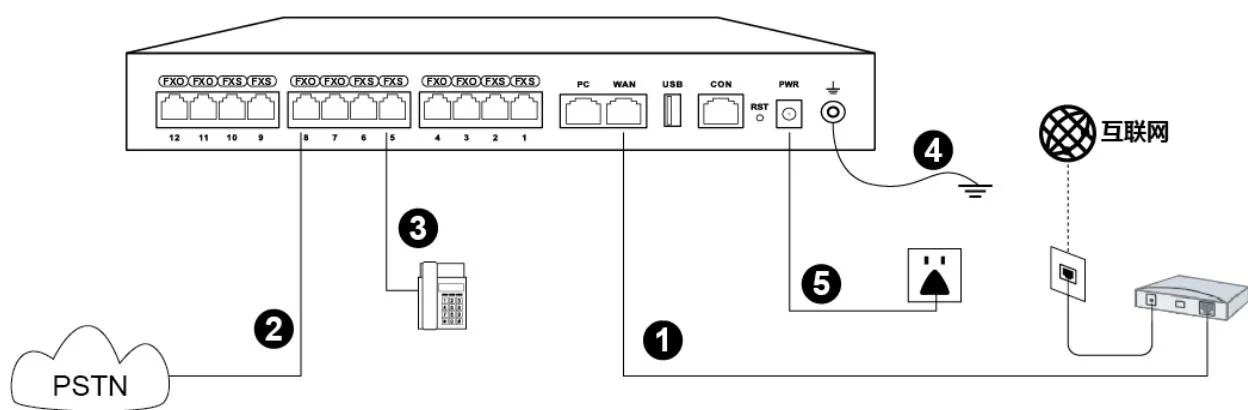
OM series IP PBX wiring topology: internet uplink, PSTN lines, analog phones, extensions and power

The short answer

An IP PBX for a small business is a desktop chassis with 24 SIP trunks (OM20G) or 62 (OM50G); an enterprise with several floors moves to the 216-trunk OM80E, the 496-trunk OM200G or the 1000-trunk OM1000-UC. One trunk carries up to 120 concurrent calls, and 200 on the OM1000-UC, so trunk count is a licence of the model rather than a card you add later.

Analog lines still matter. The OM20G takes 4 analog ports, the OM50G 12, the OM80E 48 and the OM200G 96, ordered as FXS, FXO or a mix, and an outbound SIP call can be set to fall back to an analog line automatically when the trunk fails. The OM1000-UC is SIP only: no FXS and no FXO ports at all.

Extension numbers start at 200, and the system features are the same across the range: ring groups of up to 40 extensions on the two smaller models and 60 on the larger ones, group pickup across up to 32 departments, up to 20 waiting calls in a queue, a 500-entry routing table and call recording in G.711 and G.729. Prices are not published on this site — every system is quoted per site after the trunk and endpoint counts are agreed.

System wiring: internet uplink, PSTN lines, analog phones and grounding all land on one chassis

What goes wrong on this type of site

Capacity is published in trunks, not extensions

No maximum IP extension count is stated for any model in the range, so a design conversation that starts with "how many handsets" cannot be answered from the datasheet. Start with the busy-hour outside call count: that maps directly to 24, 62, 216, 496 or 1000 trunks, and the extension side follows the site.

Analog devices that will not go away

A fax machine, a lift line, an old door phone or a legacy line often outlives the PBX project. Each one costs an analog port: 4 on the OM20G, 12 on the OM50G, 48 on the OM80E, 96 on the OM200G and none on the OM1000-UC. Count them before choosing the model, not after.

Recording and call records have a destination

Only the OM20G and OM50G record locally as well as to a server; the OM80E, OM200G and OM1000-UC record to a recording server only, reached on port 1311. If the site records calls or bills them, the server, the retention rule and the call-detail feed on port 1809 are part of the design from day one.

A move, add or change should be cheap

The value of an IP PBX shows up after handover. Batch extension creation, auto provisioning over DHCP option 66 and TR069, and a documented dial plan are what make a new desk or a moved team a same-day task. If those are not set up, the platform behaves like the old system it replaced.

Choosing by size

Size bandSystemDevicesNotes
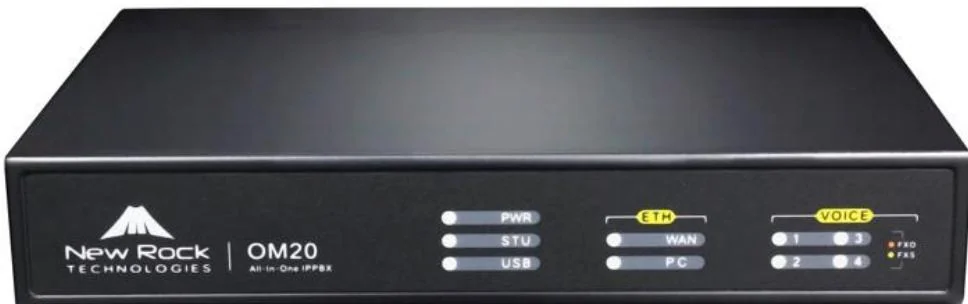
Up to 24 outside lines — small office, clinic, shop, guesthouseOM20G — 24 SIP trunks; 4 analog ports (4 FXS, 4 FXO or 2+2); 2 × 100 Mbps switch portsAround 30 desk phones, 1–2 analog devices (fax or door phone) on the FXS ports, 16 GB internal storage for local recording and voicemailThe only model in the range that can dial out through a 3G/4G USB modem, and one of the two that record locally as well as to a server. Ring groups hold up to 40 extensions.
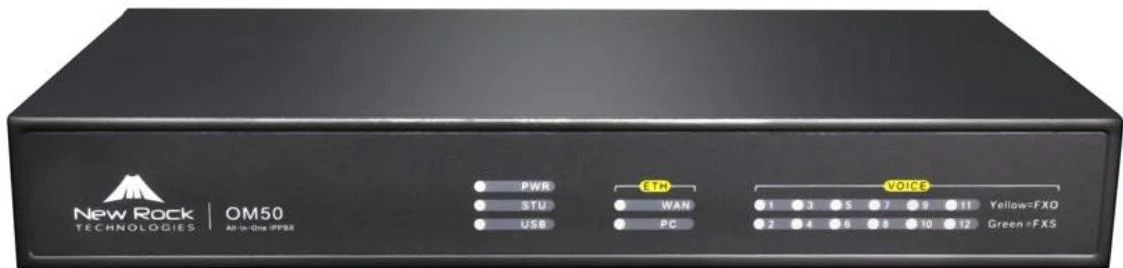
24–62 outside lines — growing business, single buildingOM50G — 62 SIP trunks; up to 12 analog ports across 3 interface cards; 2 × 100 Mbps switch portsDesk phones per position, 2–4 door phones, speakers for paging, up to 12 analog devices where a legacy line is keptLocal and remote recording, 16 GB internal storage, and no 3G/4G modem support. Interface cards are connected to a patch panel over Cat5 Ethernet cable.
62–216 outside lines — multi-floor enterprise or campusOM80E — 216 SIP trunks; up to 48 analog ports (3 cards × 16 lines); 2 × 100 Mbps switch portsDesk phones per floor, consoles, paging zones, fax on an FXS port, analog devices on the frame where pairs remainInterface-card architecture with 16 lines per card and an LED status matrix per RJ45; remote recording only, so a recording server is part of the design.
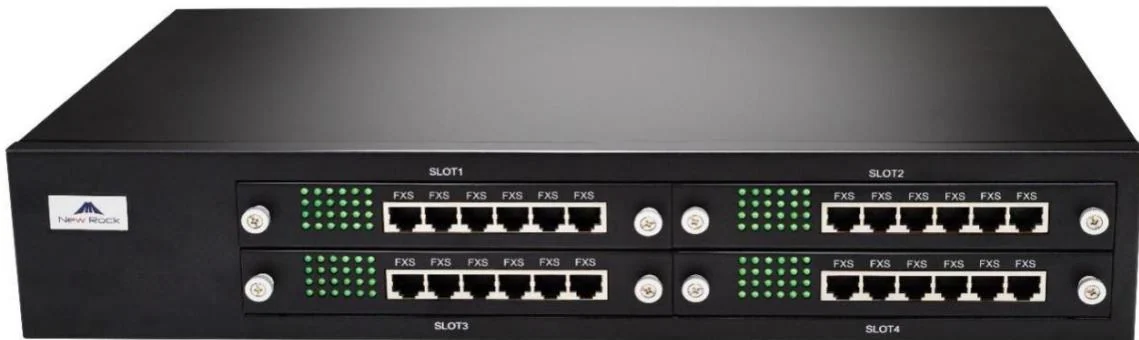
216–496 outside lines — large site with analog requirementsOM200G — 496 SIP trunks; up to 96 analog ports on 24-line interface cards; 2 × Gigabit switch portsDesk phones and consoles per building, paging zones, up to 96 analog devices, conference terminals4 hot-swap card slots (cards can be replaced live), gigabit Ethernet, single or dual AC/DC power, and PT2400 or PT4800 patch panels for structured cabling.
Up to 1000 outside lines — multi-site, contact-hub or campus coreOM1000-UC — 1000 SIP trunks; 200 concurrent calls per trunk; 4 × Gigabit ports (WAN, AUX, EXP1, EXP2); 32 GB SD cardDesk phones across sites, consoles, door phones, paging zones, DID numbers bound to extensions or groupsSIP only, no analog ports. Adds dual hot standby (3 fixed IP addresses) and DID/DOD, which binds an extension or group to as many as 4 outside numbers.
Retrofit where the building has only two-core cableOM20G or OM50G — 24 or 62 SIP trunksIP terminals at the points that can be re-cabled, PN1 converters at the points that cannotPN1 carries network and power over an existing two-core cable, up to 1600 m for the network function without power, with local supply at AC 100–240 V.

Numbers behind the design

The five OM models, side by side, as published
ItemOM20GOM50GOM80EOM200GOM1000-UC
Maximum SIP trunks24622164961000
Concurrent calls per trunk120120120120200
Analog ports (FXS / FXO)4 total (4S, 4FXO or 2+2)6 / 8 / 10 / 12 by sub-model0–48 across 13 sub-modelsDetermined by interface cards, up to 960
Interface architecture1 interface cardUp to 3 interface cardsUp to 3 cards, 16 lines each4 slots, 24-line cards, hot-swapNo analog interfaces
Network ports2 × 100 Mbps switch ports2 × 100 Mbps switch ports2 × 100 Mbps switch ports2 × Gigabit switch ports4 × Gigabit (WAN / AUX / EXP1 / EXP2)
Internal storage16 GB16 GB16 GB16 GB32 GB SD card
RecordingLocal and remoteLocal and remoteRemote onlyRemote onlyRemote only
Ring group extension limit4040606060
Dual hot standbyNoNoNot supportedNot supportedYes
DID/DOD binding of up to 4 outside numbersNot in this modelNot in this modelNot in this modelNot in this modelYes — up to 4 outside numbers per extension or group
3G/4G USB modemSupportedNot supportedNot statedNot statedNot stated
Extension status subscriptionSupportedSupportedNoNoSupported
Power optionsAdapter supplied with the unitAdapter supplied with the unit100–240 V AC or −48 V DCSingle or dual AC, single or dual DC100–240 V AC (single)
This design against a conventional analog PBX
RequirementConventional analog PBXThis IP designWhat changes operationally
Adding an extensionA card, a port and a cable pair to the frameA SIP account created in a batch; the phone is provisioned over DHCP option 66 or TR069A move, add or change is a configuration task
Outside linesAnalog trunks, one pair per line, capacity fixed by the card24 to 1000 SIP trunks, with FXO ports available where analog lines remain and fallback to analog when a trunk failsCapacity scales with the model, and lines can be a service rather than a pair
Remote and branch desksNot possible without a second systemExtensions register over the internet or through the site-to-site tunnel; multi-site networking uses unique or repeatable numberingA branch office shares the dial plan instead of duplicating the equipment
FeaturesRinging, transfer, maybe voicemail on a cardAuto attendant and multi-level IVR, ring groups in three modes, queues of 20, voicemail, five permission levels, call barring by day and time, 6 transfer typesThe features are on the platform rather than in the price list
Recording and recordsTape or a separate loggerRecording in G.711 and G.729, locally on the OM20G/OM50G and to a server (port 1311) on the larger models; call detail records to a server on port 1809Proof of what was said and who called whom
Two sitesTwo systems and tie lines, or nothingMulti-site networking over IP with extension short numbers and shared trunk capacity; the management site holds the address of each nodeOne system administration across sites
Failure handlingManual switch to a standby unitOM1000-UC dual hot standby with a 10-second heartbeat and 3 fixed IP addresses; ETH1-to-ETH2 failover in about 1.75 seconds; backup SIP server by fixed address or DNS SRVThe design answers "what if" with a documented behaviour
PhonesWhatever the PBX vendor suppliesStandard SIP: terminals — desk phones, consoles, hotel handsets, care stations, door phones and speakers — and third-party SIP terminalsThe terminal choice follows the room, not the platform

Deployment by area

AreaDeviceNote
Equipment roomOM series IP PBX, plus PT2400 or PT4800 patch panel where analog ports are fittedRack or flat desktop installation, earthed, with the uplink, PSTN lines and analog extensions landed as the published installation diagram shows. Interface cards connect to the patch panel over Cat5 Ethernet cable.
Site switchingPoE switch per floor or per zoneThe PBX does not power the endpoints; the site switch does. Budget PoE per switch against the terminals on that switch — desk phones, consoles, speakers, door stations and care devices all draw from it.
Desk positionsV and X series desk phonesTwo-line entry sets through to 20-line phones with three screens; dual Gigabit ports with integrated PoE on most models, so one cable per desk.
Reception and dispatch positionsX210i / A330i consoleX210i: 106 DSS keys across three screens with a gooseneck microphone. A330i: 116 DSS keys, 10.1-inch touchscreen, 92 dB speaker and 8 short-circuit inputs, 1 output and an RS-485 interface for alarm and control inputs.
Doors and gatesA10W / A12V door intercomBoth register as SIP extensions, so a door call follows the same ring groups and call records as any other call; the A12V adds a 4 MP camera, IP66 and IK10 protection and an anti-tamper alarm.
Paging and announcementsA201 ceiling, A212 wall and A233 horn speakers; PA2S or PA3 gateway for legacy speaker linesUp to 20 multicast zones with prioritisation, scheduled broadcasting with custom time templates and real-time text-to-speech in the advanced tier. The gateways drive existing passive speakers so a legacy paging line can be bridged rather than replaced.
Staff and clinicians on the moveW611W / W620W Wi-Fi 6 handsets, or W710H + W610D DECTRegistering as ordinary extensions; DECT base stations carry up to 30 handsets per base and 300 per system where coverage must not depend on the data network.

Questions buyers ask

What is an IP PBX?

An IP PBX is a telephone system whose extensions and outside lines are IP: phones register to it over SIP, calls are routed in software, and the features (auto attendant, ring groups, voicemail, recording, call records) run on the same platform. In this range it is an appliance on the local network — five models from 24 to 1000 SIP trunks.

  • Extensions: SIP desk phones, hotel handsets, care stations, consoles, door phones, speakers and softphones all register as extensions.
  • Outside lines: SIP trunks over the internet, or analog lines terminated on FXO ports.
  • Analogue endpoints: FXS ports keep a fax machine, an analog phone or a legacy door entry in service.
  • Management: web GUI or SSH locally and remotely, with TR069 central provisioning.

How many extensions can the IP PBX support?

A maximum number of IP extensions is not stated for any model in the published documentation, and we do not invent one. What is published is the SIP trunk capacity — 24, 62, 216, 496 and 1000 across the five models — plus the concurrent-call ceiling per trunk, 120 or 200.

  • Register more extensions than you have trunks: extensions are internal, trunks are outside lines. The published ceiling per trunk is what limits simultaneous outside calls.
  • Ring groups hold 40 extensions on the OM20G and OM50G and 60 on the larger models, which is a practical limit when designing a group that must ring several positions at once.
  • Send the extension count and the busy-hour call count and the model is confirmed on the quotation, rather than sized from a table on a website.

What is a SIP trunk, and do we need one?

A SIP trunk is an outside line delivered over IP instead of a copper pair: the provider gives you a number (or a block of numbers) and a registration or an IP peer, and the PBX treats it as a trunk. You need one — or several — if you want calls to and from the outside world, unless you keep analog lines on FXO ports.

  • One trunk carries up to 120 concurrent calls, 200 on the OM1000-UC; how many you need depends on the busy-hour call count, not on the headcount.
  • Direct-inward-dialling (DID) binds an outside number to an extension or a group so callers bypass the auto attendant; on the OM1000-UC, DID/DOD binds up to 4 outside numbers to one extension or group.
  • Where analog lines remain, they can be kept on FXO ports and outbound SIP calls can be set to fall back to them when the trunk fails.

Should we buy an on-premise PBX or a hosted PBX?

They solve different problems. The OM series is on-premise hardware: the call-routing core sits in your building, which keeps internal calls working when the internet does not, gives you the analog ports, and avoids a monthly platform charge. A hosted PBX is a service in which the core runs in a data centre and the phones register to it over the internet.

  • Choose on-premise when continuity of internal calls, analog lines, local recording and site-controlled data all matter — hotels, hospitals, factories and campuses usually land here.
  • Choose hosted when the site is small, has no equipment room, and every extension has a reliable internet connection; the terminals in this range register to third-party SIP platforms as well.
  • A hybrid is common: an on-premise PBX for the site and its trunks, with remote extensions registering over the internet through the published remote-access options.
  • NEXVIA supplies and commissions on-premise systems; a hosted platform would be supplied by its own service provider, and the terminals stay the same.

Can an IP PBX keep our existing analog lines and devices?

Yes, on every model except the OM1000-UC. Analog ports are 4 on the OM20G (4 FXS, 4 FXO or 2+2), up to 12 on the OM50G, up to 48 on the OM80E and up to 96 on the OM200G, ordered as FXS, FXO or a mix.

  • FXO ports take an outside analog line; FXS ports take an analog phone, a fax machine or a legacy door entry.
  • Fax runs as T.38 or G.711 pass-through, with G.711 pass-through required over an analog line and a maximum transmission speed of 33600 bps.
  • The OM1000-UC has no FXS or FXO ports at all, so a site that must keep analog devices should plan the OM200G or keep a smaller PBX as the analog gateway.

What happens when the network or a link fails?

The published behaviour is specific. The OM1000-UC supports dual hot standby between two paired units with 3 fixed IP addresses and a 10-second health heartbeat; ETH1 and ETH2 can run as a redundant pair with a switchover in about 1.75 seconds; a backup SIP server can be configured by fixed address or DNS SRV.

  • Analog lines on FXO ports keep working directly during an internet outage, and an outbound SIP call can fall back to an analog line automatically.
  • The OM20G can dial out through a 3G/4G USB modem where no wired line exists.
  • Recording and voicemail storage sit on the internal storage (16 GB on the first four models, a 32 GB SD card on the OM1000-UC), and storage can be backed up to a USB device.
  • Plan the redundant path deliberately: a second uplink, a second PBX or an analog fallback is a design decision made before the first outage.

What does deployment involve?

Four steps: set the PBX address on the network, create the extensions (in batches), let the phones provision themselves over DHCP option 66 or TR069, and then configure the trunks, dial plan, groups and recording. The published setup guide creates extension blocks of ten, for example 101–110, and phones pick up configuration without a visit.

  • Extensions are numbered from 200 by default on the PBX ports, and IP extensions can use any numbering scheme the site prefers.
  • Auto provisioning supports TFTP, FTP, HTTP and HTTPS, with TR069 for central management and a firmware update cycle on power-up or on a periodic schedule.
  • Plan the firewall for remote extensions: SIP signalling on 5060 by default, and the RTP range 10010–10266, where each call uses an RTP and an RTCP port.
  • NEXVIA commissions the system on site and hands over the dial plan, extension list and configuration export.

How secure is the system?

The platform ships with the controls that stop the usual attacks, and they should be configured rather than left at defaults: an access whitelist of up to 20 addresses, static ACL rules, dynamic rate limiting, and an account lock-out after a configurable number of failed logins (1 to 6 per day, default 6, locked for 10 minutes by default).

  • Signalling and media can be encrypted: TLS for SIP registration and SRTP for the media, with several negotiation modes published, plus a voice-packet encryption setting and T.38 data encryption.
  • Two management levels (administrator and operator) with a read-only browsing mode; SSH is disabled by default and the web interface runs on HTTPS (port 443 by default, HTTP 80 redirects to it).
  • Alarm classes include security notices, orange alarms and red alarms, with red covering trunk registration failure, extension registration failure, DNS failure, port disconnection and SIP attacks.
  • For extensions registering from outside, use TLS and SRTP, restrict the source addresses and review the security level setting, which can refuse registrations from outside on high or medium.

Cabling, power and network notes

  • Earth the chassis and land the uplink, the PSTN lines, the analog extensions and the power input as the published installation diagram shows; the PBX is a network device and behaves like one.
  • Analog ports need a patch panel: interface cards connect over Cat5 Ethernet cable, and FXO/FXS port groups on the RJ45 connectors are broken out into pairs. PT2400 or PT4800 panels are the published accessories for this.
  • Remote extensions need the firewall opened deliberately: SIP signalling on 5060 by default and the RTP range 10010–10266, with each call using an RTP and an RTCP port. Where the PBX sits behind NAT, the published options are the vendor tunnel domain or port forwarding with DDNS.
  • For a multi-site plan, give the management site a fixed address and let the other nodes use a domain name where they are dynamic; site authentication can be by IP address, or by IP address and port where the NAT keeps ports stable.
  • Resilience wiring is part of the plan: the OM1000-UC hot standby pair needs 3 fixed IP addresses in the same subnet (primary, secondary and virtual), and the network detection node should be an address that answers pings.
  • Where an analog line is kept for continuity, land it on an FXO port and set the outbound fallback so a failed SIP call retries over the analog line automatically.
  • Label both ends of every extension run and keep the extension list with the as-built drawings; the first move, add or change after handover will depend on it.

Choosing the model in four questions

  • How many outside calls run at the busiest hour? That is the trunk count, and it maps to 24, 62, 216, 496 or 1000. One trunk carries up to 120 concurrent calls (200 on the OM1000-UC).
  • How many analog devices must survive? 4 ports on the OM20G, 12 on the OM50G, 48 on the OM80E, 96 on the OM200G, none on the OM1000-UC. Any FXS requirement rules the OM1000-UC out unless a gateway is added.
  • Does the site record calls or bill them? Only the OM20G and OM50G record locally; the larger models need a recording server (port 1311) and a call-detail destination (port 1809).
  • Does the site need hot standby? Only the OM1000-UC supports dual hot standby, and it needs 3 fixed IP addresses and a network detection address to work.

Answer those four and the model is decided; the endpoint count — which the published documentation does not cap — follows the rooms and desks.

The features that carry the day-to-day load

  • Auto attendant with a multi-level IVR, working-hours and off-hours prompts, and time-of-day routing in up to 3 periods per day; up to 30 voice files can play simultaneously.
  • Ring groups in sequential, rotating or simultaneous mode, with up to 20 calls waiting in a queue and group pickup across up to 32 departments.
  • Operator position accepting up to 5 numbers, with a 24-second no-dial timeout to the operator and 10 rings before the voicemail prompt.
  • Voicemail retrieved by dialling *98, with message forwarding to a mailbox where a mail server is configured.
  • Call transfer in six variants, call hold, park, three-way calling, DND, call barring by weekday and time, and five outbound permission levels.
  • Call recording in G.711 and G.729, plus call detail records to an external server on port 1809 and extension status subscription on the OM20G, OM50G and OM1000-UC.
  • Waiting on a busy line: 500 routing entries, a number-bitmap table of up to 100 rules, and up to 30 simultaneous voice prompts — the figures that decide how a busy switchboard behaves.

Resilience, plainly stated

  • Dual hot standby on the OM1000-UC: two paired units with 3 fixed IP addresses and a 10-second health heartbeat; the secondary takes over when the primary fails.
  • ETH1-to-ETH2 failover in about 1.75 seconds where the two ports are connected to the same network or to a second switch.
  • Backup SIP server by fixed address or DNS SRV, with the main server monitored by periodic OPTION requests.
  • Outbound fallback to an analog line when a SIP trunk fails, where FXO ports are fitted.
  • Local storage for recording and voicemail on the internal storage, which survives a restart; storage can be backed up to USB.
  • Alarm notification: the PBX can call a nominated number on events such as trunk registration failure, SIP attack, analog line failure or recording failure.

None of these is automatic. Each one is a design decision with a configuration behind it, and each should be tested as part of the handover.

What registers to it, and what it connects to

  • Standard SIP terminals register as extensions: desk phones, consoles, hotel handsets, care stations, door phones and SIP speakers, plus third-party SIP phones and softphones.
  • SIP trunks from a provider of your choice, with registration, direct-IP or registered-to modes published, and multi-platform registration where one PBX faces more than one provider.
  • IMS interconnection and published compatibility with mainstream call platforms and softswitches — the platform list in the published documentation should be checked against your own provider before the trunk is ordered.
  • An analog line on an FXO port, and a 3G/4G USB modem on the OM20G, for sites with no wired path.
  • Call detail records to a billing or logging server, and API access for call control, status monitoring and configuration delivery where the site runs its own applications.
  • Multi-site networking where several PBXs share extension numbers and trunk capacity, with either unique or repeatable numbering.

Compliance, standards and local requirements

Structured cabling and PoE are the site's responsibility

The PBX is a network device, and the quality of the installation is what decides whether it behaves. Interface cards connect to a patch panel over Cat5 Ethernet cable, the chassis is earthed as the published installation diagram shows, and the terminals are fed by PoE from the site's switches — the PBX does not power the endpoints. Budget PoE per switch, label the outlets, and keep the as-built drawing current, because every later move, add or change depends on it.

Emergency calls and local numbering rules

How emergency calls are routed, which numbers must be barred, whether call records must be retained, and how extension numbering must look are set by local regulation and by the site's own policy — they are not features you can infer from a datasheet. The platform supports the tools: five outbound permission levels, call barring by weekday and time, a 500-entry routing table, a number-bitmap table of up to 100 rules, and 30 country or region tone sets. Confirm the required behaviour with the site's telecoms adviser and test it before handover.

Security hardening is part of the installation

An IP PBX is reachable from the network, so the hardening list is a compliance item, not an optional extra: change the default administrator credentials, use the access whitelist (up to 20 addresses), keep the default deny posture and add only the rules the site needs, enable TLS and SRTP for remote extensions, restrict SSH, and keep the firmware current. The published security settings support all of this. Where the site is regulated, have the network and telephony hardening reviewed together rather than as two separate topics.

No certification is claimed

The published material behind this page records no certification for these products, and this page does not assert any. Regulatory approvals, electrical safety listings and telecoms-type approvals differ by country and are frequently a requirement of the tender rather than of the equipment. Confirm what your project requires — and say so at enquiry stage, because it affects the equipment list and the documentation package rather than just the price.

Standards referenced

Frequently asked questions

How many SIP trunks do we need?

Count the concurrent outside calls in the busiest hour, not the number of employees. One trunk carries up to 120 concurrent calls — 200 on the OM1000-UC — so a site that peaks at 18 outside calls sits comfortably on the 24-trunk OM20G, while a site that peaks at 200 needs at least the 216-trunk OM80E.

Can we keep our analog lines and fax?

Yes. Analog ports are 4 on the OM20G, up to 12 on the OM50G, up to 48 on the OM80E and up to 96 on the OM200G, ordered as FXS, FXO or a mix. Fax runs as T.38 or G.711 pass-through, and G.711 pass-through is required over an analog line. The OM1000-UC has no analog ports at all.

Is the system a hosted PBX or an on-premise system?

The OM series is on-premise hardware — the call-routing core sits in your building, which is what keeps internal calls working when the internet does not and allows analog ports. A hosted PBX is a service model in which the core runs in a data centre; the SIP terminals in this range register to third-party platforms as well, so the terminal choice survives either decision.

What happens if the PBX fails?

On the OM1000-UC, dual hot standby between two paired units with a 10-second heartbeat and 3 fixed IP addresses. On the other models, the published resilience options are ETH1-to-ETH2 failover in about 1.75 seconds, a backup SIP server, and outbound fallback to an analog line. A spare chassis or a service arrangement is a separate decision — ask for it explicitly in the enquiry.

Can one system cover several buildings or sites?

Yes. Multi-site networking links PBXs over IP so extension short numbers work across sites and trunk capacity is shared. Two numbering schemes are published: unique extension numbers across the network, and repeatable numbers with a site prefix for head-office and branch administration. The management site must have a fixed address.

Do we need a separate device for recording?

It depends on the model. The OM20G and OM50G record locally as well as to a server, with 16 GB of internal storage and a default 10 GB allocated to recording. The OM80E, OM200G and OM1000-UC record to a recording server only, reached on port 1311, so the server is part of the design.

Can the PBX work with the phones we already own?

If they are standard SIP terminals, yes — registration is by server address, port 5060 by default, extension number and password. Proprietary digital handsets from another platform cannot be reused; those positions need SIP terminals or an FXS port for an analog phone.

What documentation comes with the system?

The handover package includes the extension list and dial plan, the trunk and routing configuration, the IP address plan, the analog port assignment where ports are fitted, the equipment list with serial numbers, and a configuration export. Ask for anything else your IT or facilities team needs at enquiry stage rather than after installation.

Project evidence

We have not published a named reference project on this page. The site does not carry customer names or installation records until the client confirms in writing which projects may be made public.

Page author: NEXVIA EngineeringPublished:Last updated:

Covers: ip pbx · ip pbx system · sip trunk · hosted pbx · pbx system

All IP telephony, intercom and paging equipment in this design is supplied and integrated by NEXVIA.

Already decided on a platform, or replacing a system?

Explore Products

Related products

Planning an IP telephony project?

Send us the site type, the number of extensions or rooms and the areas to cover — we will come back with a configuration and quotation.

Send the site details

Six facts build a configuration: site type, extensions or rooms, simultaneous calls, areas to cover, existing lines and the documents you already hold. Send as many as you know — nothing has to be final before the first reply.

  • Reply within one working day
  • Configuration + quotation for your site
  • Your details are used only to answer this inquiry

* required