
System planner · IP PBX Systems
Size an IP PBX Before You Specify It
Choose the model and the trunk count from the numbers that are actually published: SIP trunks, concurrent calls per trunk and analog port ceilings. This is an estimator built from the manufacturer figures — it is not a quotation, and no price appears anywhere in it.
- Analog ports: 4 / 12 / 48 / 96 / none
- SIP trunks: 24 to 1000 across five models
- 120 concurrent calls per trunk, 200 on the OM1000-UC
- Readable without JavaScript
How the range is sized
Four rules, all of them from the datasheet
If a number is not documented for a model, this page does not invent one — the estimator says so and sizes from what is published.
Sized by SIP trunks, not by extension count
The product manual does not state a maximum number of IP extensions for any model in the OM series, so we do not publish one and this tool does not estimate from it. Published capacity is given in SIP trunks — 24 to 1000 across the range — with up to 120 concurrent calls per trunk (200 on the OM1000-UC). Sizing therefore starts from trunks, analog ports and simultaneous calls.
Analog ports are a hard ceiling
Analog endpoints — ordinary telephones, fax machines, older hotel handsets — need physical FXS ports, and outside analog lines need FXO ports. The ceiling per model is fixed: 4 / 12 / 48 / 96 ports, or none on the OM1000-UC. Count them before anything else, because they decide which models are even candidates.
Simultaneous calls drive the trunk count
Provision the trunks from the busy hour, not from the headcount: how many conversations happen at once. Each published trunk carries up to 120 concurrent calls, so the arithmetic usually lands on one or two trunks for a single SIP provider — more when several providers, number ranges or failover servers are involved.
Redundancy is one model only
Dual hot standby is published for the OM1000-UC alone. The other four models rely on network design for resilience: analog lines kept as an escape route on FXO ports, and a backup SIP server configured with a fixed address or DNS SRV. If standby is a requirement and analog ports are also needed, the OM1000-UC is paired with an ATA gateway on the SIP network.
The estimator
Five inputs, one recommended model
Enter the site numbers you already know. The recommendation below is a starting point for the quotation — it is not a bill of materials and it is not an offer.
Describe the site
Not used to pick the model — the product documentation does not publish a maximum IP extension count. It sizes the endpoint order and the ring-group check.
Conversations happening at the same time, not people in the building.
The FXS/FXO split inside the port ceiling is set by the variant or card fitted — the estimator checks the total and the split is confirmed on the quotation.
Recommended starting point
The button writes the estimate into the message field of the inquiry form below. Review it, add the site details, and send — the quotation is prepared from that message.
Published capacity
All five models side by side
Every figure below is taken from the OM series product manual and repeated on the model pages. The range spans 24 to 1000 SIP trunks and 0 to 96 analog ports.
| Model | Analog ports | Max SIP trunks | Concurrent calls per trunk | Ethernet | Power | Recording | Dual hot standby |
|---|---|---|---|---|---|---|---|
| OM20G | Up to 4 | 24 | 120 | 2 × 100M | Adapter | Local + remote | No |
| OM50G | Up to 12 | 62 | 120 | 2 × 100M | Adapter | Local + remote | No |
| OM80E | Up to 48 | 216 | 120 | 2 × 100M | AC or −48 V DC | Remote only | No |
| OM200G | Up to 96 | 496 | 120 | 2 × gigabit | Single/dual AC or DC | Remote only | No |
| OM1000-UC | None — SIP only | 1000 | 200 | 4 × gigabit | Single AC | Remote only | Yes |
Source: OM series product manual, as published on each model page. The manual does not state a maximum number of IP extensions, so none is listed — sizing is done by SIP trunks and analog ports. Variant availability, card mix and the FXS/FXO split are confirmed on the quotation.
- OM20G — Small office or branch, analog lines kept, cellular backup possible
- OM50G — Office keeping six to twelve analog lines, clinic or small hotel
- OM80E — Rack-mount site with dozens of analog ports, AC or DC room
- OM200G — Campus or large hotel, hot-swap cards, structured cabling
- OM1000-UC — Pure SIP, multi-site, contact centre, dual hot standby required
Six details that change the choice
Ring groups
Ring groups hold up to 40 extensions on the OM20G and OM50G, and up to 60 from the OM80E upwards. If one group — a reception hunt group, for example — must contain more than 40 members, that alone moves the site up a model.
Analog fallback
An outbound call over a SIP trunk can fall back to an analog line when it times out or returns 4xx/5xx/6xx. That is why a site with FXO ports and one analog line kept spare stays reachable when the internet drops.
Fax
A fax machine connects to an FXS port. Faxing runs as T.38 or G.711 pass-through; over an analog line, G.711 pass-through is required. Count each fax machine as one FXS port when you size the card.
DID/DOD
Direct inward and outward dialling is documented for the OM1000-UC, where an extension or group can be bound to as many as four outside numbers. Where a team must present one public number, that feature decides the model more than capacity does.
Growth
The OM200G takes cards in four hot-swap slots and the OM50G takes three interface cards, so both can grow after installation. The OM20G takes a single card and the OM80E a fixed set of boards — for those two, size the ports for the site as it will be, not as it is on day one.
Network ports
The OM20G, OM50G and OM80E present 100M Ethernet; the OM200G and OM1000-UC are gigabit. Voice traffic is small, but provisioning, firmware and recording uploads are not — where the site is large, the gigabit models are also the easier ones to manage.
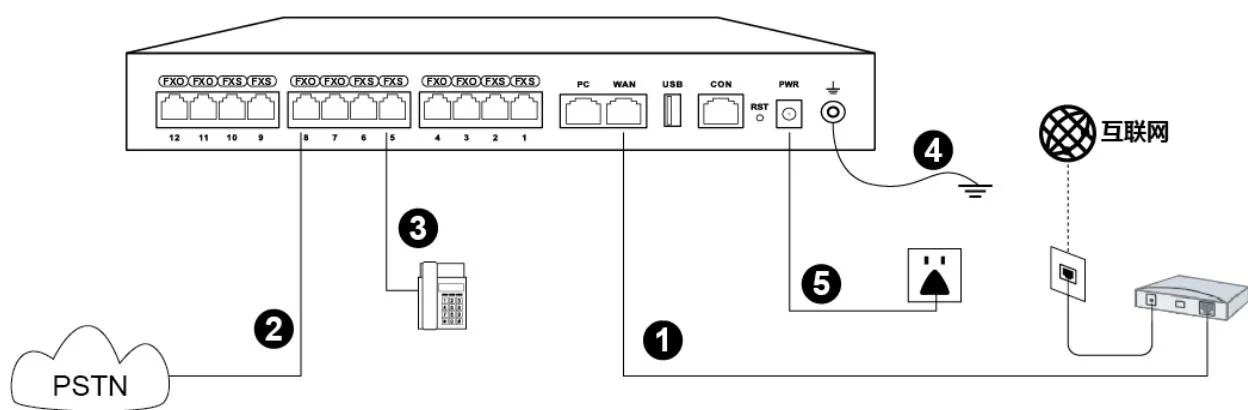
Want to check the wiring side as well? The knowledge base explains how the PBX, the analog ports and the phones fit together, and the support page describes the configuration help that comes with a project.
Sizing — questions
How many extensions can the system support?
Do these systems work with ordinary SIP phones from other brands?
How do I connect a fax machine?
Can several sites share one dial plan?
Is there redundancy?
Send the estimate and get a real configuration
The estimator returns a model, a trunk count and the analog ports to provide. Add the site details and the reply is an itemised configuration and quotation.
Send the site details
Six facts build a configuration: site type, extensions or rooms, simultaneous calls, areas to cover, existing lines and the documents you already hold. Send as many as you know — nothing has to be final before the first reply.
- Reply within one working day
- Configuration + quotation for your site
- Your details are used only to answer this inquiry
Page author: NEXVIA EngineeringPublished: Last updated: