Public address
IP public address: zones and priority
On this page
- What a zone means on an IP system — what should you know?
- Priority: who wins when two pages overlap — what should you know?
- Which speaker for which space — what should you know?
- Power and PoE budget — what should you know?
- Bringing the old speaker lines across — what should you know?
- Emergency: triggers and the integration layer
- Designing a campus in five decisions
What a zone means on an IP system — what should you know?
On a conventional system a zone is a cable pair and an amplifier channel. On a SIP system a zone is a group of endpoints sharing an address space, and the practical implication is that zones cost configuration rather than copper. The speaker models in this range state support for up to 20 multicast zones with prioritisation, which is the ceiling to design inside.
The same property makes zone changes cheap: moving a speaker from "corridor A" to "corridor A and B" is a group edit, not a re-cable. It also means the number of zones should be decided by how the site is managed - who needs to hear what, and separately - rather than by how many amplifier channels are available.
Priority: who wins when two pages overlap — what should you know?
Every serious PA design has to answer one question: if a routine announcement is running and an emergency broadcast starts, what does a person in the corridor hear? The range's answer is prioritisation between zones, configured on the platform. The design work is to write down the order before configuring it. A workable order for most sites:
- Emergency broadcast, all zones, highest priority.
- Voice alarm or evacuation message, zone or all.
- Live page from the control room.
- Scheduled announcement or bell.
- Background music or recorded message, lowest.
Two system functions support that order: one-click emergency broadcast, and zoned paging, both stated as core capabilities of the care and public-address material. The Advanced tier adds scheduled broadcasting with custom time templates, real-time text-to-speech, and audio archiving that records SIP pages, intercom calls and broadcasts for later review.
Which speaker for which space — what should you know?
| Space | Model | Stated character |
|---|---|---|
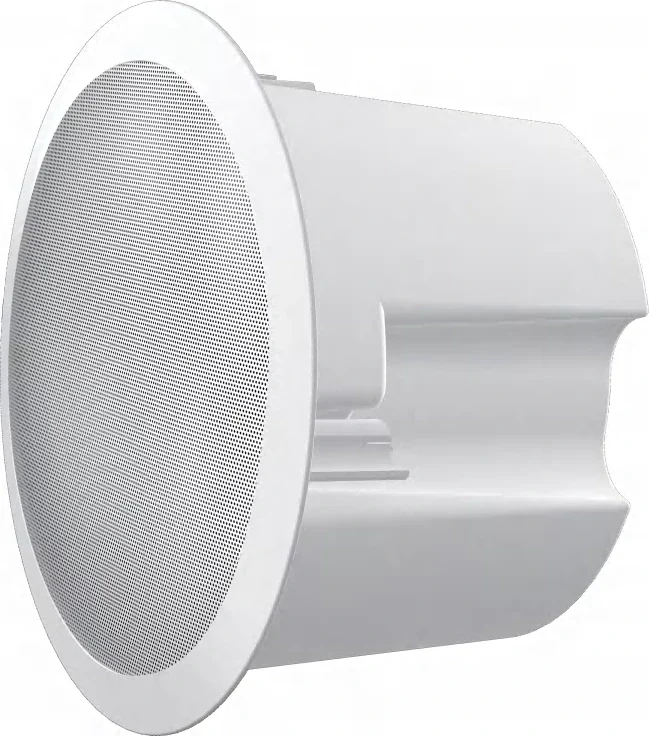
| Classrooms, offices, indoor ceilings | A201 ceiling speaker | Real-time and MP3 broadcasting, built-in microphone, self-test, monitoring, environmental noise detection, offline timed broadcast; up to 20 multicast zones |
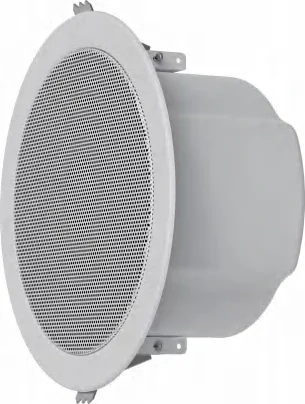
| Halls and large indoor rooms | FH-S01 ceiling speaker | Up to 20 W class D output, PoE IEEE 802.3af, a customisable WAV for emergency notification and alarm linkage |
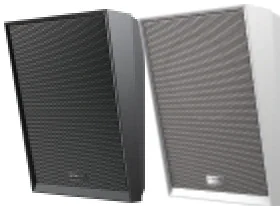
| Corridors where sound must be aimed | A212 wall speaker | 2-way coaxial driver, up to 15 W class D, talkback microphone, optional angle bracket, can drive an additional passive analog speaker |
| Outdoor fields, gates, walkways | A233 horn speaker | 30 W rated output, IP66, built-in microphone for self-test and two-way voice |
| Positions that also need video | A513W video speaker | Up to 10 W, built-in 4 MP camera with infrared night vision, IP66, Wi-Fi and BLE |
Two selection rules follow. Indoors, a ceiling speaker gives even coverage and a wall speaker gives aimed coverage; use the wall model where a corridor runs long and narrow. Outdoors, the horn is the only model with the IP66 rating and 30 W output needed to carry over a field.
Power and PoE budget — what should you know?
Audio output follows power, and the A212 is the clearest example in the range: it states PoE 8 W and PoE+ 15 W, and another source gives it PoE IEEE 802.3at. At PoE the output is lower than at PoE+; a zone that has to hit full output on that model needs the PoE+ budget at the switch port. The FH-S01 is stated as PoE IEEE 802.3af, and the paging gateways differ too: the PA2S is 802.3af while the PA3 is stated as PoE Class 4 with 802.3at, and both accept 12 to 24 V DC as an alternative.
That last point matters on long outdoor runs: where a PoE run cannot be justified, DC power at the gateway or speaker is the fallback, and the models that state DC support are the ones to pick.
Bringing the old speaker lines across — what should you know?
The IP endpoint tier of this range exists precisely for that: it is stated as being able to bridge legacy paging systems into an IP environment, as a full IP or hybrid solution. Two gateway models do the work.
- PA3: 10 to 30 W mono output that adapts to the input voltage, into 4 ohm/30 W or 8 ohm/15 W loads, with two SIP lines, a line output for an external active speaker or amplifier, an SOS call key, a line input, and USB or TF storage for offline playback.
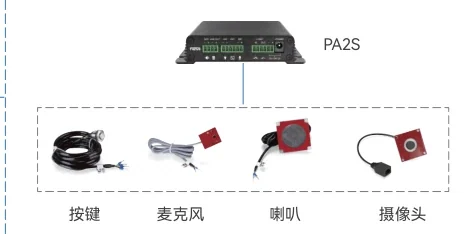
- PA2S: a SIP paging and intercom gateway with one short-circuit input, one short-circuit output and one relay - which is what an outdoor help point needs for a gate or a strobe - plus camera support through an external accessory up to 1080p.
Practically, the gateway sits where the old amplifier or speaker line terminates, and the site keeps its speakers while gaining IP control, scheduling and logging.
Emergency: triggers and the integration layer
- Short-circuit inputs turn a physical button into a call and, where wired, into a strobe or light output at the same time.
- ONVIF is stated for the intercom and broadcast terminals, so events can be tied into a VMS rather than living in a separate system.
- Where an AI camera platform is in use, the materials state that endpoints can broadcast pre-recorded alerts triggered by events such as intrusion.
- Alarm linkage on the A212 and FH-S01, plus a customisable WAV file, let the site decide exactly what an emergency sounds like.
- Serverless operation is available at the Lite tier, where the console holds the management platform and the terminals are discovered automatically - useful for a site that cannot justify a server room in the first phase.
Designing a campus in five decisions
- Write the zone list from the site's management structure, then check it against the 20-zone multicast ceiling.
- Write the priority order, then configure it - not the other way round.
- Choose speaker types by space: ceiling indoors, wall in corridors, horn outdoors.
- Budget PoE and PoE+ per port, and identify which zones need full output.
- Decide where the platform lives: on a console at the Lite tier, or on a cloud or on-premise server at the Advanced tier for multi-site management.